Subscriber And Payments Dashboard - DjangoSubscriber And Payments Dashboard - Django
A lightweight Django admin panel to track subscribers, free users, premium users, and payment logs across multiple apps.
Subscriber And Payments Dashboard - Django
A lightweight Django admin panel to track subscribers, free users, premium users, and payment log...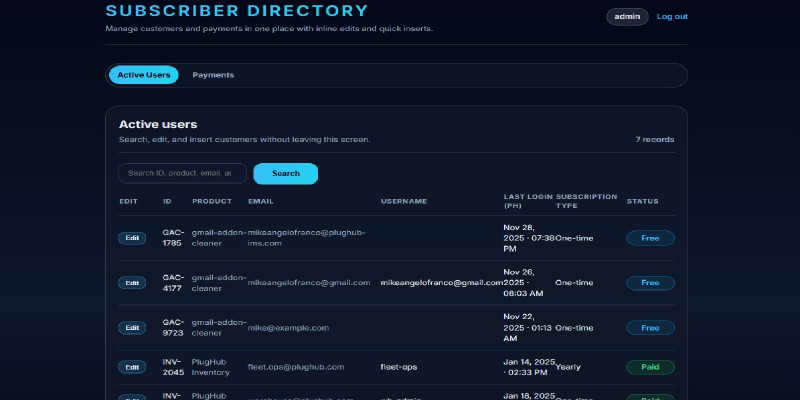
Screenshots


Overview
This Subscriber & Payment Tracking Dashboard is a clean and lightweight Django-based system designed to centralize the management of your users across multiple applications. Whether you are building SaaS tools, Chrome extensions, Gmail Add-ons, mobile apps, or micro-services — this dashboard keeps track of:
- Active users
- Free vs Premium users
- Payments logs
- User profiles
- Application usage
- Subscription status
The project uses a simple and clean Django layout:
-
portalapp for your dashboard logic - User authentication
- Admin login
- Templates using standard Django templates
- Models for Users + Payments
- Built-in user admin management
This system is designed to be easy to plug into any existing system.
Features
User Tracking
✔ Track all users from multiple apps
✔ Show free users, paid users, and active users
✔ Log payments
✔ Track amount, product, timestamp
✔ Clean Django templates
✔ Mobile-responsive layout
✔ Clean folder structure
✔ Extendable models
Requirements
🛠️ System Requirements
Server Requirements
Your project requires the following minimum server specs:
| Component | Minimum Requirement |
|---|---|
| Python | 3.10 or higher |
| Django | 4.x (already included in requirements.txt) |
| Database | SQLite (default) or PostgreSQL |
| Disk Space | 200 MB minimum |
| RAM | 512 MB minimum |
| OS | Linux (Ubuntu recommended) / Windows / Mac |
Python Packages
All dependencies are included in:
requirements.txt
The important packages used:
- Django
- Gunicorn (optional for deployment)
- python-dotenv
- whitenoise
- psycopg2 (optional, only if using PostgreSQL)
Software You Need Installed
- Python 3
- Pip
- Virtualenv (recommended)
- Git (optional)
Instructions
Development Setup Guide (For Developers)
This is the developer version of the installation instructions.
Include this inside your /documentation folder or README.md.
🧩 1. Project Structure Overview
<b>
subscriber-directory/
│   manage.py
│   requirements.txt
│   README.md
│   RELEASE_NOTES.md
│   .env.example
│
├── plughub_paymentchecker/       # Main Django project settings
│
├── portal/                       # Core app: users + payments
│   ├── models.py
│   ├── views.py
│   ├── urls.py
│   ├── forms.py
│   ├── templates/portal/
│   └── migrations/
│
├── templates/                    # Global templates
│
└── static/                       # CSS, JS, images


</b>
🧰 2. Development Environment Setup
Step 1 — Extract the ZIP
Extract the folder named:
subscriber-directory
Step 2 — Create Virtual Environment
Windows:
python -m venv venv
venvScriptsactivate
Mac/Linux:
python3 -m venv venv
source venv/bin/activate
Step 3 — Install Dependencies
pip install -r requirements.txt
Step 4 — Copy and Configure .env
cp .env.example .env
At minimum, set:
SECRET_KEY=your-secret-key
DEBUG=True
Step 5 — Run Database Migrations
python manage.py migrate
Step 6 — Create Admin Account
python manage.py createsuperuser
Step 7 — Run Development Server
python manage.py runserver
Open the app:
👉 http://127.0.0.1:8000/
Admin login:
👉 http://127.0.0.1:8000/admin/
🏗️ 3. Django App Overview (For Developers)
Main Models (in portal/models.py)
Customer (your user/subscriber model) PaymentRecord (payment log) Includes fields for: email status (free/premium) date registered last login payment amount product name date consumedApp Features
Login authentication Dashboard (portal/templates/portal/dashboard.html)
User listing
Payment listing
Static assets included
HTML templates extend from base.html
User Instruction Guide (For End Users / Clients)
This guide is for non-developers who buy your product on Codester.
👤 User Guide (Non-Technical)
✅ Login to Dashboard
Visit:
http://your-domain.com/login/
Enter the admin username and password your developer will give you.
📊 Dashboard Overview
After logging in, you will see:
1. Active Users Page
Shows:
User email Whether user is free or premium Registration date Last login App usage2. Payments Page
Shows:
Payment amount Product purchased Date consumed User who paidThis lets you monitor your subscribers across all your apps.
🛒 Common Uses
✔ Track who is free or premium
✔ See which users actually paid
This is the exact content you paste inside Codester’s “Documentation” tab.
📘 Product Documentation
✔ Overview
This Django-based Subscriber Directory allows developers to track users, subscription statuses, and payments across multiple apps. Includes dashboard, login system, templates, and static files.
✔ Features
Track subscribers Track free vs premium users Log payments Admin login Clean dashboard UI Easy to deploy Uses SQLite for easy setup Works with Python 3.10 & Django 4+✔ Installation Requirements
Python 3.10+ pip virtualenv Basic knowledge of Django deployment (optional)✔ Installation Steps
Extract ZIP Create virtual environment Install requirements.txt Migrate database Create superuser Run serverFull commands:
python -m venv venv
source venv/bin/activate
pip install -r requirements.txt
python manage.py migrate
python manage.py createsuperuser
python manage.py runserver
Other items by this author


| Category | Scripts & Code / Django |
| First release | 2 December 2025 |
| Last update | 2 December 2025 |
| Files included | .py, .css, .html, .xml, Javascript .js |
| Tags | admin panel, user management, admin dashboard, django, subscription manager, payment tracking, saas starter kit, user tracker, subscriber system, user analytics, django dashboard, payment logs, membership system, micro saas, subscription analytics |