MerchMaven AI - WooCommerce Product OptimizerMerchMaven AI - WooCommerce Product Optimizer
AI WooCommerce plugin that instantly creates optimized titles, descriptions, and ALT text with one click to boost product SEO and
MerchMaven AI - WooCommerce Product Optimizer
AI WooCommerce plugin that instantly creates optimized titles, descriptions, and ALT text with on...
Screenshots


Overview
MERCHMAVEN AI
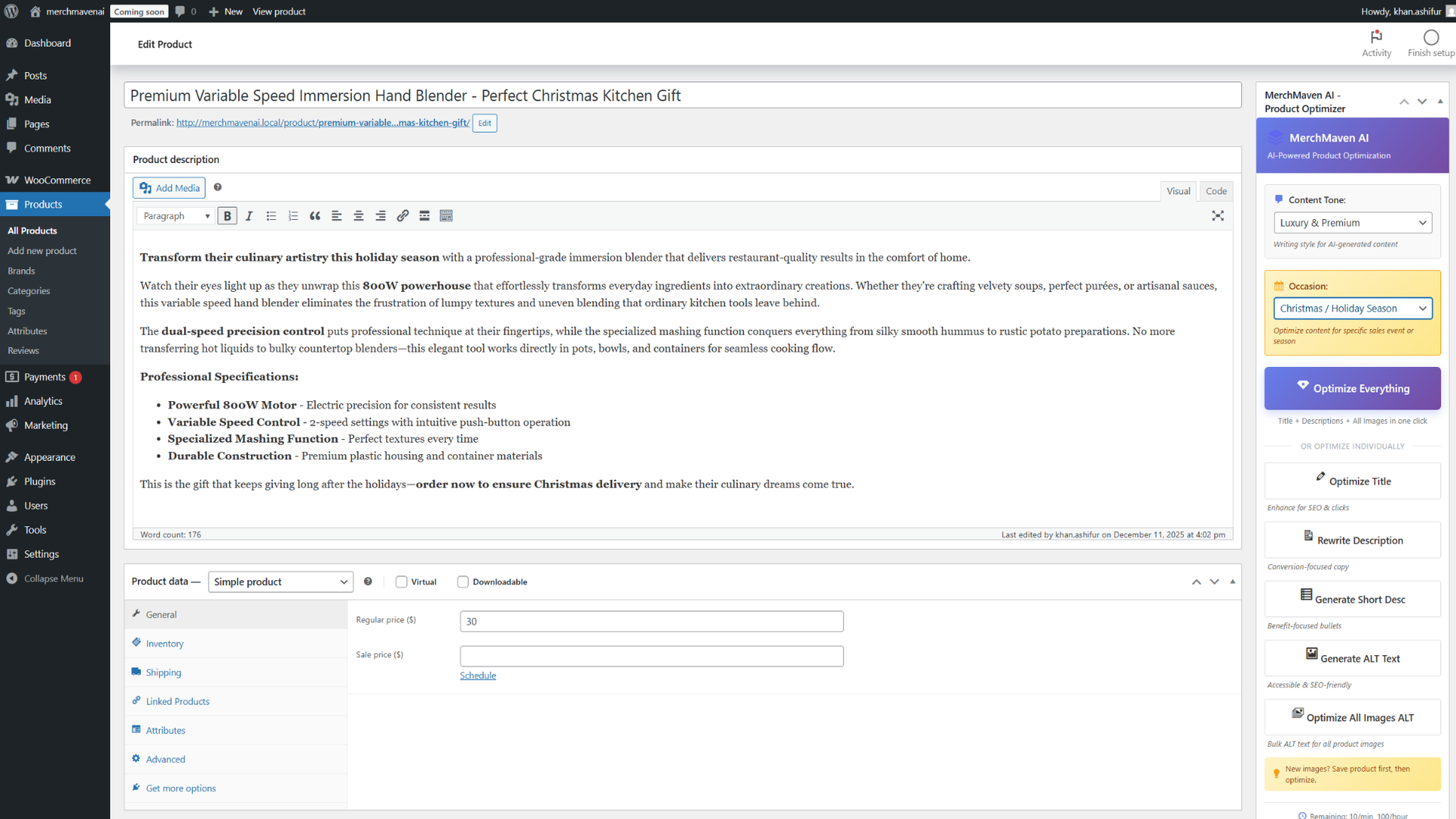
The AI Listing Optimizer that lives inside your product editor
Instantly generate product titles, long descriptions, short descriptions, and image ALT text in your exact brand tone.
Built for real WooCommerce stores, agencies, and high-volume sellers.
NO CODING REQUIRED • ONE-CLICK OPTIMIZATION • AGENCY GRADE
STOP SPENDING HOURS WRITING PRODUCT COPY
Publishing a new product is easy. Publishing hundreds with great titles, polished descriptions, and SEO-ready images is not.
MerchMaven AI removes the bottleneck. It puts an intelligent copywriter directly inside your WooCommerce editor, allowing you to optimize an entire catalog in minutes, not days.
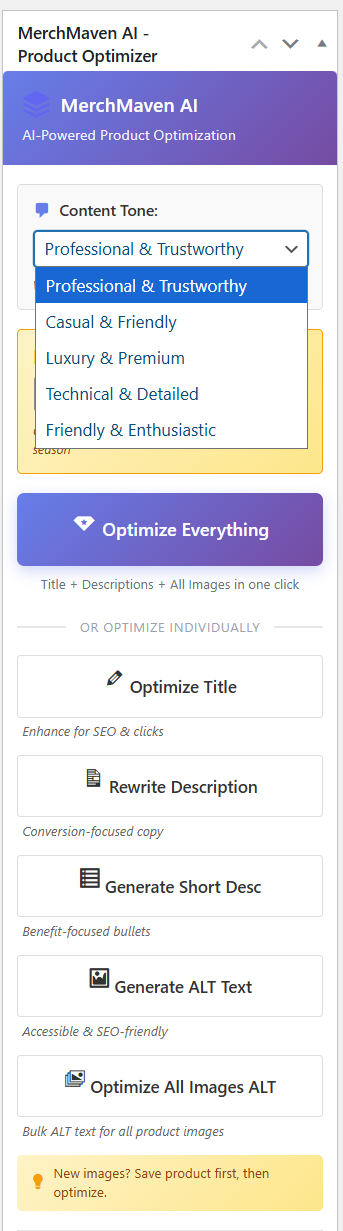
BRAND TONE CONTROL
Choose how your store should sound and let MerchMaven AI keep it consistent. Every generated title, paragraph, and bullet follows the tone you set.
- Professional & Trustworthy
- Luxury & Premium
- Casual & Friendly
- Technical & Detailed
- Energetic & Enthusiastic
Ideal for brands that manage multiple stores or clients and need strict voice guidelines.
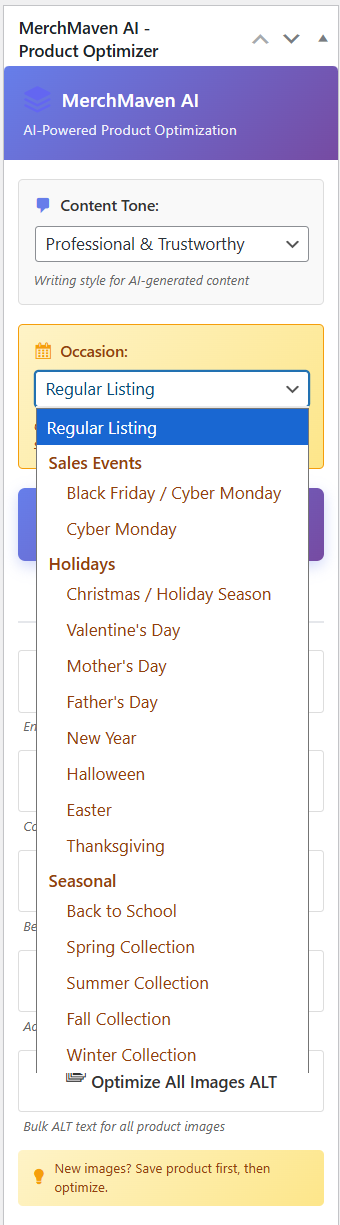
OCCASION-BASED OPTIMIZATION
Switch your listing from regular evergreen mode into campaign mode with one dropdown. The AI understands the context and adjusts language accordingly:
- Black Friday and Cyber Monday
- Christmas and Holiday Season
- Valentine's Day, Mother's Day, Father's Day
- Back to School and seasonal collections
Ideal for stores that run frequent promotions and do not want to rewrite every description from scratch.
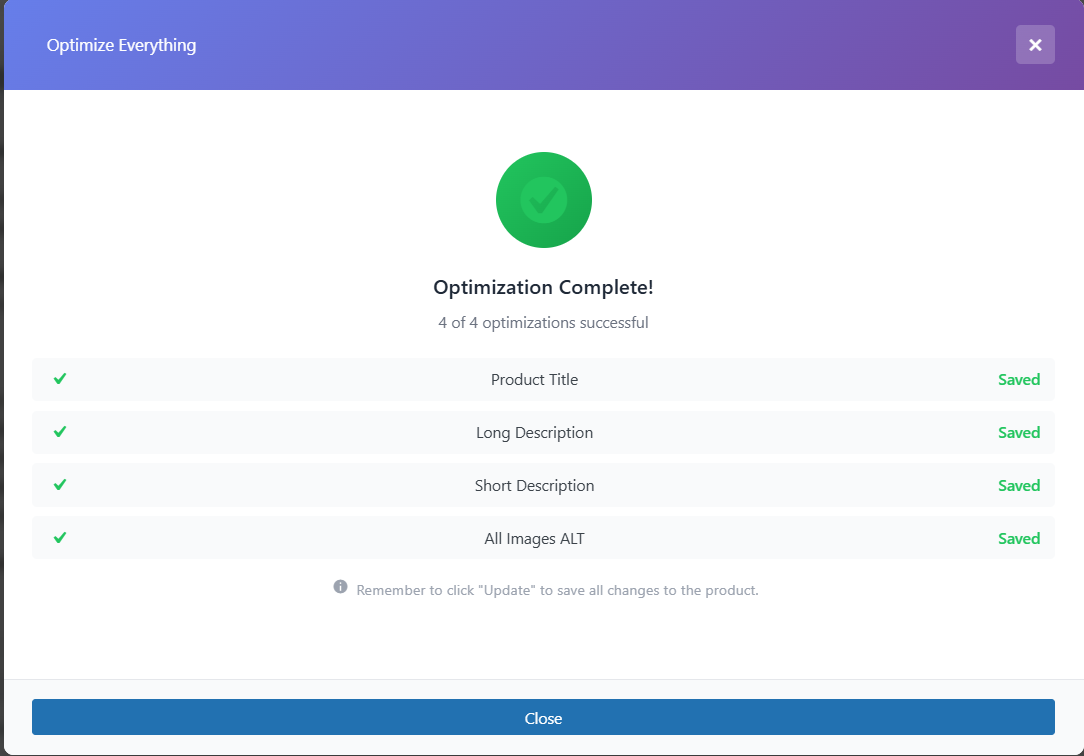
ONE-CLICK "OPTIMIZE EVERYTHING"
When speed matters, use one button to optimize the entire listing at once. MerchMaven AI will:
- Rewrite the product title
- Generate a detailed long description
- Produce a short, conversion-focused summary
- Create ALT text for each product image
A clear result screen shows what was updated and saved so you remain fully in control.
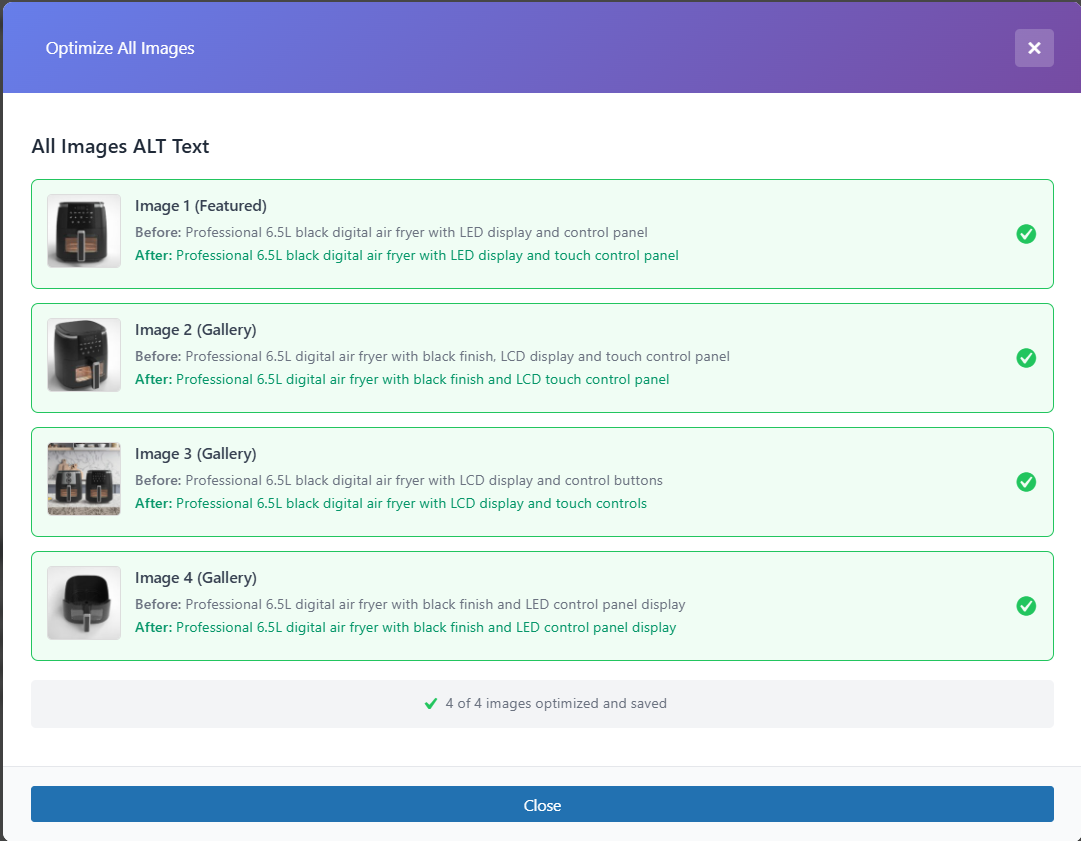
AUTOMATIC ALT TEXT GENERATION
Image SEO and accessibility are often ignored because they are time-consuming. MerchMaven AI handles all image ALT text for you.
- Scans all featured and gallery images for a product
- Generates descriptive, human-readable ALT text
- Creates keyword-smart phrasing that helps search visibility
Great for stores that care about long-term SEO and accessibility compliance.
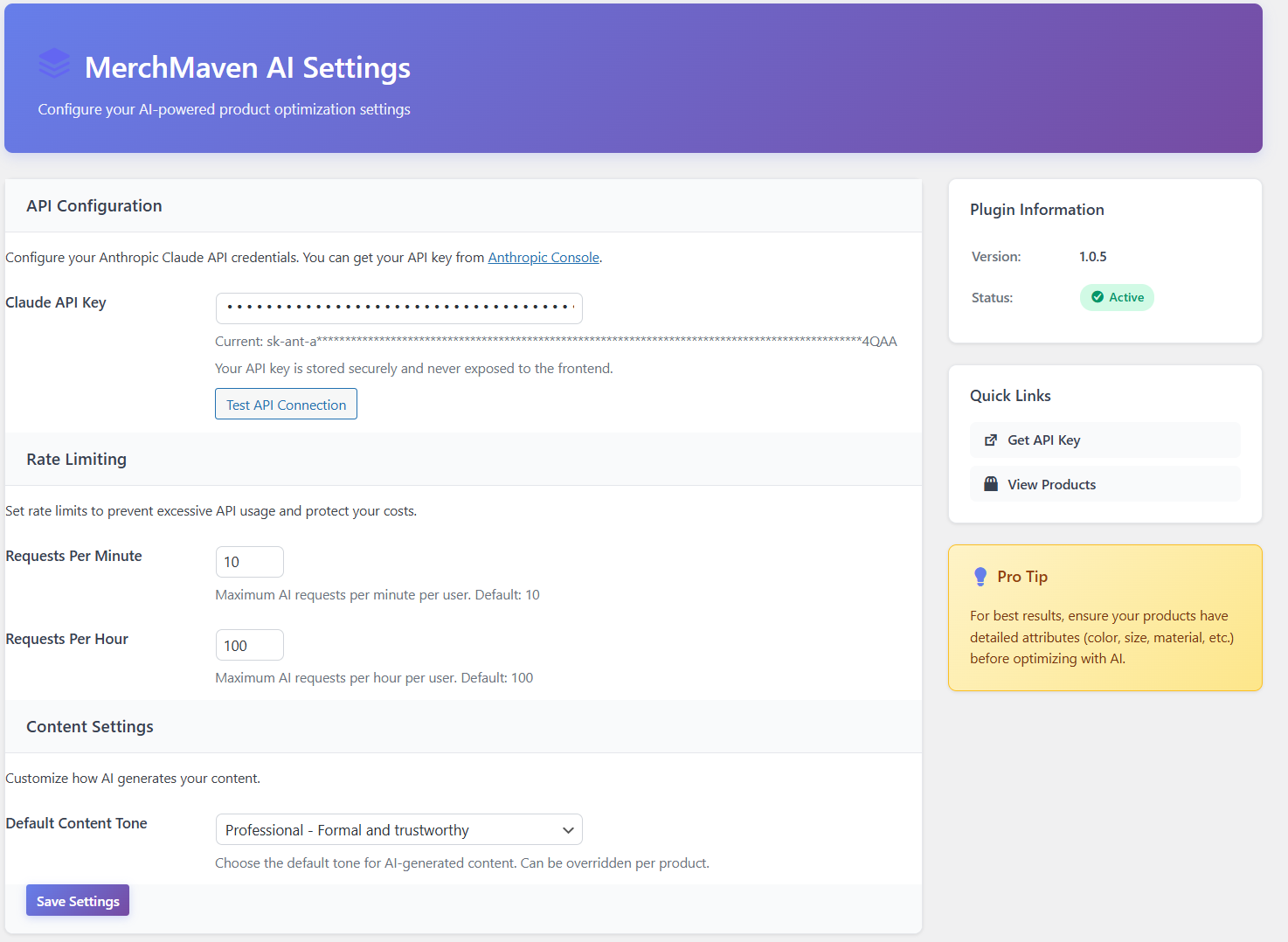
SETTINGS BUILT FOR SERIOUS STORES
A dedicated settings page allows you to keep AI usage safe, predictable, and on-brand.
- Secure API key configuration
- Rate limiter per minute and per hour
- Global default content tone
- Default occasion preference
WORKFLOW IN 3 STEPS
- Install the plugin and activate it in your WordPress admin.
- Enter your Anthropic Claude API key and choose default tone/occasion in the settings page.
- Open any WooCommerce product, choose tone and occasion, and click Optimize.
TRANSFORM YOUR WOOCOMMERCE LISTINGS WITH MERCHMAVEN AI
Save hours of manual work, improve consistency across your catalog, and give every product a premium presentation.
Features
📝 AI Content Generation
1. AI Product Title Generator
Create clear, SEO-optimized product titles tailored to your tone and audience. Instantly rewrite or improve any product title with one click.
2. AI Long Description Writer
Generate polished, structured long descriptions that sound natural, follow brand style, and include helpful details customers expect.
3. Conversion-Focused Short Descriptions
Create short, high-impact summaries designed to increase conversions and quickly communicate value to shoppers.
⚡ Optimization Tools
4. One-Click Full Optimization
Rewrite your entire product listing—title, description, short description, and ALT text—in a single click. Fast and efficient for large catalogs.
5. Brand Tone Control
Select from tone presets like Luxury, Professional, Casual, Technical, and more. All generated content matches your brand identity.
6. Occasion-Based Copywriting
Instantly switch your listings for Black Friday, Christmas, Valentine’s Day, and other campaigns. Language adjusts automatically.
⚙️ SEO & Management
7. Automatic Image ALT Text Generator
Improve your SEO and accessibility instantly. Bulk-generate descriptive, keyword-smart ALT tags for all product images.
8. Smart Settings & API Controls
Manage rate limits, set global tone defaults, configure your AI keys, and maintain full control over usage for teams and agencies.
9. Fast & Lightweight
No page builders, no heavy scripts. MerchMaven AI loads only where needed and stays fully aligned with WooCommerce UI.
Requirements
MerchMaven AI is built to integrate smoothly with modern WordPress and WooCommerce setups. This plugin uses only the official Anthropic Claude API for generating product titles, descriptions, and ALT text.
⚡ Core System Requirements
WordPress & WooCommerce
Latest stable versions recommended. MerchMaven AI works directly inside the WooCommerce product edit screen.
PHP Version
PHP 7.4 or higher is required (PHP 8.x recommended for full compatibility and faster execution).
Anthropic Claude API Key
A valid API key is required. The plugin supports Claude 3.5 Sonnet and other official models.
⚠️ Important
MerchMaven AI does not function without a valid Claude API key. Please ensure your Anthropic account has sufficient quota.
🖥️ Hosting & Compatibility
Hosting Environment
Works on any standard WordPress-compatible hosting. The plugin is lightweight and does not require special server configuration.
Browser Compatibility
Compatible with all modern browsers including Chrome, Firefox, Edge, and Safari.
User Knowledge
Basic understanding of WooCommerce product management. No coding knowledge is required.
To ensure best performance, keep WordPress, WooCommerce, and your hosting environment updated to the latest stable versions.
Instructions
Follow these steps to install MerchMaven AI, connect your API key, and start generating optimized listings in minutes.
📦 Step 1: Installation
Getting started is easy. You can install the plugin directly from your WordPress dashboard.
1. Download the merchmaven-ai.zip file from your Codester downloads.
2. Log in to your WordPress Admin Dashboard.
3. Navigate to Plugins → Add New → Upload Plugin.
4. Select the zip file and click Install Now.
5. Click Activate to enable the plugin.
⚙️ Step 2: Configuration
Connect your store to the AI engine using your Anthropic API key.
1. Go to Settings → MerchMaven AI in the WordPress menu.
2. Paste your Anthropic Claude API Key into the designated field.
3. Select your default Content Tone (e.g., Professional, Luxury).
4. Click Save Changes.
✅ Success
Once saved, you are ready to start generating content immediately.
🚀 Step 3: How to Optimize
MerchMaven AI lives inside your product editor for a seamless workflow.
1. Open any existing product or create a new one in WooCommerce.
2. Locate the MerchMaven AI panel (sidebar or meta box).
3. (Optional) Change the Occasion if you are running a specific campaign.
4. Click "Optimize Everything" to rewrite the entire listing at once.
5. Review the generated content and click Update/Publish.
Other items by this author



| Category | Plugins / WooCommerce |
| First release | 12 December 2025 |
| Last update | 12 December 2025 |
| Supported CMS | WordPress 6.0, WordPress 6.1, WordPress 6.2, WordPress 6.3, WordPress 6.4, WordPress 6.5, WordPress 6.6, WordPress 6.7, WordPress 6.8 |
| Files included | .php, .css, .html, Javascript .js |
| Tags | seo optimization, wordpress content generator, ai title generator, woocommerce ai plugin, ai product descriptions, bulk alt text generator, one click content generator, wordpress ecommerce plugin, product listing automation, brand tone control, occasion based optimization, content writing automation, ecommerce seo tools, ai copywriting plugin, woocommerce product optimizer |