Google Search Suggestion Tags For WordPressGoogle Search Suggestion Tags For WordPress
It instantly pulls popular suggestions from Google searches and adds SEO-friendly trending tags to your posts in seconds.
Screenshots
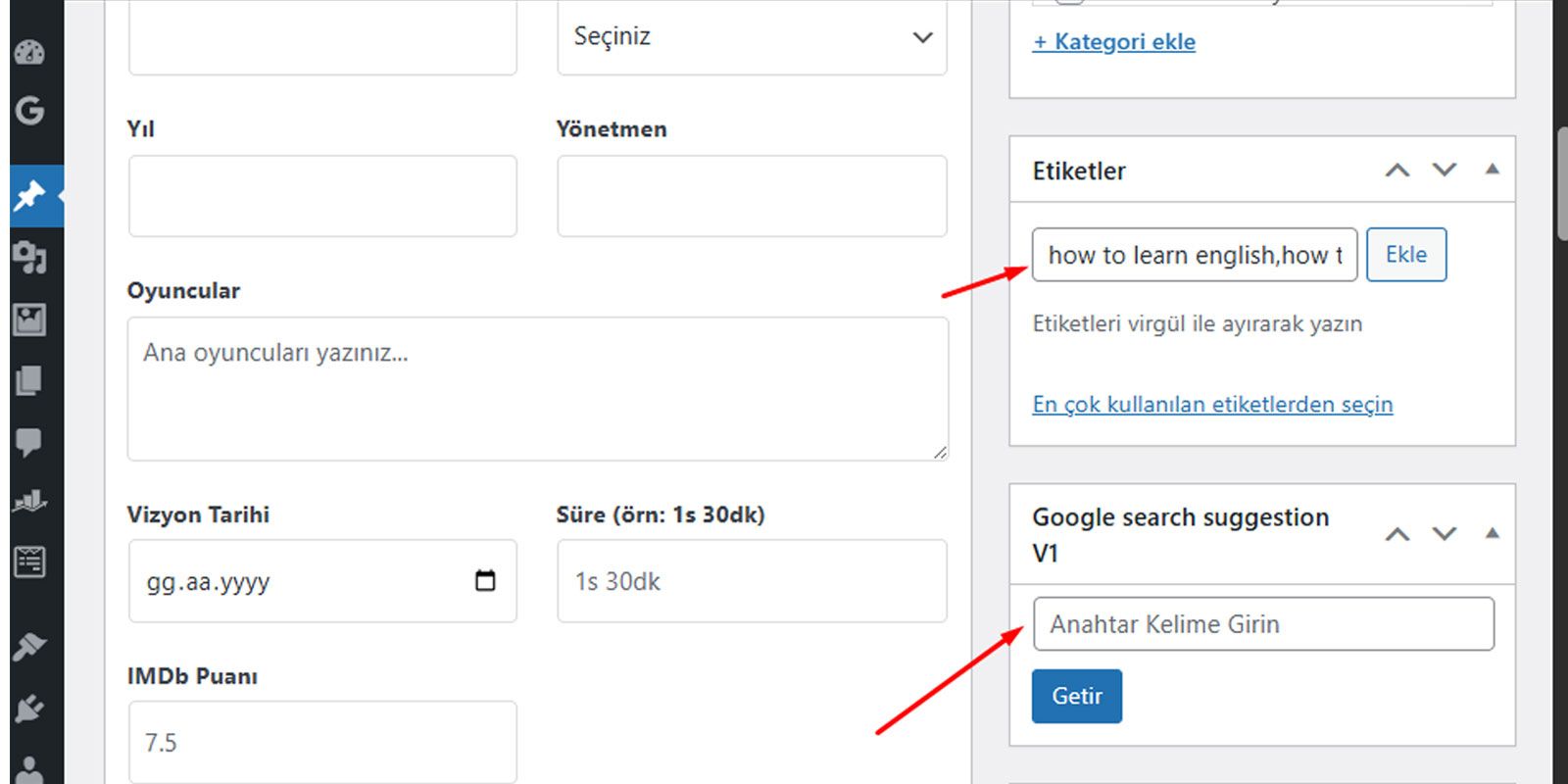


Overview
DEMO
https://www.inplantia.com/wp-admin/
user : author
pass : author
Google Search Suggestion Tags V1
Generate the Most Popular Tags for Your Posts in Seconds with Google Data!
In the SEO world, using the right keywords makes the difference between your content being noticed and getting lost. Google Search Suggestion Tags V1 lets you stop guessing and feed directly from Google's massive data pool.
How it Works?
This plugin uses Google's "Autocomplete" suggestions that the user provides when a word is typed into the search bar. When you enter a keyword, the plugin connects to the Google API in the background and instantly retrieves the most searched "long-tail" keywords related to that topic and adds them to your WordPress tag box.
Key Features:
Real-Time Data: Captures Google's most up-to-date trending suggestions.
Fast and Lightweight: Thanks to Ajax technology, it provides results in seconds without refreshing the page.
Fully Automatic: Eliminates the hassle of manual copy-pasting; It places suggestions directly into the tag field, separated by commas.
SEO Friendly: Helps increase your organic traffic by associating your content with real user searches on Google.
User-Friendly Interface: Requires no complex settings; it comes as a panel integrated into the post editing screen.
Why Use This Plugin?
Classic tagging methods usually rely on the author's guesswork. However, with this plugin, you see what people are actually searching for on Google about that topic. For example, when you type "cake recipe," Google gives you the most searched terms like "orange," "soft," and "easy." Using these terms as tags increases your chances of ranking higher in relevant searches.
Features
Below, I've categorized all the plugin's key features, both technically and from a marketing perspective. You can use this list on the plugin's sales page or in the "Features" section of WordPress.org:
🚀 Key Features
1. Real-Time Google Data
The plugin uses Google's Autocomplete API, which is used in its own search engine. This allows you to create tags using current terms that people are actually searching for on Google at that moment, not based on guesswork.
2. Smart JSON API Technology
Unlike older methods (HTML scraping/parsing), it uses Google's modern JSON infrastructure. This feature allows the plugin to:
Run much faster,
Consume minimal server resources,
Reduce the risk of being blocked by Google.
3. One-Click Integration
No copy-paste is required. When you click the "Fetch" button, all the found keywords are automatically placed in WordPress's native tag box, separated by commas.
4. AJAX-Based User Experience
Operations take place in the background (asynchronously). The page is not refreshed while retrieving tags, your written content is not lost, and your workflow is not interrupted.
5. Full Turkish Character Support
Thanks to the special character encoding infrastructure; Turkish characters such as ç, ş, ğ, ü, ö, ı are not corrupted at all. Data from Google is transferred cleanly as is.
6. Advanced Security (WordPress Standards)
Nonce Validation: Prevents unauthorized access and CSRF attacks.
Sanitization: All incoming and outgoing data is passed through WordPress security filters (sanitize_text_field).
Prefix Protection: All functions are defined with special prefixes, preventing conflicts with other plugins.
7. Modern and Lightweight Code Structure
It does not require external libraries (e.g., simple_html_dom.php).
It loads only in the post editing screen and never slows down your site's frontend.
8. SEO Optimization
By feeding your content with "long-tail" keywords, it helps you rank higher on Google for specific searches.
Requirements
NOTE: Compatible with Classic Editor. NOT compatible with Block Editor (Gutenberg).
WordPress version 5.0 or higher.
PHP 7.4 or higher.
A server with an internet connection (for Google API access).
Instructions
1. Installation
Method A (Via Panel): In your WordPress admin panel, go to Plugins > Add New > Upload Plugin, upload the .zip file, and activate it.
Method B (Via FTP): Upload the plugin folder to the /wp-content/plugins/ directory and activate it from the admin panel.
2. How to Use
Post Panel: Add a new post or edit an existing one.
Tag Panel: Find the "Google Search Suggestion Tags V1" box in the right column of the screen (or at the bottom depending on your theme).
Query: Enter your main topic in the box that says Keyword... (e.g., "WordPress SEO").
Fetch Data: Click the "Fetch Tags" button.
Automatic Addition: The top 10 suggestions from Google will be automatically added to your standard WordPress tag box within seconds.
3. Tips and Best Practices
Be Specific: If you write "Orange cake recipe" instead of "Cake," you'll get more niche and effective tags.
Avoid Conflicts: The plugin doesn't delete your existing tags; it adds new ones on top. You can manually delete irrelevant ones from the standard WordPress tag panel.
Limits: The Google API is unlimited in normal use. However, querying hundreds of times in seconds may cause your IP address to be temporarily blocked.
4. Troubleshooting
No Results: Make sure your server allows external links (cURL) and can access Google.
Not Writing to Tag Box: If you are using a custom "Tag Plugin," the standard WordPress tag field (#new-tag-post_tag) may be hidden. In this case, the plugin cannot find a place to transfer the data.