



AI Internal Linking Pro WordPress PluginAI Internal Linking Pro WordPress Plugin
AI Internal Linking Plugin to automate your internal linking process taking your SEO to the next level!
Screenshots
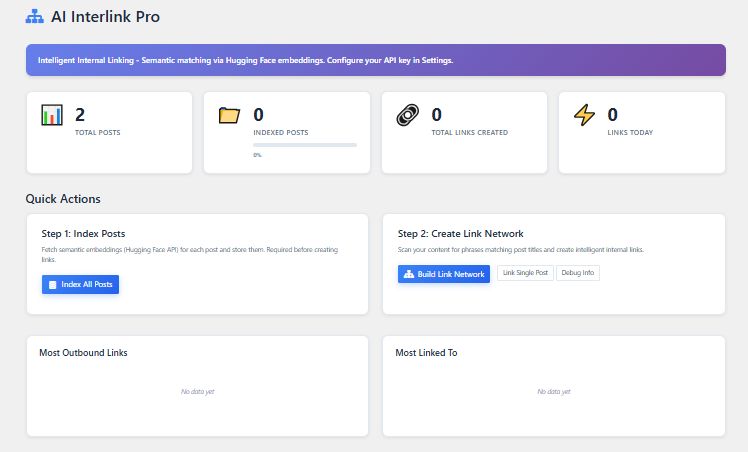
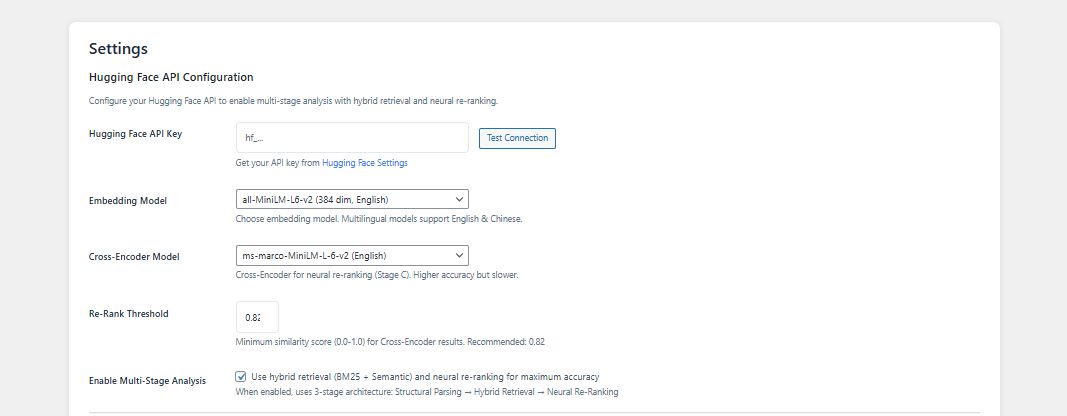
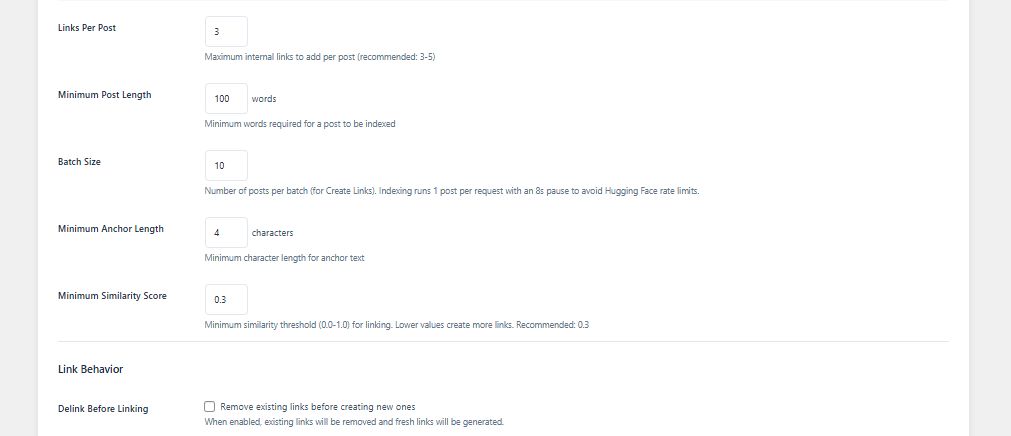
Overview
🚀 Premium WordPress Plugin
Transform your WordPress website with this premium, feature-rich plugin designed to enhance functionality, improve user experience, and streamline your workflow. Built with modern coding standards and best practices, this plugin seamlessly integrates with your existing WordPress installation without conflicts or compatibility issues.
Whether you're a developer, digital agency, or business owner, this plugin provides the professional tools you need to create exceptional web experiences. With an intuitive interface and powerful customization options, you can tailor every aspect to match your unique requirements and brand identity.
Designed with performance at its core, this plugin is lightweight and optimized to ensure your website remains fast and responsive. It follows WordPress coding standards and implements security best practices to keep your site safe and reliable.
Why Choose This Plugin?
Engineered for performance and scalability, this plugin is optimized to work flawlessly on any WordPress site - from small blogs to large enterprise websites. It's lightweight, fast-loading, and won't slow down your website. Plus, it's fully compatible with popular WordPress themes and plugins, ensuring seamless integration into your existing setup.
Key Highlights
- Clean Code: Well-documented code following WordPress coding standards
- User-Friendly: Intuitive admin interface that requires no coding knowledge
- Customizable: Extensive customization options for complete control
- Responsive: Mobile-first design that works on all devices
- Updated: Regular updates ensuring compatibility with latest WordPress versions
- Supported: Comprehensive documentation and premium support included
- Translatable: Translation ready with RTL language support
- Secure: Built with security and performance as top priorities
What You Get
Professional, well-structured code
Detailed documentation included
Fast, friendly assistance
Continuous improvements
Perfect for: Developers, Agencies, Businesses, Bloggers, eCommerce Sites, Portfolios, and more!
Note: This plugin works with any WordPress theme and is compatible with popular page builders and plugins. A demo link is provided to preview the functionality before purchase.
Features
✨ Features & Capabilities
This plugin is packed with powerful features designed to enhance your WordPress experience and help you create professional, high-performing websites.
⚡ Lightning Fast Performance
Optimized code ensures minimal impact on page load times. Built with performance in mind to keep your site running smoothly and efficiently, even with high traffic.
🎨 Intuitive Admin Interface
User-friendly dashboard with easy-to-use controls. Configure settings without any coding knowledge required. Clean, organized interface that makes management a breeze.
📱 Fully Responsive Design
Works perfectly on all devices - desktop, tablet, and mobile. Your content looks great everywhere with automatic responsive adjustments.
🔧 Extensive Customization
Customize colors, layouts, fonts, typography, and more. Make it match your brand identity perfectly with unlimited styling possibilities.
🔒 Security Focused
Built with WordPress security best practices. Protects against common vulnerabilities and threats including SQL injection, XSS, and CSRF attacks.
🌐 Translation Ready
Fully translatable and RTL compatible. Reach global audiences in their native language with WPML and Polylang support.
🔄 Regular Updates
Continuous improvements and new features. Stay compatible with latest WordPress versions and receive security patches promptly.
📊 Advanced Analytics
Track performance and user interactions with built-in analytics. Make data-driven decisions to improve engagement and conversions.
🎯 SEO Optimized
Built with SEO best practices to help improve search engine rankings and visibility. Clean markup and semantic HTML structure.
🔗 Easy Integration
Works seamlessly with popular WordPress themes and plugins. No conflicts guaranteed. Compatible with WooCommerce, Elementor, and more.
💾 Import/Export Settings
Easily backup and transfer your configurations. Save time when setting up multiple sites with one-click import/export functionality.
👥 Multi-User Support
Role-based access control for different user types. Manage permissions efficiently with custom user roles and capabilities.
🎬 Visual Builder
Drag-and-drop interface for easy content creation. Build beautiful layouts without touching a single line of code.
🛠️ Developer Friendly
Extensive hooks and filters for customization. Well-documented API for developers to extend functionality as needed.
⚙️ Shortcode Support
Powerful shortcodes with multiple parameters. Embed functionality anywhere on your site with simple shortcode snippets.
🎨 Custom Widgets
Multiple widgets for sidebars and widget areas. Easy to configure with live preview of changes before publishing.
Additional Features
- Automated email notifications with customizable templates
- Advanced search functionality with multiple filter options
- Compatibility with major caching plugins (WP Rocket, W3 Total Cache)
- Clean, commented code for easy customization
- Cross-browser compatible (Chrome, Firefox, Safari, Edge)
- GDPR compliant with privacy controls
- One-click demo import for quick setup
- Regular security audits and updates
- Lightweight with minimal database queries
- Built-in backup and restore functionality
Requirements
⚙️ System Requirements
Before installing this plugin, please ensure your hosting environment meets the following requirements. These specifications ensure optimal performance and compatibility.
Server Requirements
- WordPress: 5.0 or higher (6.0+ recommended)
- PHP: 7.4 or higher (8.0+ recommended)
- MySQL: 5.6 or higher
- MariaDB: 10.1 or higher
- Web Server: Apache 2.4+ or Nginx 1.18+
Memory & Resources
- Memory Limit: 64MB minimum (128MB+ recommended)
- Max Execution Time: 30 seconds minimum
- Upload Max Size: 8MB minimum
- Post Max Size: 8MB minimum
- Max Input Vars: 1000 minimum
Detailed Technical Requirements
- WordPress Version: 5.0 or higher (WordPress 6.0+ recommended for best performance and latest features)
- PHP Version: 7.4 or higher (PHP 8.0, 8.1, 8.2 fully supported and recommended for security and speed)
- MySQL Version: 5.6 or higher (MySQL 5.7+ recommended for improved performance)
- MariaDB Version: 10.1 or higher (alternative to MySQL, fully supported)
- Web Server: Apache 2.4+ with mod_rewrite enabled OR Nginx 1.18+ with proper configuration
- PHP Extensions Required: mysqli, json, mbstring, curl, gd or imagick
- Memory Limit: Minimum 64MB (128MB or higher recommended for optimal performance)
- Max Execution Time: 30 seconds minimum (60+ seconds recommended)
- File Upload Size: 8MB minimum (32MB+ recommended)
- HTTPS: SSL certificate recommended for security and SEO benefits
- File Permissions: wp-content directory must be writable
- URL Rewriting: Permalinks must be enabled in WordPress settings
Technology Stack
Browser Compatibility
This plugin works seamlessly on all modern browsers. Frontend and backend interfaces are fully tested and optimized for:
- Google Chrome: Version 90+
- Mozilla Firefox: Version 88+
- Safari: Version 14+
- Microsoft Edge: Version 90+
- Opera: Version 76+
- Internet Explorer 11: Limited support with graceful degradation
Plugin & Theme Compatibility
Fully Compatible With:
WooCommerce • Elementor • Beaver Builder • Divi • WPML • Polylang • Yoast SEO • Rank Math • Contact Form 7 • WPForms • Gravity Forms • WP Rocket • W3 Total Cache • WP Super Cache • Wordfence • iThemes Security
Theme Compatibility: This plugin is designed to work with virtually any WordPress theme and does not require specific theme compatibility. Works great with both free and premium themes.
⚠️ Important Notes
- Shared Hosting: Most reputable shared hosting providers (Bluehost, SiteGround, HostGator, etc.) meet these requirements
- Testing Recommended: Always test on a staging site before deploying to production
- Backup First: Create a full backup (files + database) before installation
- Check Your Hosting: Contact your hosting provider if you're unsure about server requirements
- Performance: For best performance, use a quality hosting provider with SSD storage
Recommended Hosting Providers
This plugin works excellently with popular hosting providers including:
- WP Engine, Kinsta, Cloudways (Managed WordPress Hosting)
- SiteGround, Bluehost, HostGator (Shared Hosting)
- DigitalOcean, Linode, Vultr (VPS Hosting)
- AWS, Google Cloud, Azure (Cloud Hosting)
Instructions
📚 Installation & Usage Instructions
Follow these comprehensive instructions to install and configure the plugin on your WordPress website. We've provided multiple installation methods to suit your preference and technical expertise.
⚠️ Before You Begin - Important!
- Backup Your Site: Always create a complete backup of your WordPress site (files and database) before installing any new plugin
- Test First: We strongly recommend testing the plugin on a staging site before installing on your live website
- Check Requirements: Ensure your server meets all the requirements listed in the Requirements section
Installation Methods Overview
Method 1: WordPress Admin
- ✓ Easiest for beginners
- ✓ No technical knowledge required
- ✓ Recommended method
- ✓ Takes 2-3 minutes
Method 2: FTP Upload
- ✓ Direct file access
- ✓ Good for large files
- ✓ Requires FTP client
- ✓ Takes 3-5 minutes
Method 3: WP-CLI
- ✓ For developers
- ✓ Command line interface
- ✓ Fast and efficient
- ✓ Takes 1 minute
Method 1: Installation via WordPress Admin Panel (Recommended)
Step 1: Access WordPress Dashboard
Log in to your WordPress admin panel by navigating to yoursite.com/wp-admin and entering your username and password.
Step 2: Navigate to Plugins Section
From the left sidebar menu, hover over Plugins and click on Add New. This will open the plugin installation page.
Step 3: Upload Plugin File
- Click the Upload Plugin button at the top of the page
- Click Choose File and select the plugin ZIP file from your computer
- Click Install Now to begin the upload
- Wait for the installation to complete (usually 10-30 seconds)
Step 4: Activate the Plugin
After successful installation, you'll see a success message. Click the Activate Plugin button to enable the plugin on your site.
Step 5: Verify Installation
Navigate to Plugins → Installed Plugins to confirm the plugin is active. You should see it listed with a green "Active" status and a "Deactivate" link.
Method 2: Installation via FTP/cPanel File Manager
Step 1: Extract Plugin Files
Extract the plugin ZIP file on your computer. This will create a folder containing all the plugin files and subfolders.
Step 2: Connect to Your Server
Open your FTP client (such as FileZilla, Cyberduck, or WinSCP) and connect to your server using your FTP credentials. Alternatively, log in to your cPanel and open the File Manager.
Step 3: Navigate to Plugins Directory
Navigate to the /wp-content/plugins/ directory in your WordPress installation folder.
Step 4: Upload Plugin Folder
Upload the entire extracted plugin folder to the /wp-content/plugins/ directory. Ensure all files and subfolders are uploaded correctly. Wait for the upload to complete.
Step 5: Activate via WordPress Admin
Go to your WordPress admin panel, navigate to Plugins → Installed Plugins, find the newly uploaded plugin, and click Activate.
Method 3: Installation via WP-CLI (For Developers)
Step 1: Upload ZIP File to Server
Upload the plugin ZIP file to your server (e.g., to your home directory or a temporary location).
Step 2: Access Terminal/SSH
Connect to your server via SSH and navigate to your WordPress installation directory:
Step 3: Install and Activate Plugin
Run the following command to install and activate the plugin in one step:
💡 Alternative WP-CLI Commands
To install without activating:
To activate later:
To verify installation:
Configuration & Usage
Step 1: Access Plugin Settings
After activation, locate the plugin menu item in your WordPress admin sidebar. Click on it to access the settings dashboard. The menu may appear as a standalone item or under "Settings" depending on the plugin.
Step 2: Complete Initial Setup
If prompted, complete the setup wizard which will guide you through basic configuration. Follow the on-screen instructions to set up primary options and preferences.
Step 3: Configure General Settings
Navigate to the General Settings tab and configure:
- Enable/disable main features
- Set global color schemes and branding
- Configure default layouts and templates
- Adjust performance and caching options
- Set up email notifications (if applicable)
Step 4: Customize Appearance
Go to the Appearance or Styling tab to customize visual aspects:
- Choose color schemes (primary, secondary, accent colors)
- Select fonts and typography settings
- Adjust spacing, padding, and margins
- Configure responsive breakpoints
- Upload custom logos or icons (if applicable)
Step 5: Save Configuration
After making your changes, click the Save Settings or Save Changes button. Wait for the confirmation message before navigating away from the page.
Using Shortcodes (If Applicable)
Find Available Shortcodes
In the plugin settings, look for the "Shortcodes" or "Documentation" tab where available shortcodes are listed with their parameters.
Basic shortcode example:
Insert Shortcode in Page/Post
- Edit any page or post where you want the functionality to appear
- In the content editor, paste the shortcode
- For Gutenberg editor, use a "Shortcode" block
- For Classic Editor, paste directly in the text
- Customize parameters as needed
Customized shortcode example:
Widget Integration (If Applicable)
Adding Widget to Sidebar
- Navigate to Appearance → Widgets
- Find the plugin widget in the "Available Widgets" section
- Drag and drop it to your desired widget area (sidebar, footer, etc.)
- Configure widget settings (title, display options, etc.)
- Click Save
Testing & Verification
Essential Testing Steps
- Clear All Caches: Clear browser cache, WordPress cache plugins, and CDN cache
- Test Frontend: Visit your website and verify plugin functionality displays correctly
- Test Devices: Check on desktop, tablet, and mobile devices for responsive design
- Test Browsers: Verify in Chrome, Firefox, Safari, and Edge
- Check Conflicts: Ensure no conflicts with theme or other plugins
- Review Error Logs: Check for any PHP errors in your server logs
💡 Pro Tips for Best Results
- Backup First: Always backup before installation
- Staging Test: Test on staging site before production
- Check Compatibility: Verify theme and plugin compatibility
- Clear Cache: Clear all caches after setup
- Mobile Test: Always test on mobile devices
- Keep Updated: Regularly update to latest version
- Read Docs: Review full documentation for advanced features
- Monitor Performance: Check site speed after installation
⚠️ Troubleshooting Common Issues
- Plugin won't activate: Check PHP version and memory limit in your hosting settings
- Settings not saving: Check file permissions - wp-content directory must be writable
- Conflicts with theme: Temporarily switch to a default WordPress theme (Twenty Twenty-Three) to test
- Slow performance: Ensure your hosting meets minimum requirements and disable unnecessary features
- Features not working: Clear all caches and deactivate other plugins temporarily to identify conflicts
- White screen error: Increase PHP memory limit to at least 128MB
🆘 Need Help?
If you encounter any issues during installation or configuration, please refer to the detailed documentation included with the plugin download or contact our support team. We typically respond within 24 hours on business days and are here to help you get up and running smoothly!


| Category | Plugins / WordPress / AI |
| First release | 9 February 2026 |
| Last update | 11 February 2026 |
| Supported CMS | WordPress 4.4, WordPress 4.3, WordPress 4.2, WordPress 4.0, WordPress 4.5, WordPress 4.6, WordPress 4.7, WordPress 4.8, WordPress 4.9, WordPress 5.0, WordPress 5.8, WordPress 5.9, WordPress 6.0, WordPress 6.1, WordPress 6.2, WordPress 6.3, WordPress 6.4, WordPress 6.5, WordPress 6.6, WordPress 6.7 |
| Files included | .php, .css, .html, Javascript .js |
| Tags | wordpress seo internal linking ranking plugin woocommerce blogging elementor blog content writing ai automation |


