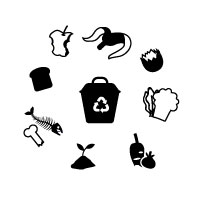
Compost Bin Icons Set - Organic Waste Vector GraphCompost Bin Icons Set - Organic Waste Vector Graph
Premium compost bin and organic waste icons. Perfect for recycling apps, eco websites, zero waste branding, and environmental educ
Overview
Communicate sustainability instantly with this professional icon set.
Whether you're designing an eco-friendly app, creating educational materials about composting, or building a zero-waste brand identity, you need clear, recognizable visuals. This comprehensive icon collection features everything from compost bins and kitchen scraps to worms, leaves, and finished compost – all crafted with careful attention to detail.
Each icon is designed to be universally understood, following established visual conventions for organic waste management. The set includes multiple bin styles (open, closed, with recycling symbols) and a complete range of organic waste items: fruit peels, eggshells, coffee grounds, vegetable scraps, leaves, and more.
What makes this set special:
- Consistent style – all icons share the same clean, modern aesthetic
- Practical variety – multiple bin orientations and waste types for every use case
- Ready for any project – use in websites, mobile apps, printed materials, or signage
- Scalable vectors – crisp at any size, from favicons to billboards
Perfect for environmental organizations, waste management companies, gardening apps, educational institutions, or any project promoting sustainability.
Features
- Unique icons – compost bins (front, side, top views), organic waste scraps, worms, leaves, finished compost pile
- formats included – EPS (compatible with all major design software)
- Color and line art versions – full color icons plus monochrome/outline variants for maximum flexibility
- Editable vectors – fully customizable strokes, colors, and shapes in Illustrator/EPS format
- Organized folder structure – clearly named files for quick access
- Commercial license included – use in personal and commercial projects
Requirements
- Any software that supports EPS file (Adobe Illustrator, Inkscape, Figma, Sketch, Photoshop, or even web browsers for SVGs)
- No special system requirements – files work on Windows, Mac, and Linux
Instructions
Installation & usage:
- Download and extract the ZIP package
- Browse the folders:
/EPSeditable source files for professional designers- For print/design: use EPS
Customize as needed – all vectors are fully editable
Integrate into your project – simply drag, drop, or code