Home / Scripts & Code / PHP Scripts / POS

Karastrux Workspace - Multi-Tenant POS SystemKarastrux Workspace - Multi-Tenant POS System
Karastrux Workspace is a modern multi-tenant, multi-branch POS + operations platform with real-time updates, advanced access contrHome / Scripts & Code / PHP Scripts / POS
Karastrux Workspace - Multi-Tenant POS System
Karastrux Workspace is a modern multi-tenant, multi-branch POS + operations platform with real-ti...
Screenshots



Overview
Karastrux Workspace is a production-ready, multi-tenant, multi-branch POS and operations platform built for retail and F&B businesses that need centralized control, real-time visibility, and automated back-office workflows.
It helps businesses run daily sales operations while also handling the hard parts behind the scenes: permissions, billing collections, dunning, operational jobs, and auditability.
Who It’s For
- Retail and F&B operators with multiple branches
- SaaS-style POS providers managing many tenant workspaces
- Teams needing strict role access, billing control, and audit trails
- Businesses replacing fragmented tools with one integrated system
Core Business Problems It Solves
- Disconnected systems for POS, users, billing, and admin operations
- Manual billing follow-ups and inconsistent collections
- Weak access control and feature entitlement management
- Lack of visibility into background jobs and failures
- Poor auditability for support, compliance, and incident response
Demo:
- Email: [email protected]
- Password: PosDemo#2026!Secure
- url: https://workspace.karastrux.te...
Features
Key Features
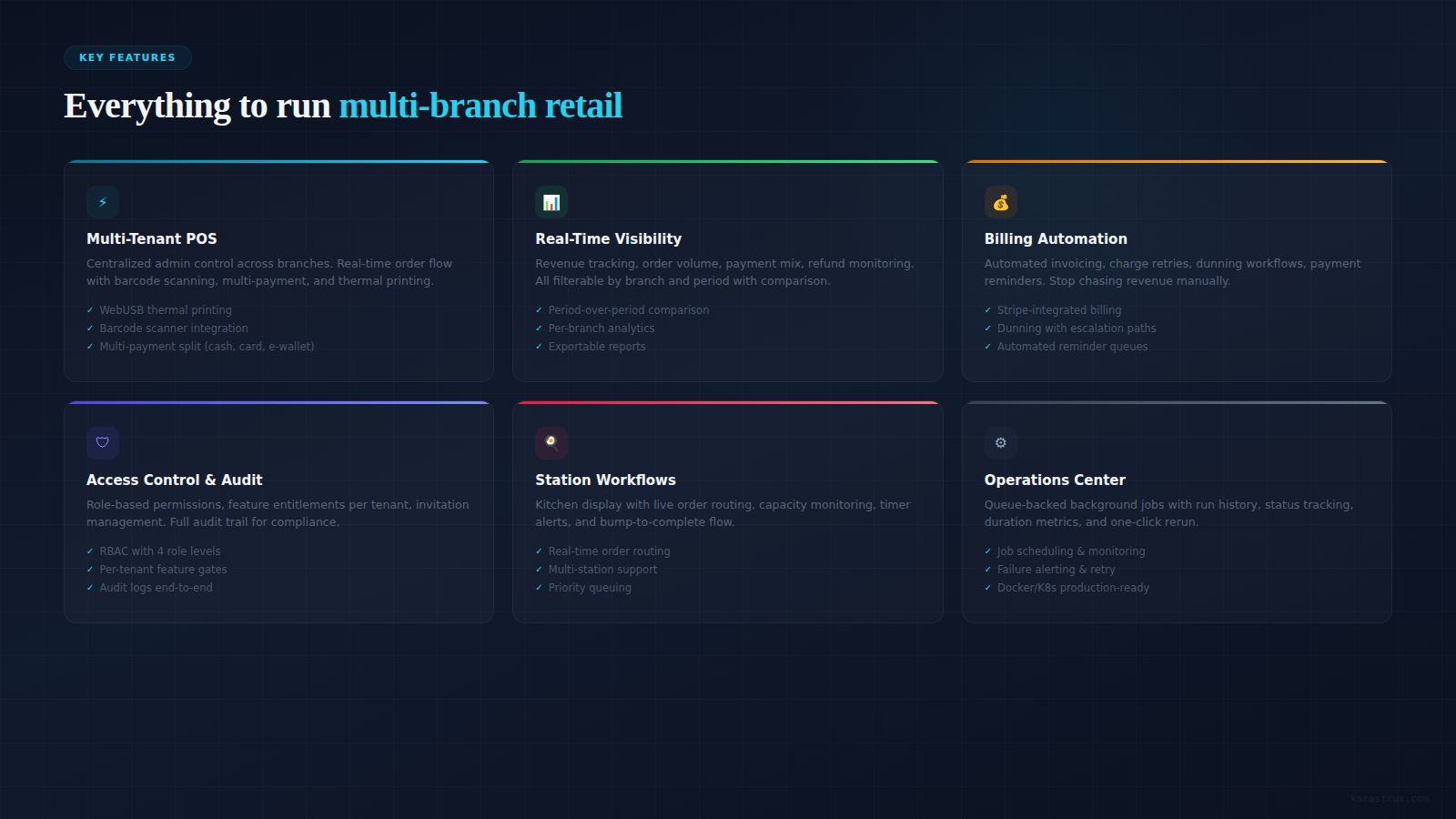
- Multi-tenant, multi-branch POS architecture
- Real-time order and station updates
- Product, inventory, customer, transaction, and payment modules
- Centralized user, role, invitation, and join-request management
- Tenant feature entitlements (enable/disable, baseline reset, bulk apply)
- Billing collections operations:
- Retry charge
- Charge now
- Send reminder
- Mark dispute
- Pause/resume dunning
- Configurable dunning workflows and escalation policies
- Operations Control Center:
- Queue-backed jobs
- Run history
- Status, duration, success/failure tracking
- Rerun support
- Audit logs for critical actions
- Observability metrics for billing and notification reliability
- Docker/Kubernetes deployment support
Requirements
- Linux VPS/Cloud server (Ubuntu 22.04+ recommended)
- Docker Engine 24+ and Docker Compose plugin
- Minimum server: 4 vCPU, 8 GB RAM, 40 GB SSD (recommended: 8 vCPU, 16 GB RAM)
- Domain/subdomains configured for:
- tenant web
- admin web
- gateway/API
- landing page (optional)
- Reverse proxy with SSL (Nginx/Caddy/Traefik)
- Open ports: 80, 443
- SMTP credentials for email delivery (password reset, invitations, notifications)
- Payment provider keys (Stripe/Midtrans/Xendit) if payment integration is enabled
- Write permission for media storage path (example: /var/lib/pos/gallery)
- Modern browser (Chrome, Edge, Safari, Firefox)
Instructions
- Upload project files to your server.
- Copy .env.example to .env and fill all required environment variables.
- Set production domains and GraphQL/GraphQL WS endpoints.
- Configure SMTP and optional payment provider keys.
- Ensure storage directory exists and is writable by containers.
- Run: docker compose build
- Run: docker compose up -d
- Verify services are healthy (gateway + web clients + databases).
- Access tenant/admin URLs and log in with your configured credentials.
- Test critical flows: login, POS order, billing invoice, invitation email, password reset, subscription updates.
Other items by this author



Additional options
|
PHP Script Installation Service
Don't worry about the installation of your script! Have your PHP Script installed for you.
|
$39 | Buy now |
Information
| Category | Scripts & Code / PHP Scripts / POS |
| First release | 7 March 2026 |
| Last update | 7 March 2026 |