Content Guard - Ultimate WP Content ProtectionContent Guard - Ultimate WP Content Protection
Protect your WordPress content with Right-Click Disable, Watermarking, Content Locking & Anti-Theft tools.
Screenshots




Overview
Protect Your Hard Work with Content Guard
Content Guard is the most complete solution to protect your WordPress content from being copied, stolen, or scraped. Whether you are a blogger, photographer, or business owner, this plugin ensures your text and images stay yours.
With a modern, dark-mode ready dashboard, you can configure over 20+ protection modules without touching a single line of code.
🔥 Key Features
- Full Copy Protection: Disable Right-Click, Text Selection, Copy (Ctrl+C), Cut (Ctrl+X), Paste (Ctrl+V), and Drag & Drop.
- Advanced Image Security:
- Transparent Overlay: Prevents users from saving images via right-click or drag-drop.
- Auto Watermarking: Automatically adds your logo to images on the fly.
- Hotlink Protection: Stops other sites from stealing your bandwidth.
- Content Access Control:
- Content Locking: Lock content for guests (Login required).
- Social Locker: Require visitors to share on Facebook/Twitter/WhatsApp to unlock content.
- Password Protection: Set unique passwords for specific posts.
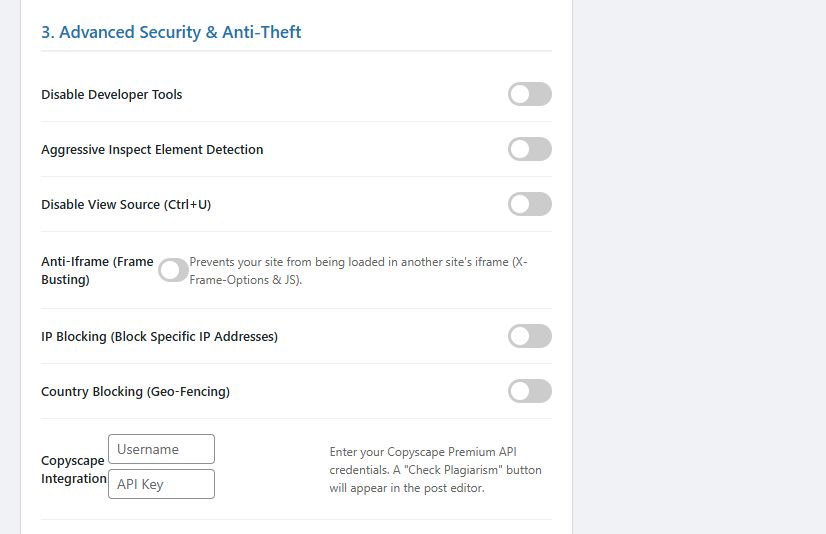
- Developer Protection: Disables "Inspect Element" (F12), "View Source" (Ctrl+U), and detects aggressive debugging tools.
- Media Protection: Secures Audio/Video players and prevents PDF downloads.
- Smart Automation:
- IP & Geo Blocking: Ban specific IPs or entire countries (Geo-fencing).
- Auto-Expiry: Automatically hide post content after a specific date.
- Activity Logging: Track who is trying to copy your content with real-time logs (IP, Action, Time).
🚀 Why Choose Content Guard?
- Lightweight & Fast: Optimized for speed with zero external dependencies.
- SEO Friendly: Search engines can still crawl your site (unless you explicitly lock content).
- Translation Ready: Includes .pot file for easy translation.
- GDPR Compliant: No personal data is stored without consent.
- Mobile Friendly: Disables long-press actions on touch devices.
Change Log
Version 1.0.0 - Initial Release
- Added Content Locking
- Added Watermarking
- Added Activity Logging
Features
- Disable Right-Click: Prevent context menus on pages, posts, and media.
- Disable Text Selection: Stop users from highlighting and copying text.
- Image Protection: Drag & drop disable, transparent overlay, and hotlink protection.
- Watermarking: Automatically add logos to images.
- Content Locking: Lock content for guests (Login required).
- Social Locker: Unlock content by sharing on social media.
- Password Protection: Secure specific posts with passwords.
- Developer Protection: Disable Inspect Element (F12) and View Source.
- Geo-Blocking: Restrict access by country or IP address.
- Activity Logging: View real-time logs of blocked attempts.
- Mobile Protection: Disable long-press actions on touch devices.
Requirements
- WordPress Version: 5.0 or higher
- PHP Version: 7.2 or higher
- GD Library: Required for Watermarking feature (Standard on most hosts)
Instructions
- Download the plugin zip file from CodeCanyon.
- Log in to your WordPress Dashboard.
- Go to Plugins > Add New > Upload Plugin .
- Select the desheelabs-content-guard.zip file and click Install Now .
- Activate the plugin.
- Navigate to the Content Guard menu in the sidebar to configure your protection settings.
Other items by this author





| Category | Plugins / WordPress / Security |
| First release | 7 March 2026 |
| Last update | 7 March 2026 |
| Supported CMS | WooCommerce 2.7.x, WooCommerce 3.0.x, WooCommerce 2.8.x, WooCommerce 2.9.x, WooCommerce 4.x, WooCommerce 5.x, WooCommerce 6.x, WooCommerce 7.x, WooCommerce 8.x, WordPress 6.0, WordPress 6.2, WordPress 6.3, WordPress 6.4, WordPress 6.5, WooCommerce 9.x, WordPress 6.7 |
| Files included | .php, .css, .html, Javascript .js |
| Tags | Security, content locker, copy protection, image watermark, copyright, image protection, content protection, anti theft, no right click, disable right click, text protection, woocommerce protection, secure content, prevent copying, desheelabs |