DataMate - Excel CSV ToolkitDataMate - Excel CSV Toolkit
Excel and CSV Toolkit | Search, Filter, Clean , Convert
DataMate - Excel CSV Toolkit
Excel and CSV Toolkit | Search, Filter, Clean , Convert
Screenshots




Overview
DataMate is a professional desktop application built for
anyone who works with Excel or CSV data daily.
No Microsoft Excel required — DataMate handles everything
natively with a clean, modern dark interface.
━━━━━━━━━━━━━━━━━━━━━━━━━
SMART SEARCH
━━━━━━━━━━━━━━━━━━━━━━━━━
• Search across millions of rows instantly
• Case-sensitive and case-insensitive modes
• Live streaming results — no waiting
• Real-time progress bar while scanning
• Stop search at any time
━━━━━━━━━━━━━━━━━━━━━━━━━
DATA CLEANER
━━━━━━━━━━━━━━━━━━━━━━━━━
• Remove empty rows automatically
• Remove duplicate entries
• Trim whitespace from all cells
• Normalize text case (UPPER / lower / Title)
• Preview cleaned data before saving
━━━━━━━━━━━━━━━━━━━━━━━━━
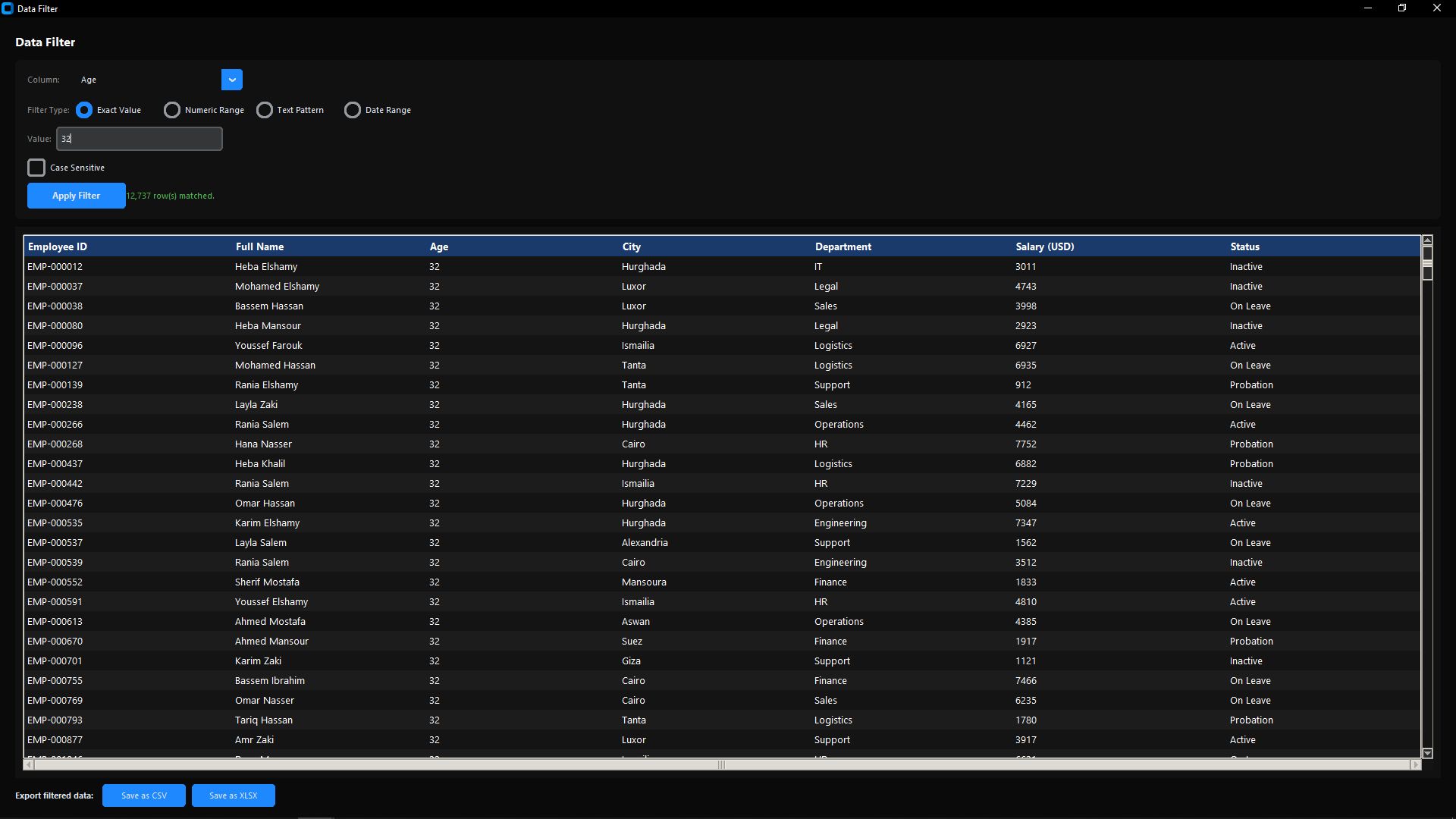
DATA FILTER
━━━━━━━━━━━━━━━━━━━━━━━━━
• Filter by exact column value
• Filter by numeric range (min / max)
• Filter by text pattern or regex
• Filter by date range
• Export filtered results instantly
━━━━━━━━━━━━━━━━━━━━━━━━━
FILE CONVERTER
━━━━━━━━━━━━━━━━━━━━━━━━━
• Excel → CSV
• CSV → Excel (.xlsx)
• Excel / CSV → JSON
• Auto-suggests output path
• Handles large files with ease
━━━━━━━━━━━━━━━━━━━━━━━━━
FILE PREVIEW
━━━━━━━━━━━━━━━━━━━━━━━━━
• Instantly preview first 50 rows
• No need to open the full file
• Clean scrollable table view
━━━━━━━━━━━━━━━━━━━━━━━━━
EXPORT RESULTS
━━━━━━━━━━━━━━━━━━━━━━━━━
• Export search / filter results as CSV
• Export as Excel (.xlsx)
• Export as plain TXT
━━━━━━━━━━━━━━━━━━━━━━━━━
WHAT YOU GET
━━━━━━━━━━━━━━━━━━━━━━━━━
• Full Python source code
• Clean modular structure
• Easy to customize and extend
• Well-documented codebase
Features
Search, Filter, Clean, Convert Excel & CSV Files
Real-time Streaming Search with Progress Bar
Data Cleaner: Remove Duplicates & Empty Rows
Filter by Value, Range, Pattern or Date
Convert Excel↔CSV↔JSON in One Click
Preview First 50 Rows Instantly
Drag & Drop File Support
Export Results as CSV, Excel or TXT
Works with Millions of Rows (Low RAM)
100% Offline — No Excel Required
Clean Modern Black & Blue Dark UI
Full Python Source Code Included
Requirements
• Python 3.9+
• Windows / macOS / Linux
Instructions
1. Download and extract the ZIP file
2. Open a terminal in the project folder
3. Run the following command to install dependencies:
pip install -r requirements.txt
Run the application with:
python main.py
or just run main.exe
Other items by this author


| Category | Scripts & Code / Python |
| First release | 11 March 2026 |
| Last update | 11 March 2026 |
| Tags | excel csv data search filter pandas python toolkit desktop cleaner converter json xlsx data-tool dark-ui |