Fitness Tracker App - Flutter AppFitness Tracker App - Flutter App
Fitness tracker that helps users monitor daily activities, track personal goals. Recently Updated
Fitness Tracker App - Flutter App
Fitness tracker that helps users monitor daily activities, track personal goals.
Screenshots




Overview
The Fitness Tracker App is a comprehensive mobile solution designed for health-conscious individuals who want to take control of their fitness journey. Built using the Flutter framework and powered by a local SQLite database, the app provides a seamless, private, and offline-capable experience for managing your health data.
Features
- Daily Progress Dashboard
- Visual Goal Progress Cards
- Weekly Calories Bar Chart
- Weekly Summary Statistics
- Historical Date Navigation
- Pull-to-Refresh Functionality
- Manual Activity Logging
- Multiple Activity Categories (Running, Walking, Cycling, Swimming, etc.)
- Duration & Calories Tracking
- Step Counter & Notes Integration
- Activity History View
- Filtering Views (Day, Week, All)
- Swipe-to-Delete Activities
- SQLite Local Database Storage
- Offline Data Persistence
- Goal Configuration System
Requirements
give me all techinical requirements to be able to use our this app
Based on the project documentation, here are the technical requirements needed to build, run, and use the Fitness Tracker App:
🛠️ Development Environment Requirements
To clone the repository and run the source code, your machine needs the following:
- Flutter SDK: Version 3.10 or higher
- Dart SDK: (Included automatically with Flutter 3.10+)
- Android SDK: Configured with API level 21 or higher
- Version Control: Git (to clone the repository)
📱 Device Requirements (To run the app)
- Android: Android 5.0 (Lollipop) or newer (due to the minimum API level 21 requirement).
- Storage: Sufficient local storage space, as the app utilizes an offline SQLite database to store all user activity data directly on the device.
- Internet Connection: Not required! The app is designed to be fully functional offline.
💻 Core Tech Stack & Dependencies
The app relies on the following core technologies under the hood:
- Language: Dart
- Database: SQLite (via the
sqfliteplugin) - Data Visualization:
fl_chartlibrary for rendering the weekly statistics - Formatting:
intlpackage for precise date and time handling - State Management: Built-in
setState(no external state management libraries required)
Instructions
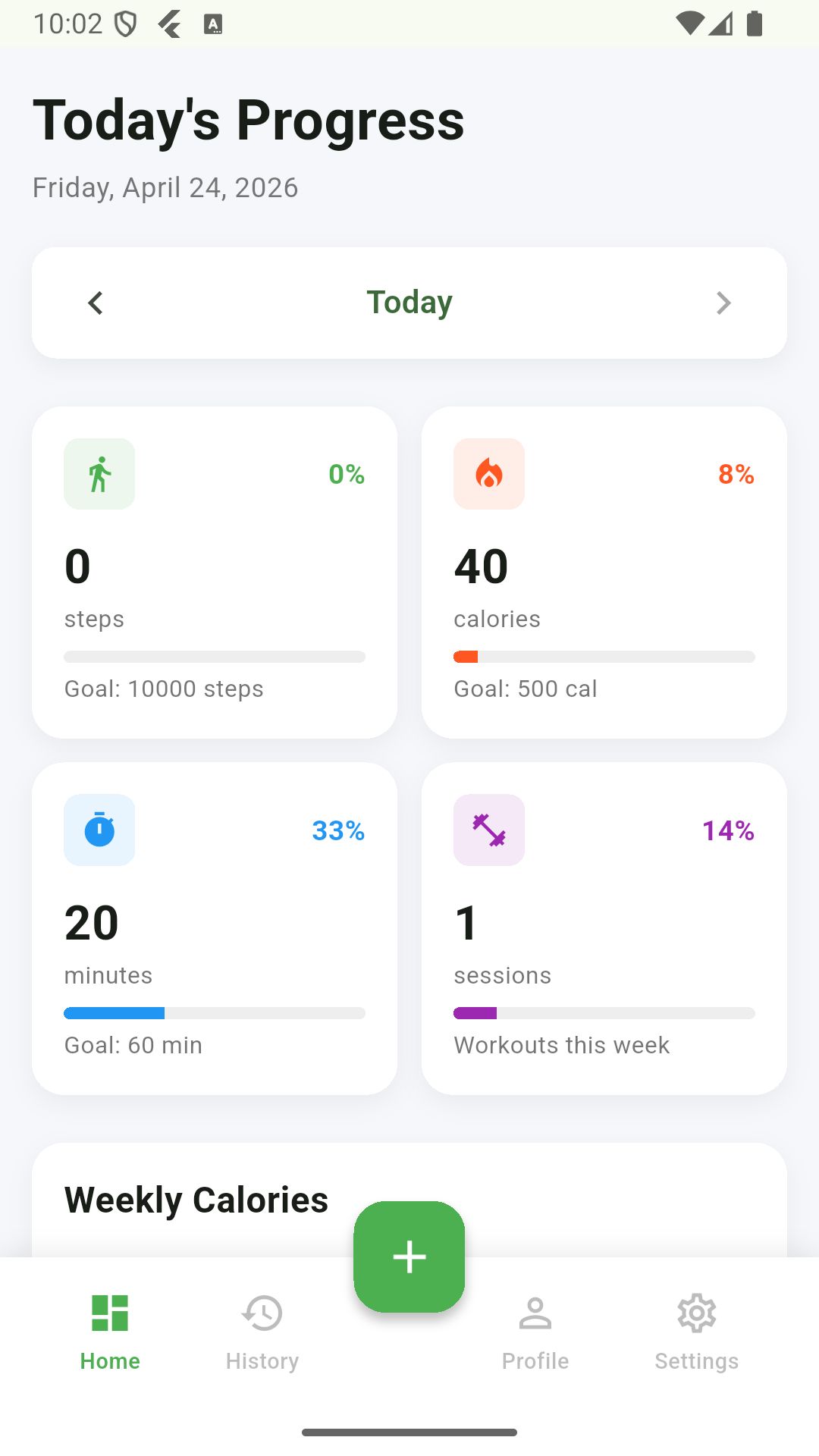
📊 Understanding Your Dashboard (Home Screen)
The Dashboard is the first screen you see and acts as your daily fitness command center.
- View Today's Progress: When you open the app, you will immediately see your progress for the current day.
- Track Your Goals: Watch the visual progress bars fill up as you get closer to your daily targets:
- Steps: Goal is 10,000 steps.
- Calories: Goal is to burn 500 calories.
- Active Duration: Goal is 60 minutes of activity.
- Check Previous Days: Want to see how you did yesterday? Simply tap the Left and Right Arrow Buttons at the top of the screen to navigate between different dates.
- Refresh Data: If you need to force the screen to update, simply swipe down from the top of the screen (pull-to-refresh).
➕ How to Log a New Activity
Logging your workouts is quick and easy.
- On the Dashboard or History screen, locate and tap the "+" (Plus) Floating Action Button in the bottom corner.
- Choose Activity Type: A grid of 8 activities will appear. Tap the icon that matches your workout (e.g., Running, Cycling, Yoga, Swimming, etc.).
- Enter Core Details:
- Input the Duration of your workout in minutes.
- Input the estimated Calories Burned.
- Add Optional Details: If applicable, you can log the number of Steps taken and add any personal Notes about how the workout felt.
- Adjust Date/Time: By default, it logs for the current time. You can change this using the date and time picker if you are logging a past workout.
- Save: Tap the Save Activity button at the bottom to record it to your database.
🗓️ Viewing and Managing Your History
Keep track of everything you've accomplished over time.
- Open History: Tap the History tab located in the bottom navigation bar.
- Switch Views: At the top of the screen, you can toggle between three viewing modes to see exactly what you want:
- Day: See all activities broken down for a specific day.
- Week: View a summary of your activities over an entire week.
- All: Browse a continuous list of every activity you've ever logged.
- Navigate Time: Use the arrow buttons to jump between different weeks or months, depending on your current view mode.
- Delete an Activity: Made a mistake or want to remove an entry? Simply find the activity card in the list and swipe left on it to permanently delete it.


| Category | App Templates / Flutter / Full Applications |
| First release | 24 April 2026 |
| Last update | 24 April 2026 |
| Operating Systems | iOS 12.0, iOS 14.0, iOS 13.0, iOS 15.0, Android 12.0 |
| Tags | fitness, mobile application, flutter, fitness tracker app, tracker app |