QuakeAlert - Earthquake Tracker Android AppQuakeAlert - Earthquake Tracker Android App
Real-time earthquake monitor with USGS & EMSC APIs, Firebase Remote Ad Manager, Google Maps, Push Alerts & Full Admin Cont Recently Updated
QuakeAlert - Earthquake Tracker Android App
Real-time earthquake monitor with USGS & EMSC APIs, Firebase Remote Ad Manager, Google Maps, ...
Screenshots




Overview
🌍 QuakeAlert — Real-Time Earthquake Monitor & Tracker
QuakeAlert is a premium, ready-to-publish Android application that provides real-time earthquake tracking and monitoring worldwide. Built with Native Java and modern Android architecture, it fetches live seismic data from two of the world's most reliable sources — USGS (United States Geological Survey) and EMSC (European-Mediterranean Seismological Centre).
This is not just an app template — it's a complete business solution with a powerful remote ad management system, subscription-ready architecture, and everything you need to launch, monetize, and scale your earthquake app on the Google Play Store.
💰 Production-Grade Remote Ad Manager
The standout feature of this app is its custom-built Ad Manager powered by Firebase Realtime Database. You can control every aspect of your ad monetization remotely — without publishing a single app update!
- Multi-Network Support: AdMob, Meta Audience Network (FAN), and AppLovin — all integrated with intelligent waterfall fallback logic.
- Remote Control: Enable/disable any ad format, change ad unit IDs, set interstitial click intervals, and control native ad placement frequency — all from your Firebase console.
- Smart App Open Ads: Shows App Open ads only when the user returns from the background (not on cold start), ensuring a non-intrusive and policy-compliant user experience.
- Ad Formats Included: Banner Ads, Interstitial Ads, Native Ads (in-feed with pooling), and App Open Ads.
- Native Ad Pool System: Pre-loads native ads in the background for instant delivery inside RecyclerView — zero lag, maximum revenue.
🗺️ Google Maps Integration
- Interactive full-screen map with magnitude-based color-coded markers.
- User distance calculation from each earthquake epicenter.
- Tectonic fault lines overlay on the map.
- Map Picker Activity with search functionality — users can set custom locations by tapping or searching.
- Multiple map types: Normal, Satellite, Terrain, Hybrid.
🔔 Push Notifications & Alerts
- Firebase Cloud Messaging (FCM) integrated for real-time earthquake alerts.
- Configurable alert radius and minimum magnitude threshold.
- Background earthquake monitoring service with smart scheduling.
- Users can choose: No notifications, Nearby earthquakes only, or All significant earthquakes.
🎨 Modern Material Design UI
- Material Design 3 with Edge-to-Edge display support.
- Full Dark & Light Mode with smooth theme switching.
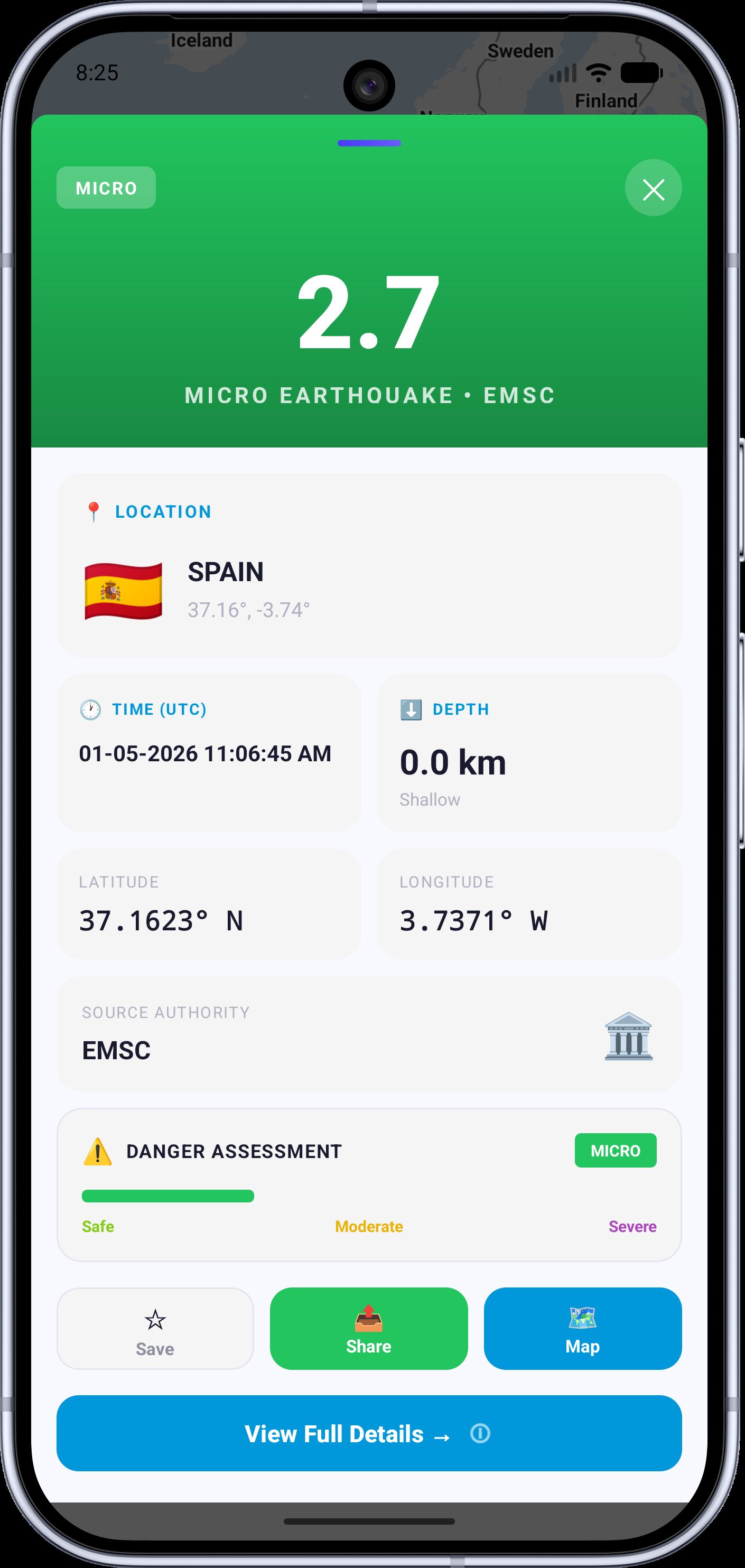
- Beautiful Bottom Sheet dialogs with blur effect for earthquake details.
- Animated magnitude indicators, live pulse dots, and gradient headers.
- Responsive design tested on phones and tablets.
📊 Advanced Features
- Dual API: Merges data from USGS and EMSC for comprehensive global coverage.
- Smart Filtering: Filter by magnitude (M3+, M4.5+, M5+, M6+, M7+), time frame, depth, and custom region/country.
- Country-based Region Filter: Users can select any country from a dynamic list — the app automatically calculates the search radius.
- Search: Search earthquakes by location name with a beautiful "No Results" empty state.
- Sorting: Sort by Latest, Strongest, or Deepest.
- Favorites/Bookmarks: Save important earthquakes locally using Room Database.
- Statistics Dashboard: Visual charts showing earthquake trends, magnitude distribution, and activity over time.
- Unit Conversion: Supports Kilometers/Miles for depth and distance, 12/24 hour clock, multiple date formats.
- Sharing: Share earthquake details with friends via any app — beautifully formatted text with emoji, magnitude, depth, coordinates, and source.
- Country Flag Detection: Automatic country flag emoji detection from earthquake location names (supports 200+ countries and regions).
⚙️ Admin & Server Features
- Firebase Realtime Database for remote ad configuration — no server needed.
- Firebase Cloud Messaging for push notifications.
- SharedPreferences backup for offline ad config — app works even if Firebase is temporarily unavailable.
- Subscription-Ready Architecture: The codebase is structured to easily add Google Play Billing for premium/ad-free subscriptions.
📦 What's Included?
- Full Android Studio Source Code (Native Java).
- Comprehensive step-by-step documentation (Setup, Reskinning, Firebase, Ads, Maps, Publishing).
- Firebase Realtime Database JSON template for ad configuration.
- Clean, well-commented, and easily customizable code.
- Free updates and dedicated support.
🚀 Perfect For
- Developers looking for a high-retention niche app to publish on Play Store.
- Entrepreneurs who want to start an app business with minimal effort.
- Agencies offering white-label app solutions to clients.
- Students and learners who want to study a production-grade Android project.
Buy once, customize, and launch your own earthquake monitoring app today!
Features
- Real-time earthquake data from USGS & EMSC dual APIs
- Production-grade Remote Ad Manager via Firebase (AdMob, FAN, AppLovin)
- Smart App Open Ads (Background-to-Foreground only)
- Banner, Interstitial, Native (with Pool), and App Open ad formats
- Waterfall ad network fallback with remote priority control
- Google Maps with magnitude-based markers and fault lines
- Map Picker with location search (Geocoder)
- User distance calculation from earthquake epicenter
- Push notifications via Firebase Cloud Messaging (FCM)
- Configurable alert radius and magnitude threshold
- Background earthquake monitoring service
- Material Design 3 with Edge-to-Edge display
- Full Dark Mode and Light Mode with smooth switching
- Bottom Sheet earthquake details with blur effect
- Filter by magnitude, time frame, depth, and region
- Country-based region filter with auto radius calculation
- Search earthquakes by location name
- Sort by Latest, Strongest, or Deepest
- Favorites/Bookmarks with Room local database
- Statistics dashboard with visual charts
- Unit conversion: KM/Miles, 12/24hr clock, date formats
- Share earthquake info with beautiful formatted text
- Automatic country flag detection (200+ countries)
- Tsunami warning indicators (USGS data)
- PAGER Alert Level display (USGS)
- Felt Reports and Significance scores (USGS)
- Detailed technical info: CDI, MMI, RMS, Gap, NST
- Custom location setting via GPS, Map, or Coordinates
- Privacy Policy WebView with offline caching
- Exit dialog with blur effect
- Permission handling: Location and Notification (Android 13+)
- Subscription-ready architecture
- Clean, well-commented Java source code
- Comprehensive documentation included
- Easy reskinning: change colors, name, icon in minutes
- Optimized for performance: DiffUtil, View caching, lazy loading
- Proper ad lifecycle management (no memory leaks)
- Supports Android 7.0 (API 24) to Android 15 (API 35)
Requirements
- Android Studio — Latest stable version (Hedgehog or newer recommended)
- JDK 17 or higher
- Minimum SDK: Android 7.0 (API Level 24)
- Target SDK: Android 17 (API Level 37)
- Google Firebase Account (Free tier is sufficient)
- Firebase Realtime Database (for remote ad configuration)
- Firebase Cloud Messaging (for push notifications)
- Google Maps API Key (Free tier from Google Cloud Console)
- Ad Network Accounts (for monetization — at least one required):
- Google AdMob Account
- Meta Audience Network (Facebook) Account (Optional)
- AppLovin Account (Optional)
- Google Play Developer Account ($25 one-time fee — required to publish on Play Store)
- Internet Connection — Required for API data fetching and ad loading
- Basic Android Development Knowledge — Familiarity with Android Studio, Gradle, and Java is recommended for customization
Instructions
📖 Installation & Setup Guide
Follow these simple steps to get started with QuakeAlert in your Android Studio.
Step 1: Extract the Project
- Download the .zip file from Codester.
- Extract the zip file to your desired location.
- Inside the extracted folder, you will find the Android Studio project folder.
Step 2: Open in Android Studio
- Open Android Studio (Recommended: Hedgehog or newer).
- Click on Open an Existing Project.
- Select the project folder (the one containing
build.gradlefile). - Wait for Gradle sync to complete.
Step 3: Firebase Setup (Important)
Go to Firebase Console and create a new project.- Add your Android app to the Firebase project.
- Download the google-services.json file.
- Place the
google-services.jsonfile insideapp/folder of your project. - Enable Realtime Database and Cloud Messaging in Firebase.
Step 4: Google Maps API Key
Go to Google Cloud Console.- Create a new project or select existing one.
- Enable Google Maps SDK for Android.
- Generate an API key and restrict it to your package name.
- Put the API key in
AndroidManifest.xmlinside themeta-datatag.
Step 5: AdMob & Other Ad Networks
- Create accounts on AdMob, AppLovin, and Meta Audience Network (if needed).
- Replace the test Ad Unit IDs with your own IDs.
- Go to Firebase Realtime Database and update the ad_config node with your Ad Unit IDs.
Step 6: Run the Project
- Connect your Android device or start an Emulator.
- Click on the Run button (green play icon).
- The app should now run successfully on your device.
Step 7: Customization
- Change app name from
strings.xml - Replace app icon using Image Asset Studio
- Modify colors from
colors.xml - Update Firebase project for your own data
Need Help? Feel free to contact me through Codester. I provide fast and reliable support.
Future product updates
Quality checked by Codester
Lowest price guarantee


|
Android App Reskin Service
Have your App reskinned to meet your needs.
|
$499 | Buy now |
| Category | App Templates / Android / Applications / Miscellaneous |
| First release | 1 May 2026 |
| Last update | 1 May 2026 |
| Operating Systems | Android 7.0, Android 8.0, Android 9.0, Android 10.0, Android 12.0 |
| Tags | android, admob, monetization, app template, tracking, material design, push notification, real time, google maps, firebase, monitor, native java, earthquake, usgs, emsc |