Premium QR Barcode Scanner Pro AndroidPremium QR Barcode Scanner Pro Android
A high-performance, professional Android QR & Barcode scanner and generator app template. Built with the latest Jetpack Compos Recently Updated
Premium QR Barcode Scanner Pro Android
A high-performance, professional Android QR & Barcode scanner and generator app template. Bui...
Screenshots


Overview
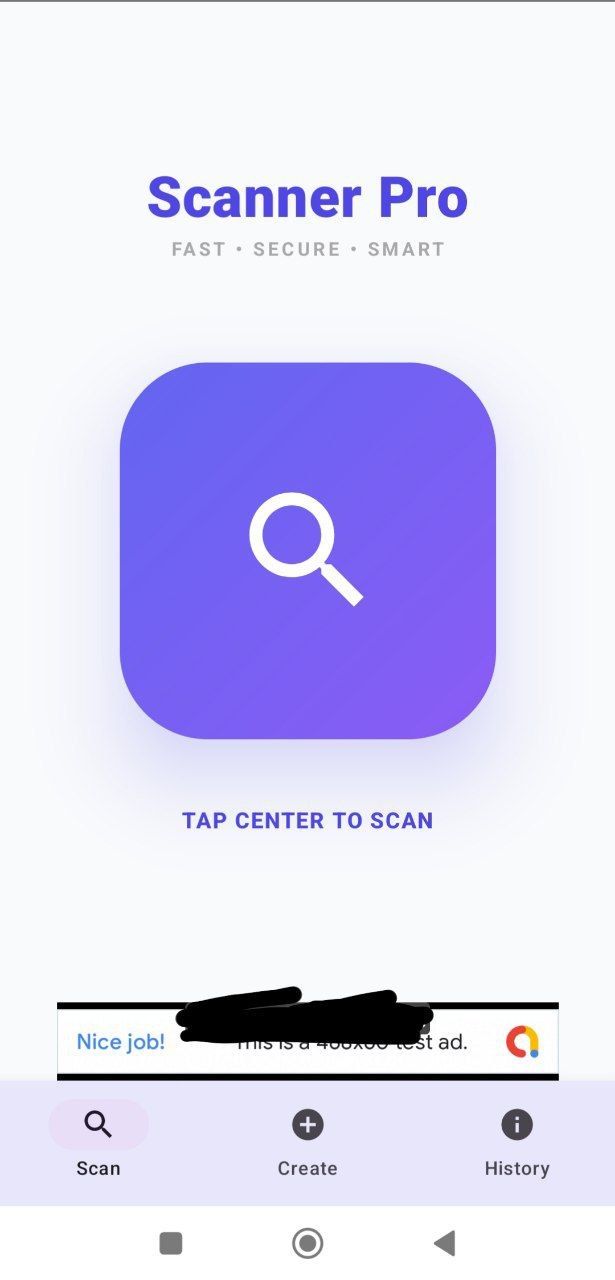
Premium QR & Barcode Scanner Pro is a complete, ready-to-publish Android application template designed for developers and entrepreneurs who want to launch a professional scanning utility on the Google Play Store.
Built using the latest Jetpack Compose framework and Material 3 design guidelines, this app offers a smooth, high-performance experience with premium aesthetics. It is fully optimized for modern Android versions (Android 15 / Target SDK 35) and comes with AdMob integration for instant monetization.
Key Features:
•Lightning Fast Scanning: Optimized engine for rapid detection of all common QR and Barcode formats (EAN, UPC, Code 128, etc.).
•QR Code Generator: Built-in tool to create custom QR codes for website links (URLs), text, and more.
•Persistent Scan History: Automatically saves all scanned and generated items locally so users never lose their data.
•AdMob Ready: Integrated Banner Ads support. Just swap the Ad Unit ID in the configuration to start earning.
•Material 3 UI/UX: A beautiful, modern interface featuring custom gradients, smooth transitions, and a premium "Dark/Indigo" theme.
•One-Hand Operation: UX optimized for easy, vertical scanning and single-hand usage.
•Smart Actions: One-tap to open links in the browser or search for product codes directly on Google.
Technical Specifications:
•Language: 100% Kotlin.
•UI Framework: Jetpack Compose (Modern Android UI).
•Architecture: Clean, modular code (MVVM pattern).
•Target SDK: 35 (Android 15).
•Min SDK: 26 (Android 8.0).
•Libraries: ZXing (Scanning), Google Play Services Ads (AdMob), Material 3.
What You Get:
1.Full Android Studio Source Code (Kotlin).
2.Ready-to-install Demo APK file.
3.Comprehensive Documentation (HTML) for setup and customization.
4.Quick Start Guide (TXT) for rapid deployment.
This template is perfect for anyone looking for a high-quality, bug-free, and easy-to-customize solution to enter the utility apps market.
Features
Main Features:
•Modern UI Framework: Built entirely with Jetpack Compose, ensuring smooth animations and a responsive interface.
•AdMob Integration: Pre-configured Banner Ads support for instant monetization—just swap the IDs.
•Universal Scanner: High-speed scanning for all common QR and Barcode formats (EAN, UPC, Code 128, etc.).
•QR Code Generator: Built-in utility to create custom QR codes for URLs, text, and other data.
•Smart History Log: Automatically saves all scan and generation results locally using persistent storage.
•Material 3 Design: Follows the latest Google design guidelines with beautiful gradients and premium aesthetics.
•Android 15 Ready: Fully optimized for the latest Android version (Target SDK 35).
•Portrait Orientation: Optimized for one-hand operation with a vertical scanning interface.
•Clean Source Code: Well-documented, modular Kotlin code based on the MVVM architecture for easy customization.
•Lightweight & Fast: Minimal app size with high-performance code execution.
Requirements
Technical Specifications:
•Development Environment: Android Studio Jellyfish (2023.3.1) or newer.
•Programming Language: Kotlin.
•UI Framework: Jetpack Compose (Modern Android UI).
•Minimum Android Version: Android 8.0 (API Level 26).
•Target Android Version: Android 15 (API Level 35).
•Java Version: Java JDK 17 recommended.
•Dependencies:
◦ZXing Android Embedded (Scanning engine)
◦Google Play Services Ads (AdMob)
◦Material 3 (Design components)
•Architecture: Clean code with MVVM pattern support.
Instructions
Step-by-Step Instructions:
1. Initial Setup
•Extract: Unzip the downloaded file to your local drive.
•Open: Launch Android Studio Jellyfish (or newer).
•Import: Select File > Open, navigate to the project folder, and click OK.
•Sync: Wait for the Gradle sync to finish successfully (make sure you have an active internet connection).
2. Branding & Customization
•Change Package Name:
i.In the project tree, right-click on com.example.qrscanner.
ii.Select Refactor > Rename > Rename Package.
iii.Enter your new unique package name.
•Change App Name: Open app/src/main/res/values/strings.xml and edit the app_name string.
•Change Icons: Right-click the app folder, select New > Image Asset, and follow the wizard to upload your logo.
3. Monetization (AdMob)
•App ID: Open app/src/main/AndroidManifest.xml and replace the test Application ID with your real ID from the AdMob dashboard.
•Ad Unit: Open MainActivity.kt, find the AdBanner function, and update the adUnitId with your Banner Ad ID.
4. Testing and Building
•Test: Connect your physical device or start an emulator and click the Run button.
•Generate APK/AAB: Go to Build > Generate Signed Bundle / APK, select your keystore, and generate the final release file for the Google Play Store.
App Usage (For End Users):
1.Scan: Point the camera at any QR or Barcode to detect it instantly.
2.Generate: Go to the "Create" tab, enter your link or text, and tap "Generate" to create a QR code.
3.History: View all previous scans in the "History" tab for quick access.
4.Actions: Tap on any scan result to open the link or search for the product on Google.
Other items by this author


| Category | App Templates / Android / Applications / Utility |
| First release | 27 May 2026 |
| Last update | 27 May 2026 |
| Operating Systems | Android 8.0, Android 9.0, Android 10.0, Android 11.0, Android 12.0 |
| Files included | .css, .html, .apk, .java, .xml |
| Tags | android, utilities, source code, QR generator, admob, app template, tools, barcode, kotlin, qr scanner, scanner app, jetpack compose, scanner pro, android 15, material 3 |