Credit Support System Pro WordPressCredit Support System Pro WordPress
Credit Support System Pro adds a credit-based customer support portal to your WordPress website. Recently Updated
Credit Support System Pro WordPress
Credit Support System Pro adds a credit-based customer support portal to your WordPress website.
Screenshots




Overview
🔧 Tired of chasing clients for payment after the work is already done?
𝗠𝗲𝗲𝘁 𝗖𝗿𝗲𝗱𝗶𝘁 𝗦𝘂𝗽𝗽𝗼𝗿𝘁 𝗦𝘆𝘀𝘁𝗲𝗺 𝗣𝗿𝗼 — a WordPress plugin that puts a professional, credit-based support portal directly on your website. Instead of sending invoices afterward, your clients purchase credits upfront, which are spent as work is approved.
𝗛𝗲𝗿𝗲'𝘀 𝗵𝗼𝘄 𝗶𝘁 𝘁𝗿𝗮𝗻𝘀𝗳𝗼𝗿𝗺𝘀 𝘆𝗼𝘂𝗿 𝘄𝗼𝗿𝗸𝗳𝗹𝗼𝘄:
💳 𝗖𝗿𝗲𝗱𝗶𝘁𝘀 𝗳𝗶𝗿𝘀𝘁, 𝘄𝗼𝗿𝗸 𝘀𝗲𝗰𝗼𝗻𝗱
Clients buy a credit package before any work begins. No more uncomfortable "can you pay your invoice?" conversations. The financial side is handled before you've written a single line of code.
📋 𝗦𝘁𝗿𝘂𝗰𝘁𝘂𝗿𝗲𝗱 𝘁𝗶𝗰𝗸𝗲𝘁 𝗳𝗹𝗼𝘄
Every request comes in as a support ticket — organized, tracked, and timestamped. No more digging through email threads to remember what a client asked for six weeks ago.
📊 𝗘𝘀𝘁𝗶𝗺𝗮𝘁𝗲 𝗯𝗲𝗳𝗼𝗿𝗲 𝘆𝗼𝘂 𝗰𝗼𝗺𝗺𝗶𝘁
You review the ticket, set an estimated start date, completion date, and credit cost. The client approves before work begins. Scope creep becomes a thing of the past because the client literally has to click "Accept" before anything moves forward.
⚡ 𝗔𝘂𝘁𝗼𝗺𝗮𝘁𝗲𝗱 𝗻𝗼𝘁𝗶𝗳𝗶𝗰𝗮𝘁𝗶𝗼𝗻𝘀 𝗮𝘁 𝗲𝘃𝗲𝗿𝘆 𝘀𝘁𝗲𝗽
New ticket, estimate ready, estimate accepted, work complete — your clients are notified automatically at every stage. You spend less time sending status updates and more time doing the actual work.
🔐 𝗧𝗿𝗮𝗻𝘀𝗽𝗮𝗿𝗲𝗻𝘁 𝗳𝗼𝗿 𝗰𝗹𝗶𝗲𝗻𝘁𝘀, 𝗽𝗼𝘄𝗲𝗿𝗳𝘂𝗹 𝗳𝗼𝗿 𝘆𝗼𝘂
Clients log in to their own support portal, see their credit balance, track their tickets, and manage everything themselves. Less back-and-forth. Fewer "what's the status?" messages.
📎 𝗘𝘃𝗲𝗿𝘆𝘁𝗵𝗶𝗻𝗴 𝗶𝗻 𝗼𝗻𝗲 𝗽𝗹𝗮𝗰𝗲
File attachments, ticket history, replies, transaction records — all stored and organized. Professional from day one.
Whether you're a solo developer, a designer, or a web agency — if you offer ongoing support or maintenance services, this plugin will change how you work.
Features
Credit purchasing — Customers buy credits through a clean popup with three configurable preset packages and a custom amount field. Supports both Stripe and PayPal with sandbox/live mode switching. A configurable minimum purchase amount is enforced at both the frontend and server level.
Support ticketing — Customers submit tickets (option to set cost to submit) with a title, description, priority level, and optional file attachments. Tickets flow through a structured lifecycle: Open → Estimated → Accepted/Declined → In Progress → Closed.
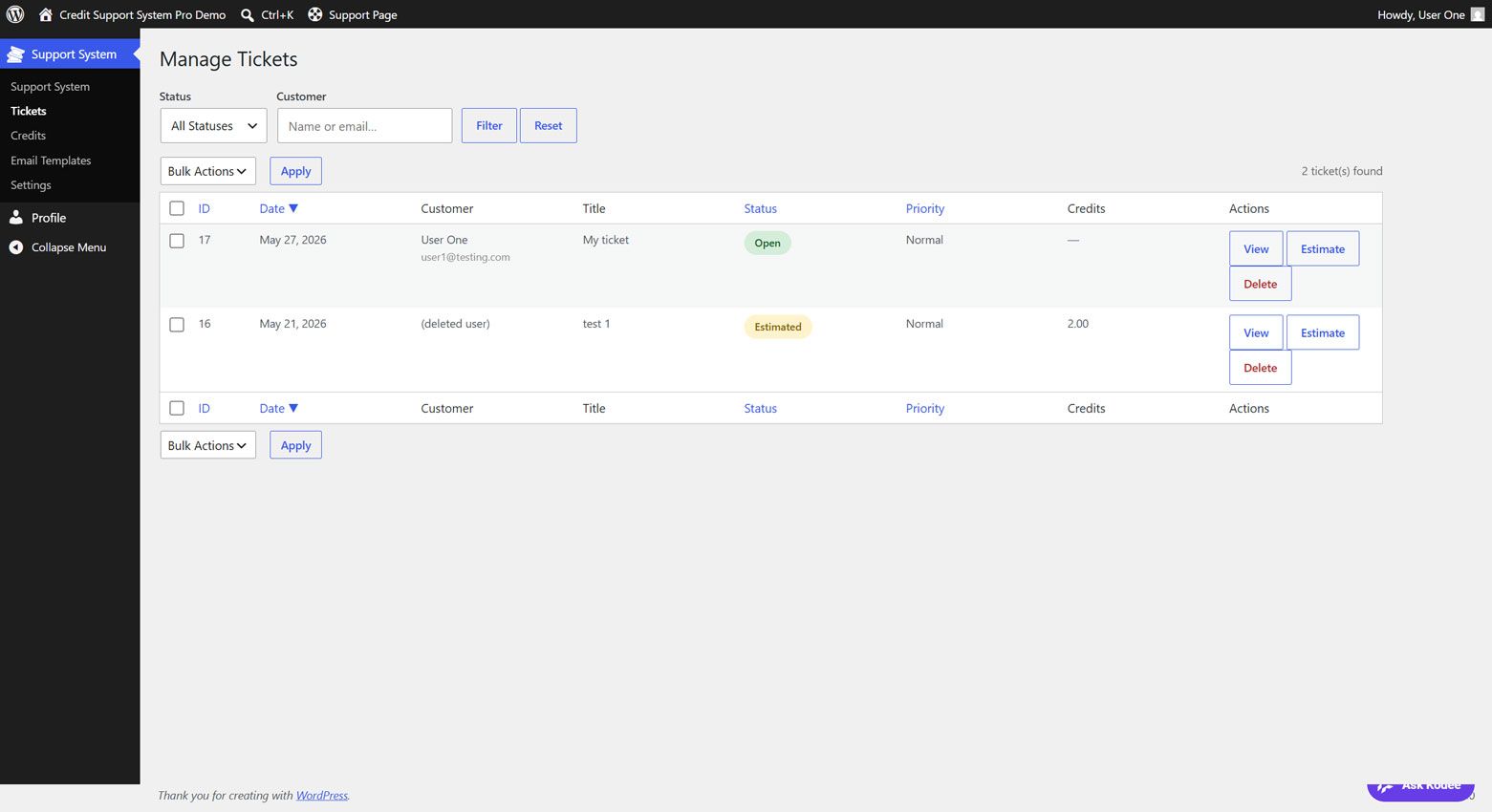
Estimate system — Admin creates time and cost estimates on any ticket. The customer receives an email notification and can accept or decline directly from their support page. Accepting deducts credits automatically; declining returns the ticket to Open status with an "Estimate Declined" badge visible to the admin.
Admin dashboard — A dedicated WordPress admin panel with ticket management, sortable and filterable ticket lists, bulk delete, customer credit management (add, deduct, set VIP status), configurable ticket statuses, and a shortcode reference panel.
Email notifications — Fully configurable templates for every event: new ticket, ticket received, estimate ready, estimate accepted, estimate declined, admin reply, customer reply, and status changes. All templates support placeholders like {customer_name}, {ticket_id}, {estimated_hours}, and more.
Welcome message — A rich-text welcome box at the top of the support page, editable via TinyMCE from the Settings page, explaining the credit system to new customers.
VIP accounts — Mark any customer as VIP to bypass credit requirements entirely.
Settings — Credit price, ticket price, credits per hour, preset package amounts, minimum purchase amount, payment gateway keys, currency, support page URL, terms of service URL, attachment size and type limits, ticket statuses, welcome message, and all email templates — all configurable from a single settings screen.
Shortcodes — [user_credits_display], [support_ticket_form], [user_tickets], and [css_customer_dashboard] (all-in-one) for flexible page layout.
Theme-proof styling — All plugin buttons use a dedicated csspro-btn class system with full !important coverage so no theme can interfere with the plugin's appearance. Fully responsive for mobile.
Requirements
WordPress: 5.8 or higherPHP: 7.4 or higher
Instructions
Initial Setup
- Create a new WordPress page (e.g. titled "Support") and add your chosen shortcodes to its content:
[user_credits_display]— credit balance + Buy Credits button[support_ticket_form]— ticket submission form[user_tickets]— customer's ticket list- (or use
[css_customer_dashboard]for all three in one block)
- Go to Support System → Settings and configure:
- Support Page URL — paste the URL of the page you just created
- Credit Price — how much one credit costs in your chosen currency
- Credits Per Hour — how many credits equal one hour of work
- Minimum Credits per Purchase — optional floor for the Buy Credits popup
- Buy Credits Preset Packages — the three quick-buy amounts shown on the popup (default 10 / 50 / 100)
- Currency — USD, EUR, GBP, etc.
- Terms of Service URL — optional; if set, customers must sign before accepting an estimate
- Configure at least one payment gateway:
- Stripe — enter your Publishable Key and Secret Key, set mode to Test or Live
- PayPal — enter your Client ID and Secret, set mode to Sandbox or Live
- Optionally configure:
- Attachment Max Size — maximum upload size in MB
- Allowed File Types — comma-separated list (e.g.
pdf,jpg,png,docx,zip) - Ticket Statuses — add, rename, or remove statuses to match your workflow
- Welcome Message — enable and write your welcome text using the TinyMCE editor
- Go to Support System → Email Templates and customise the subject and body of each notification email. Available placeholders are listed at the bottom of the page.
Testing Before Going Live
- Set Stripe to Test mode and use Stripe's test card
4242 4242 4242 4242(any future expiry, any CVC) to verify credit purchases - Set PayPal to Sandbox mode and use a PayPal sandbox buyer account to test PayPal purchases
- Submit a test ticket, create an estimate as admin, and accept it as the customer to walk through the full flow
- Switch both gateways to Live when you are satisfied everything works
** This plugin connects to the update site approximately once a month to check for updates and provide them to you. It sends only your site's domain, the product name, and the installed version number. The plugin remains fully functional if this service is unavailable, and includes one year of free updates from the date of installation.
Future product updates
Quality checked by Codester
Lowest price guarantee


| Category | Plugins / WordPress / Miscellaneous |
| First release | 27 May 2026 |
| Last update | 24 June 2026 |
| Files included | .php, .css, Javascript .js |
| Tags | helpdesk, ticket system, support, paypal, Stripe, support tickets |