Nova Archive - White Label File ArchiverNova Archive - White Label File Archiver
Secure file archiving software with full source code, multilingual support, licensing, easy rebranding, and instant activation. Recently Updated
Nova Archive - White Label File Archiver
Secure file archiving software with full source code, multilingual support, licensing, easy rebra...
Screenshots


Overview
📁 Archive, Protect, Organize, and Sell Under Your Own Brand
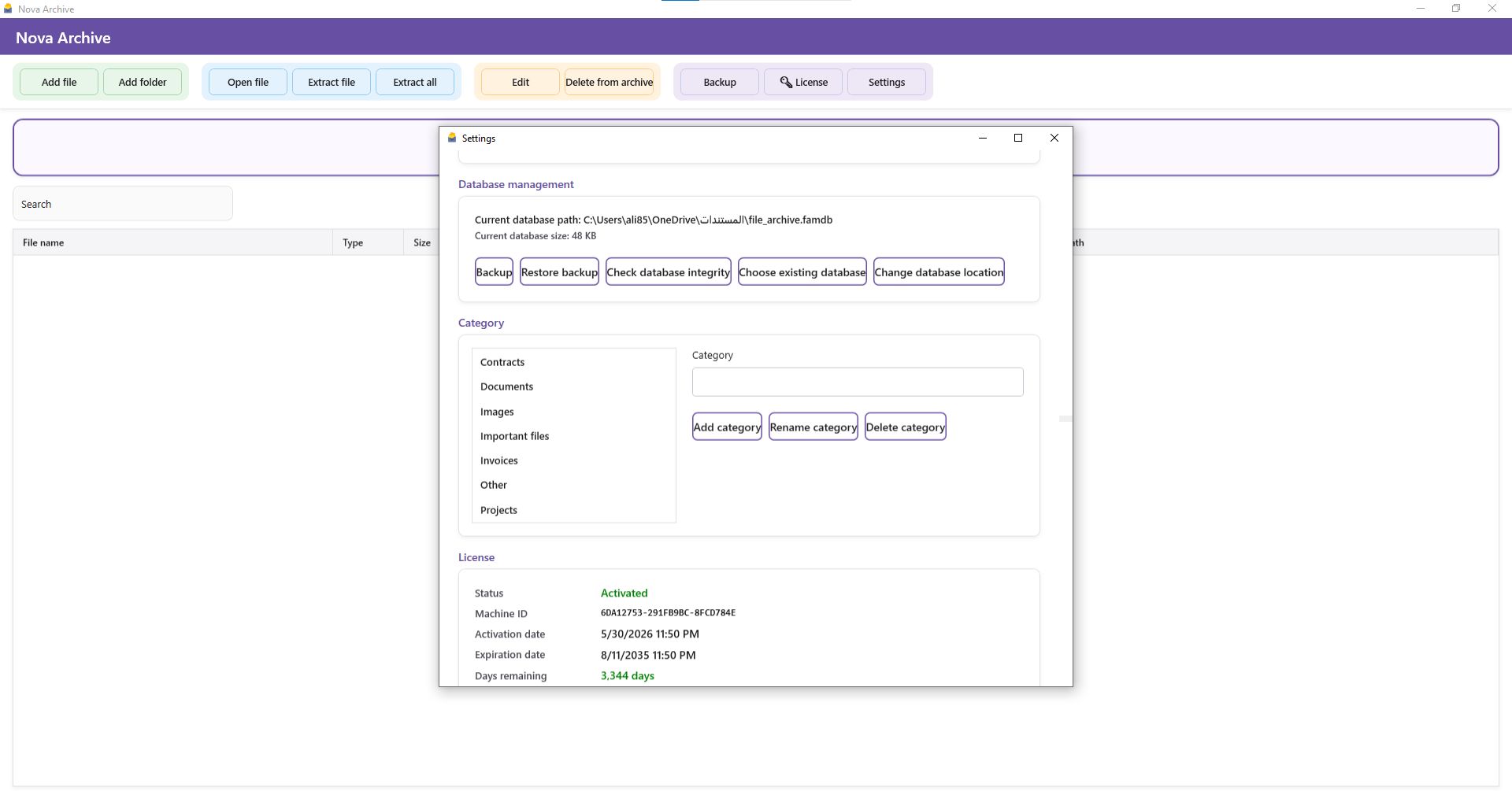
Nova Archive is a professional Windows desktop application created to help individuals, offices, and businesses archive, organize, protect, and manage important files through a modern and easy-to-use interface.
The application does not store file paths only. It saves a complete copy of every archived file inside a secure local database, helping protect important documents from accidental deletion, missing folders, or broken file locations.
🔐 Secure Local Storage and Complete Privacy
All archived files are stored inside a local database whose location is selected by the user. No cloud service or monthly subscription is required.
The database can be protected with a password, while stored file contents are encrypted to provide additional privacy and security.
✅ Data remains on the user’s device
✅ No mandatory cloud storage
✅ No recurring subscription fees
✅ Full control over the archive database
📂 Simple File and Folder Management
Users can add individual files, archive complete folders, or drag and drop files directly into the application.
Nova Archive displays important information in a clean and organized table, including:
📄 File name
📦 File type and size
📅 Date added
🏷️ Category
📝 Notes
🔎 Keywords
📍 Original file location
Users can open archived files, update their information, remove them from the archive, extract a selected file, or extract all stored files.
🔎 Fast Search and Smart Organization
The built-in search system helps users find archived files quickly, even when the database contains a large number of documents.
Files can be organized using categories, notes, and keywords, making the application suitable for archiving:
📑 Contracts and documents
🧾 Invoices and business records
🖼️ Images and designs
📊 Project files and reports
🏢 Company documents
💼 Administrative and accounting files
💾 Backup and Restore
The application includes tools for creating database backups and restoring an existing archive when required.
Users can select or change the database location at any time. Uninstalling the application does not automatically delete the archive database because it remains stored in the location selected by the user.
After reinstalling the software, the previous database can be selected and used again.
🔑 Complete Licensing and Activation System
The project includes a professional licensing system that can bind each activation to the customer’s device.
A separate license-code generator is included, allowing the distributor to generate activation codes and define their validity period in days.
🚀 Ready to use and activate immediately after purchase
🖥️ Ready-built client installer included
🔐 License generator included
⏳ Configurable license validity period
🛡️ Device-bound activation system
🎨 White-Label and Reseller Ready
The project is ideal for developers, software distributors, and digital-store owners who want to sell the application under their own brand.
The included source code allows you to customize:
✏️ Application name
🖼️ Application icon
🎨 Colors and visual identity
🌐 Interface text and translations
🏷️ Default categories
🔑 Licensing settings
📦 Installer information
🏢 Company or reseller name
You can launch your own branded version without developing a file-archiving application from scratch.
🌍 Multilingual Interface
Nova Archive supports a wide range of international languages, making it suitable for distribution in different countries and markets.
The interface text and categories change according to the language selected by the user, with support for both right-to-left and left-to-right languages.
📦 What Is Included?
✅ Complete Nova Archive source code
✅ License Generator source code
✅ Ready-to-install client setup
✅ Ready-to-use activation-code generator
✅ Build and launch scripts
✅ Inno Setup installer configuration
✅ Localization and language files
✅ English customization documentation
✅ Name, icon, and color customization guide
✅ Ready-made marketing description
👨💻 Project Technology
Nova Archive is developed using C#, WPF, and .NET 8 and uses a local SQLite database to store files and application data.
The project is organized, customizable, and ready to be opened and modified using Visual Studio 2022.
🖥️ Requirements
🔹 Windows 10 or Windows 11
🔹 .NET 8 SDK for building the source code
🔹 Visual Studio 2022 for convenient customization
🔹 Inno Setup 6 for generating the installer
The ready-built client installer can be installed and used directly without opening or rebuilding the source code.
🎯 Who Is This Product For?
Nova Archive is ideal for:
👨💻 Developers looking for a ready-made software project
🛒 Digital stores selling applications and source code
🤝 Software distributors and resellers
🏢 Small businesses and offices
📚 Document and records administrators
🧾 Accountants and administrative teams
🚀 Entrepreneurs looking for a customizable digital product
🚀 Start Selling Immediately
Get a professional file-archiving application with complete source code, a licensing system, multilingual support, ready-built installation files, and complete white-label customization.
Customize it, apply your own brand, and start distributing it to your customers immediately.
Features
✨ Main Features
✅ Complete and customizable source code
✅ White-label and reseller ready
✅ Change the software name, icon, colors, and branding
✅ Ready-built installer included
✅ Ready to use and activate immediately after purchase
✅ Separate activation-code generator included
✅ Device-bound licensing system
✅ Configurable license validity period in days
✅ Supports 29 international languages
✅ Supports both RTL and LTR interface directions
✅ Modern and user-friendly Windows interface
✅ Archive files and folders inside a local database
✅ Stores a complete copy of every file, not only its path
✅ Encrypted archived file contents
✅ Password-protected database access
✅ Drag-and-drop file and folder archiving
✅ Add individual files or complete folders
✅ Fast search through archived files
✅ Organize files using custom categories
✅ Add notes and keywords to every file
✅ Display file name, type, size, and date added
✅ Display categories, notes, keywords, and original paths
✅ Open archived files directly
✅ Edit archived file information and metadata
✅ Extract a selected file or all archived files
✅ Create archive database backups
✅ Restore an existing archive database
✅ Select or change the database storage location
✅ Database integrity checking
✅ Fully local operation with no cloud subscription required
✅ Archived data remains available after uninstalling the software
✅ Windows context-menu archiving support
✅ Build and launch scripts included
✅ Inno Setup installer configuration included
✅ English customization documentation included
✅ Ideal for developers, resellers, and digital stores
✅ Developed with C#, WPF, and .NET 8
✅ Uses a local SQLite database
✅ Compatible with Windows 10 and Windows 11
Requirements
🖥️ System Requirements
✅ Windows 10 or Windows 11
✅ 64-bit processor recommended
✅ Sufficient storage space for the application and archived files
✅ Write permission for the selected database location
✅ No permanent internet connection required
✅ No cloud subscription required
✅ The ready-built installer works without Visual Studio
👨💻 Source Code Build Requirements
🔹 Windows 10 or Windows 11
🔹 Visual Studio 2022
🔹 .NET Desktop Development workload
🔹 .NET 8 SDK
🔹 Inno Setup 6 for creating the Windows installer
🔹 Basic C# and WPF knowledge for advanced customization
📌 Important Notes
✅ Ready-to-install client setup is included
✅ Ready-to-use license generator is included
✅ Customers do not need development tools
✅ Development tools are required only for editing or rebuilding the source code
✅ The archive database is stored locally in a user-selected location
✅ Regular database backups are recommended
Instructions
📘 Installation and Usage Instructions
🚀 Install the Application
- Open the ###strong/strong### folder.
- Open the Client installer folder.
- Run NovaArchive_Setup.exe.
- Complete the installation steps.
- Launch the application from the desktop shortcut or Start menu.
🔑 Activate the Application
- Launch the application to open the activation window.
- Copy the displayed Machine ID.
- Send the Machine ID to the software administrator or reseller.
- Enter the activation code you receive.
- Click the activation button to start using the application.
🗂️ Create a New Database
- Select the option to create a new database.
- Choose a secure location for the database file.
- Create a strong password and store it safely.###li/li###
⚠️ Keep the database location and password safe because they are required to access the archived files.
♻️ Open an Existing Database
- Select the option to open or restore an existing database.
- Choose the previously saved database file.
- Enter the correct password.###li/li###
📁 Archive Files and Folders
Content can be added by:
✅ Using the Add File button
✅ Using the Add Folder button
✅ Dragging and dropping files into the application
✅ Using the Windows context-menu archive option
Categories, notes, and keywords can be added to make archived items easier to organize and find.
🔎 Search and Manage Archived Files
Use the search box to quickly find stored files.
You can also:
📄 Open an archived file
✏️ Edit its information and category
📤 Extract a selected file
📦 Extract all archived files
🗑️ Remove a file from the archive
🏷️ Organize files using categories
💾 Backup and Restore
- Open the application settings.
- Select the database backup option.
- Save the backup outside the application installation folder.
- To restore it, select the restore option and choose the saved database.
Regular backups are strongly recommended when storing important documents.
🧑💼 Reseller and License Generation Instructions
- Open the License activation program folder.
- Run LicenseGenerator.exe.
- Enter the customer’s Machine ID.
- Select the license validity period in days.
- Generate the activation code.
- Send the code to the customer for use in the activation window.
⚠️ Enter the Machine ID exactly as displayed, without changing it or adding extra spaces.
🎨 White-Label Customization Instructions
- Open FileArchiveManager.sln using Visual Studio 2022.
- Update the application name and interface text.
- Replace the icon inside the Assets folder.
- Edit the publisher and product information in installer.iss.
- Review the included English customization guides before rebuilding.
You can customize:
✏️ Application name
🖼️ Application icon and logo
🎨 Colors and visual identity
🌐 Interface text and translations
🏷️ Default categories
📦 Installer name and publisher information
🛠️ Build Instructions
Quick Build
- Install .NET 8 SDK.
- Install Visual Studio 2022 with the .NET Desktop Development workload.
- Run build.bat.
- Wait for the build process to finish.
- Check the generated publishing folder.
PowerShell Build
Run the following file using PowerShell:
build.ps1
Build with Visual Studio
- Open FileArchiveManager.sln.
- Select Release mode.
- Select the x64 architecture.
- Build or publish the project.
- Test the generated application before creating the installer.
📦 Create the Windows Installer
- Install Inno Setup 6.
- Open installer.iss.
- Verify the published application paths.
- Update the product name, publisher, and icon when required.
- Click Compile to generate the Setup file.
- Test the installer on another Windows device before distribution.
⚠️ Important Notes
✅ Uninstalling the application does not automatically remove the archive database.
✅ Keep the database password in a secure location.
✅ Create a backup before moving or modifying the database.
✅ Test installation and activation after changing the name or icon.
✅ Do not modify the licensing logic without sufficient programming knowledge.
✅ Keep an original backup of the source code before customization.
✅ Review the included English documentation for additional details.
*Built with .NET 8 and Visual Studio 2022*


| Category | Scripts & Code / C# |
| First release | 16 June 2026 |
| Last update | 16 June 2026 |
| Files included | .css, .csproj, .dll, .xml |
| Tags | source code, SQLite, multilingual, file manager, wpf, white label, dotnet, reseller, document management, file archive, local database, windows application, c sharp, licensing system, file encryption |