Home / Plugins / WordPress / Miscellaneous

Bank IFSC Code Finder WordPress PluginBank IFSC Code Finder WordPress Plugin
Find IFSC codes instantly! Complete WordPress plugin with admin dashboard, 150K+ Indian bank branches, AJAX search & customizaHome / Plugins / WordPress / Miscellaneous
Bank IFSC Code Finder WordPress Plugin
Find IFSC codes instantly! Complete WordPress plugin with admin dashboard, 150K+ Indian bank bran...
Screenshots




Overview
🏦 Bank IFSC Code Finder - Complete WordPress Plugin
The Bank IFSC Code Finder is a professional WordPress plugin that helps users instantly find accurate IFSC (Indian Financial System Code) codes for any bank branch across India. Perfect for financial websites, banking portals, business tools, and fintech applications.
✨ What Makes This Plugin Special?
- Comprehensive Database: Pre-loaded with 150,000+ bank branches covering all major Indian banks
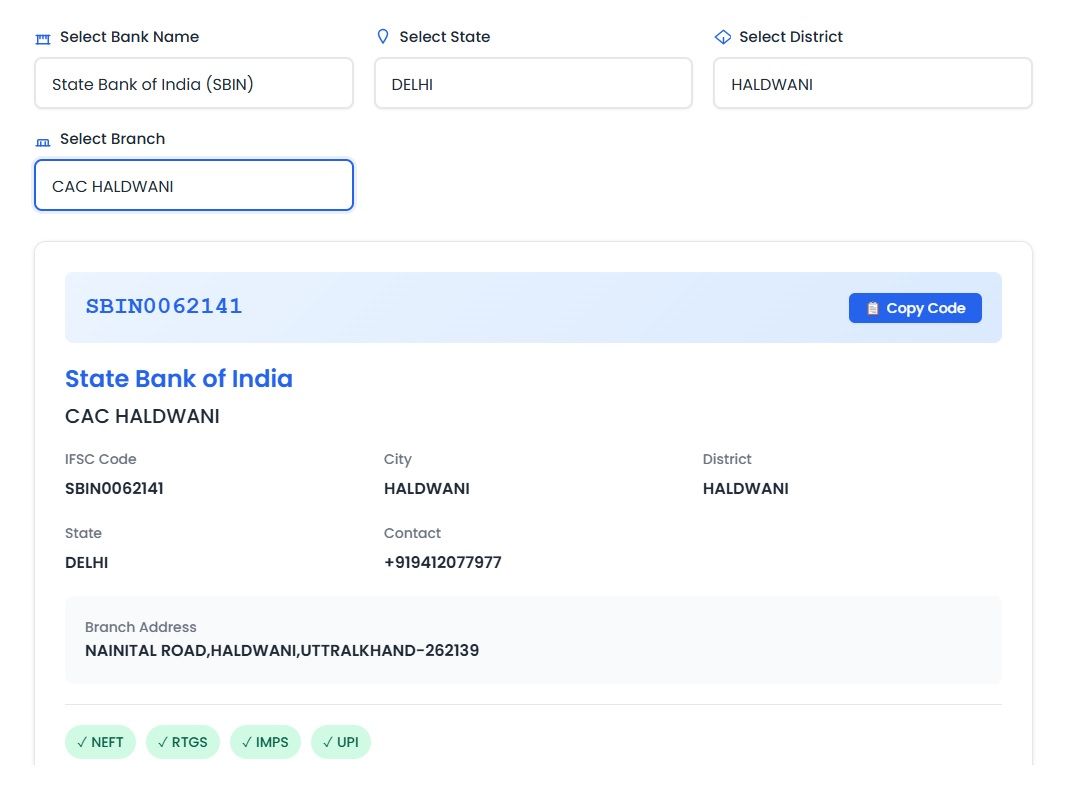
- Dual Search Methods: Search by IFSC code directly OR browse by Bank → State → District → Branch
- Complete Bank Details: Returns IFSC, MICR codes, branch address, contact numbers, and supported services (NEFT, RTGS, IMPS, UPI)
- Powerful Admin Dashboard: Full backend control panel for managing data and customization
- Lightning Fast: AJAX-powered searches with intelligent caching for optimal performance
- Fully Customizable: Color schemes, hero sections, and custom CSS support
- Mobile Responsive: Perfect display on all devices - desktop, tablet, and mobile
- SEO Friendly: Clean, semantic code optimized for search engines
💼 Perfect For:
- Financial services websites
- Banking portals and fintech apps
- Business tools and calculators
- Utility websites
- Government and educational institutions
- E-commerce platforms requiring bank verification
🎯 Live Demo
See the plugin in action: https://toolsriver.com/instant-bank-ifsc-code-finder/
🚀 Key Benefits
- Time Saver: Users get instant results instead of calling banks or visiting branches
- Error Prevention: Accurate data reduces payment failures and transaction errors
- User Engagement: Essential tool that keeps users on your website longer
- Professional Appearance: Modern, clean UI enhances your website's credibility
- Easy Integration: Simple shortcode implementation on any page
- Regular Updates: Bank database can be easily updated through admin panel
🔒 Security & Quality
- Clean, well-documented code following WordPress standards
- Secure AJAX endpoints with nonce verification
- No external API dependencies - all data stored locally
- Optimized database queries for fast performance
- Compatible with all major WordPress themes
- Regular security updates and bug fixes
Features
🎨 Frontend Features
- Dual Search Modes:
- Direct IFSC code search with instant verification
- Hierarchical navigation: Bank → State → District → Branch
- Comprehensive Results Display:
- IFSC Code
- Bank Name
- Branch Name
- Complete Address with PIN code
- Contact Phone Number
- MICR Code
- Supported Services (NEFT, RTGS, IMPS, UPI)
- Modern User Interface:
- Clean, intuitive design
- Smooth animations and transitions
- Loading indicators for better UX
- Error handling with friendly messages
- Fully Responsive: Adapts perfectly to all screen sizes
- Lightning Fast Search: AJAX-powered with intelligent caching
- Copy-to-Clipboard: One-click copying of IFSC codes
⚙️ Backend Admin Dashboard
- Dashboard Overview:
- Statistics display (total banks, branches, cache status)
- Quick action buttons
- System information
- Recent activity logs
- Database Management:
- Upload new bank JSON files (drag & drop support)
- Delete existing bank data
- View bank statistics
- Search and filter banks
- Automatic file format validation
- Theme Customization:
- Primary and secondary color pickers
- Pre-defined color preset templates
- Hero section title and subtitle editor
- Live preview of changes
- Custom CSS editor for advanced styling
- Settings Management:
- Export settings as JSON
- Import settings from backup
- Reset to default settings
- Cache management and clearing
- Performance optimization options
🔧 Technical Features
- Performance Optimized:
- WordPress transients API for intelligent caching
- 24-hour cache duration (configurable)
- Lazy loading of bank data
- Minified CSS and JavaScript
- Developer Friendly:
- Clean, well-documented code
- Follows WordPress coding standards
- Object-oriented architecture
- Extensive inline comments
- Easy to customize and extend
- Security First:
- Nonce verification on all AJAX calls
- Capability checks for admin functions
- Sanitized inputs and escaped outputs
- No external dependencies or API calls
- Database Structure:
- JSON-based data storage for easy updates
- Organized by bank codes (SBIN, HDFC, ICIC, etc.)
- Includes 150,000+ branch records
- Complete information for each branch
📱 User Experience Features
- Auto-complete suggestions while typing
- Smart validation and error messages
- Loading states and progress indicators
- Keyboard navigation support
- Accessibility compliant (WCAG standards)
- Multi-language ready (translation-ready)
Requirements
⚙️ Server Requirements
- WordPress: Version 5.0 or higher (tested up to 6.4+)
- PHP: Version 7.0 or higher (7.4+ recommended)
- MySQL: Version 5.6 or higher
- Disk Space: Minimum 15 MB (for plugin files and database)
- Memory: 64 MB PHP memory limit (128 MB recommended)
🔌 WordPress Compatibility
- Compatible with all major WordPress themes
- Works with page builders: Elementor, WPBakery, Gutenberg, Divi, etc.
- No conflicts with other plugins
- Multisite compatible
- Translation ready (POT file included)
🌐 Browser Support
- Chrome (latest)
- Firefox (latest)
- Safari (latest)
- Edge (latest)
- Opera (latest)
- Mobile browsers (iOS Safari, Chrome Mobile)
📦 What's Included
- Complete plugin files (ready to upload)
- Comprehensive README documentation
- Installation guide
- Bank data JSON files (150K+ branches)
- Frontend template files
- Admin panel files
- CSS and JavaScript assets
- Code comments and documentation
🎯 Technical Skills Required
- Installation: Basic WordPress knowledge (uploading plugins)
- Setup: No coding required - just activate and add shortcode
- Customization: Optional CSS/HTML knowledge for advanced styling
- Maintenance: No technical skills needed for day-to-day use
Instructions
📋 Installation & Setup Instructions
Step 1: Installation
Method A: Via WordPress Admin (Recommended)
- Log in to your WordPress admin dashboard
- Navigate to Plugins → Add New
- Click Upload Plugin button at the top
- Choose the
bank-ifsc-finder.zipfile - Click Install Now
- After installation, click Activate Plugin
Method B: Via FTP
- Extract the
bank-ifsc-finder.zipfile - Upload the
bank-ifsc-finderfolder to/wp-content/plugins/directory - Go to WordPress admin → Plugins
- Find "Bank IFSC Finder" and click Activate
Step 2: Initial Configuration
- After activation, you'll see "IFSC Finder" menu in the WordPress admin sidebar
- Click on IFSC Finder → Dashboard to access the admin panel
- The plugin comes pre-loaded with bank data, so it's ready to use immediately
- Review the dashboard statistics to confirm data is loaded correctly
Step 3: Adding to Your Website
Using Shortcode (Easiest Method)
- Create a new page or edit an existing page
- Add the following shortcode where you want the tool to appear:
[bank_ifsc_finder]- Publish or update the page
- Visit the page to see the Bank IFSC Finder in action
Using Page Builders
- Gutenberg: Add a "Shortcode" block and paste
[bank_ifsc_finder] - Elementor: Use the "Shortcode" widget and insert the code
- WPBakery: Add a "Raw HTML" element with the shortcode
- Divi: Use the "Code" module and add the shortcode
Step 4: Customization (Optional)
Theme Customization
- Go to IFSC Finder → Settings
- Choose your primary color (for buttons, hero gradient)
- Choose your secondary color (for success messages)
- Or select from pre-defined color presets
- Edit hero section title and subtitle to match your branding
- Click Save Settings
- Preview changes on your frontend page
Advanced Styling
- In Settings, scroll to Custom CSS section
- Add your custom CSS rules to further customize appearance
- Example: Change font sizes, spacing, border radius, etc.
- Save and check your website
Step 5: Database Management
Uploading Additional Bank Data
- Go to IFSC Finder → Database
- Click Select File or drag & drop a JSON file
- File must be named as
{BANK_CODE}.json(e.g.,SBIN.json) - System validates and uploads the file automatically
- View uploaded banks in the database table
JSON File Format
<code>{
  "SBIN0001234": {
    "BANK": "State Bank of India",
    "IFSC": "SBIN0001234",
    "BRANCH": "Mumbai Main Branch",
    "CENTRE": "MUMBAI",
    "DISTRICT": "MUMBAI",
    "STATE": "MAHARASHTRA",
    "ADDRESS": "Main Street, Mumbai 400001",
    "CONTACT": "022-12345678",
    "MICR": "400002001",
    "CITY": "MUMBAI",
    "RTGS": true,
    "NEFT": true,
    "IMPS": true,
    "UPI": true
  }
}
</code>
Step 6: Performance Optimization
- The plugin uses WordPress transients for caching (enabled by default)
- Cache duration: 24 hours
- To manually clear cache: Go to Dashboard and click Clear Cache
- Cache automatically clears when uploading new bank data
🔍 Testing Your Installation
- Visit the page where you added the shortcode
- Test IFSC Code Search: Enter a known IFSC code (e.g., SBIN0001234)
- Test Browse by Bank: Select a bank from dropdown, then state, district, and branch
- Verify that results display correctly with all details
- Test on mobile device to ensure responsive design works
💡 Pro Tips
- SEO Optimization: Create a dedicated page like "/ifsc-code-finder/" for better search rankings
- User Engagement: Add the tool to your website's top navigation menu
- Performance: Enable WordPress caching plugin for faster load times
- Branding: Customize colors to match your website theme
- Mobile First: Test on various mobile devices as many users will access on phones
🆘 Troubleshooting
Issue: Plugin menu doesn't appear
- Solution: Make sure plugin is activated. Check Plugins page.
Issue: Shortcode displays as text
- Solution: Ensure you're using the correct shortcode:
[bank_ifsc_finder](not[[bank_ifsc_finder]])
Issue: Search not working
- Solution: Check browser console for JavaScript errors. Clear cache. Ensure jQuery is loaded.
Issue: No results found
- Solution: Verify bank data files are uploaded correctly. Go to Database page to check.
Issue: Styling looks broken
- Solution: Clear WordPress cache and browser cache. Check for CSS conflicts with theme.
📧 Support
For technical support, feature requests, or bug reports:
- Contact via Codester messaging system Visit: https://toolsriver.com
- Include WordPress version, PHP version, and error details for faster resolution
Other items by this author


Information
| Category | Plugins / WordPress / Miscellaneous |
| First release | 1 December 2025 |
| Last update | 2 December 2025 |
| Supported CMS | WordPress 4.4, WordPress 4.3, WordPress 4.2, WordPress 4.0, WordPress 4.5, WordPress 4.6, WordPress 4.7, WordPress 4.8, WordPress 4.9, WordPress 5.0, WordPress 5.8, WordPress 5.9, WordPress 6.0, WordPress 6.1, WordPress 6.2, WordPress 6.3, WordPress 6.4, WordPress 6.5, WordPress 6.6, WordPress 6.7 |
| Files included | .php, .css, Javascript .js |
| Tags | banking, ifsc code finder, bank details, bank ifsc code finder, bank ifsc code, bank ifsc, bank details finder, bank micr code finder |