Success Point Library Management SystemSuccess Point Library Management System
An automated library management software featuring member registration, automated invoice generation, and email services. Recently Updated
Success Point Library Management System
An automated library management software featuring member registration, automated invoice generat...
Screenshots


Overview
Success Point Library Management System is a professional, automated solution designed to streamline library operations. It simplifies member registration, book tracking, and invoice generation, significantly reducing manual administrative tasks. Built for performance and reliability, this system ensures a seamless experience for both librarians and members.
Key Features:
- Automated Member Registration & Tracking
- Dynamic PDF Invoice Generation
- Automated Email Notification System
- Responsive Dashboard for Inventory Management
- Secure Database Structure
- User-friendly interface for record management
## 1. Main Roles
The software has two roles:
1. Student
2. Admin
Students can register, log in after approval, and view their own membership status.
Admins manage students, applications, fees, dues, renewals, and exports.
## 2. Public Flow
The public home page shows the library landing page and links to student registration, student login, and admin login.
### Student Registration
When a new student fills the registration form, the system checks whether the mobile number already exists.
If the mobile number is new, the application is saved with these default values:
- application status = PENDING
- fee status = PENDING
- joining date = null
- original joining date = null
- last renewal date = null
- renewal count = 0
- total fees collected = 0
- due date = null
- password = SP@123
The student cannot log in yet. The record waits for admin review.
### Student Login
A student can log in only after the account is approved.
Login uses:
- mobile number
- password
If the student is not approved, login is blocked and the system shows the approval message.
### Admin Login
Admin login uses:
- mobile number
- password
After login, the admin gets access to the admin panel.
## 3. What Student Can Do
The student side is limited to viewing personal membership information.
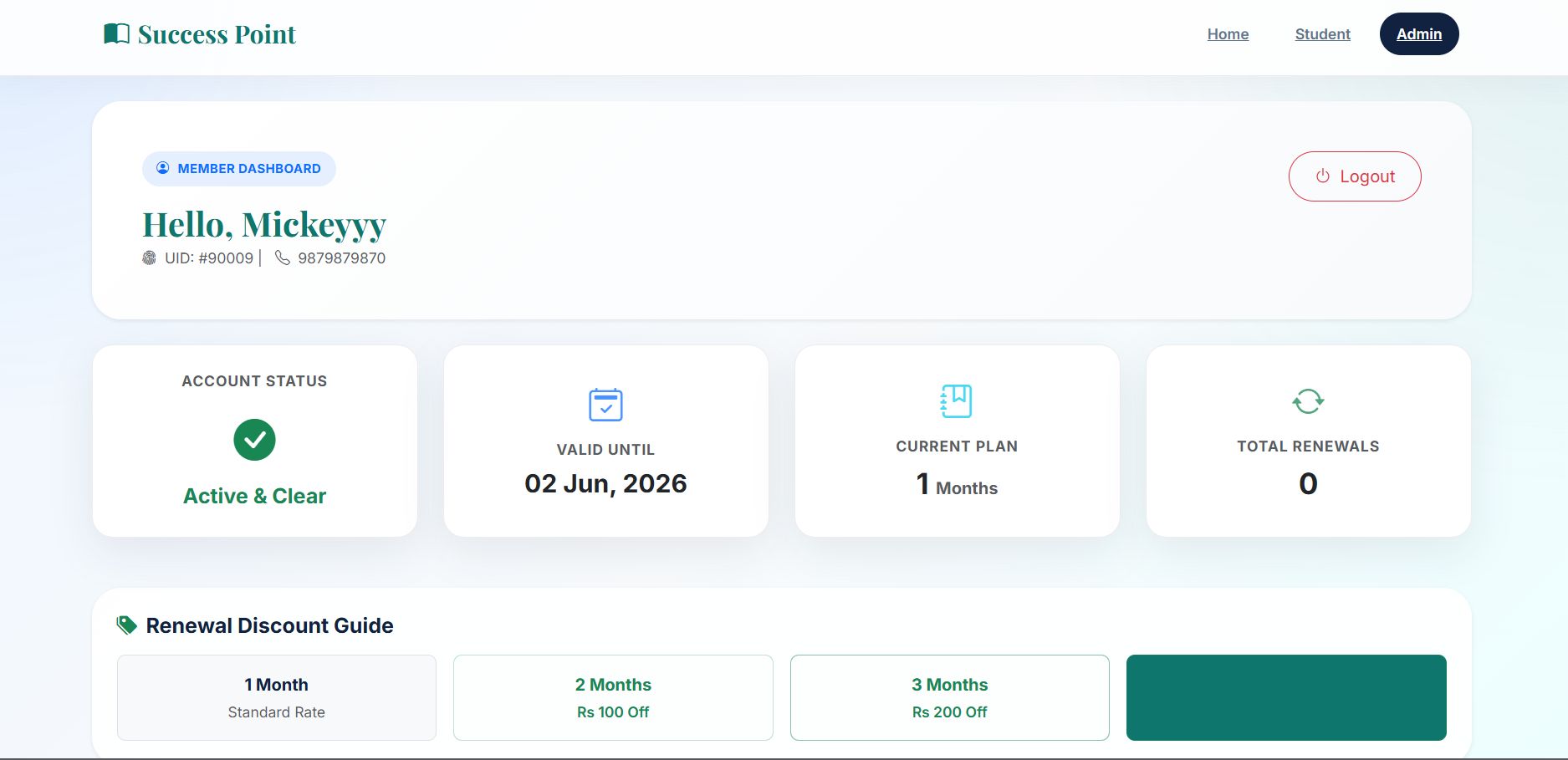
### Student Dashboard Shows
- student name
- fee status
- last renewal date
- valid till / due date
- original joining date
- current plan in months
- renewal count
- membership status message
### Student Status Messages
The dashboard changes the message based on the data:
- If fee status is clear and the due date is not expired, the membership is shown as active.
- If fee status is pending, the student is told to clear fees with admin.
- If the due date has passed, the dashboard shows the membership as due.
### Student Actions
The student can:
- submit a registration request
- log in after approval
- view membership details
- log out
The student cannot approve themselves, renew themselves, edit their own record, or delete anything.
## 4. What Admin Can Do
The admin panel is the main control area of the software.
### Admin Dashboard
The dashboard shows:
- all approved students
- number of pending applications
- number of students with pending fees
It also provides quick access to add student, dues, applications, pending fees, total amount, and export.
### Add Student Manually
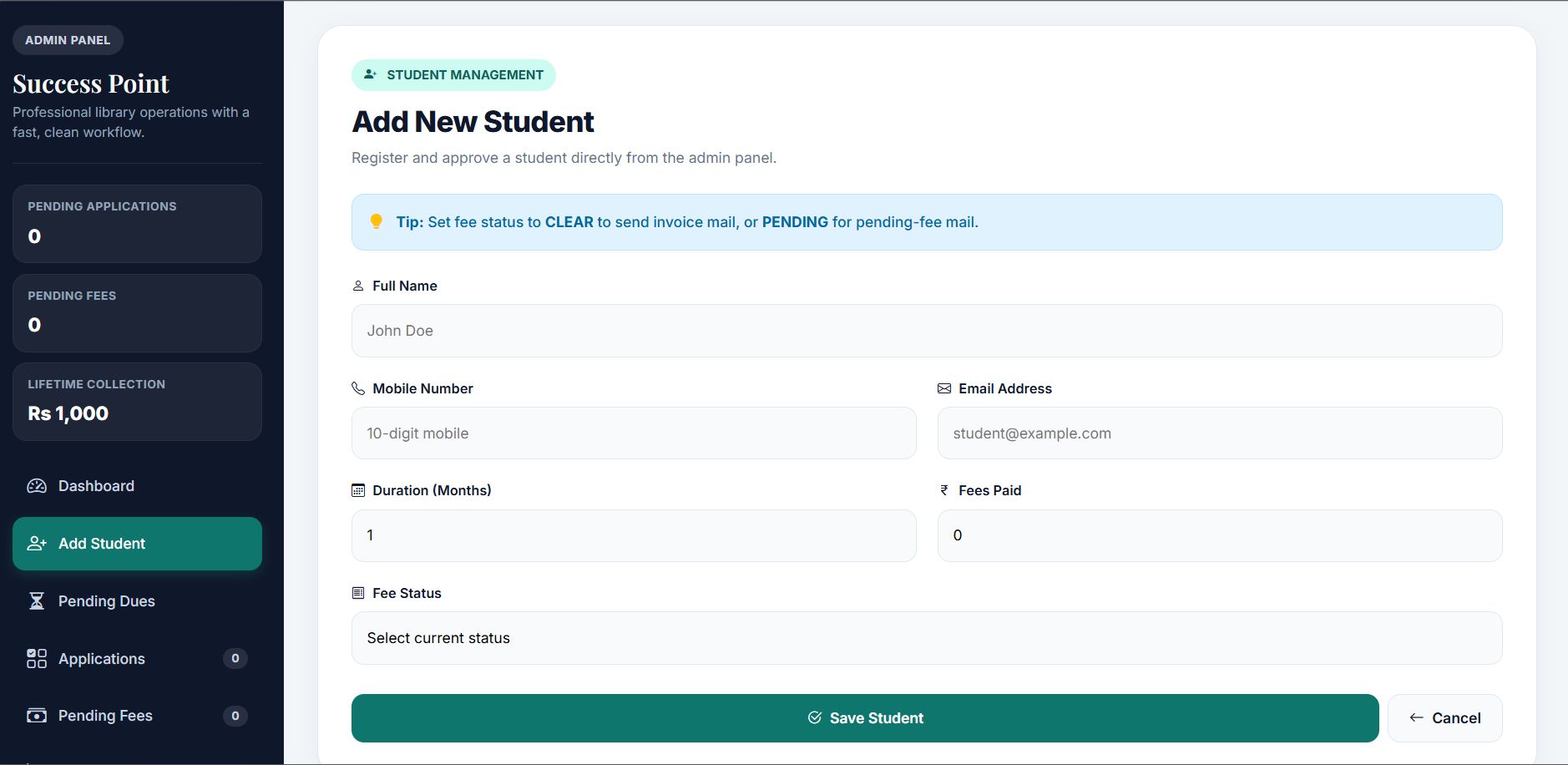
The admin can add a student directly from the panel.
When the admin saves a student manually:
- joining date is set to today
- original joining date is set to today
- due date is calculated from today + selected plan months
- application status becomes APPROVED
- password is set to SP@123
- renewal count starts at 0
- total fees collected is set based on fee status
If the admin marks the fee as clear, the student is treated as paid and an invoice email is sent.
If the admin marks the fee as pending, the student is added but shown in pending fees and a pending-fee email is sent.
### Edit Student
The admin can edit the student name, mobile number, email, fee period, and fee amount.
When student details change:
- the record is updated immediately
- if the student is active, due date is recalculated from the current joining date and the current plan
- if fee status is pending, total fees collected is reset to 0
- if fee status is clear, total fees collected is kept at least equal to the paid amount
If fees or plan data changes, the system sends the proper email again:
Features
Features:
- Automated Member Registration & Tracking
- Dynamic PDF Invoice Generation
- Automated Email Notification System
- Responsive Dashboard for Inventory Management
- Secure Database Structure
- User-friendly interface for record management
Requirements
PHP ^7.3 or ^8.0
- Composer
- MySQL (or compatible) database
- Node.js + npm (optional, for frontend assets / `npm run dev`)
- Mail provider credentials (SMTP or Brevo API)


| Category | Scripts & Code / PHP Scripts / Management / Library |
| First release | 21 May 2026 |
| Last update | 21 May 2026 |
| Files included | .php, .css, .html, .xml, Javascript .js |
| Tags | MySQL, dashboard, Database, inventory, web app, student management, library management, phpscript, automated invoicing, library software, spring boot, automated system. |