Kaddora AI Spam Firewall for WordPressKaddora AI Spam Firewall for WordPress
AI-powered anti-spam, bot protection, login security, firewall, malware defense, and WordPress threat prevention. Recently Updated
Screenshots


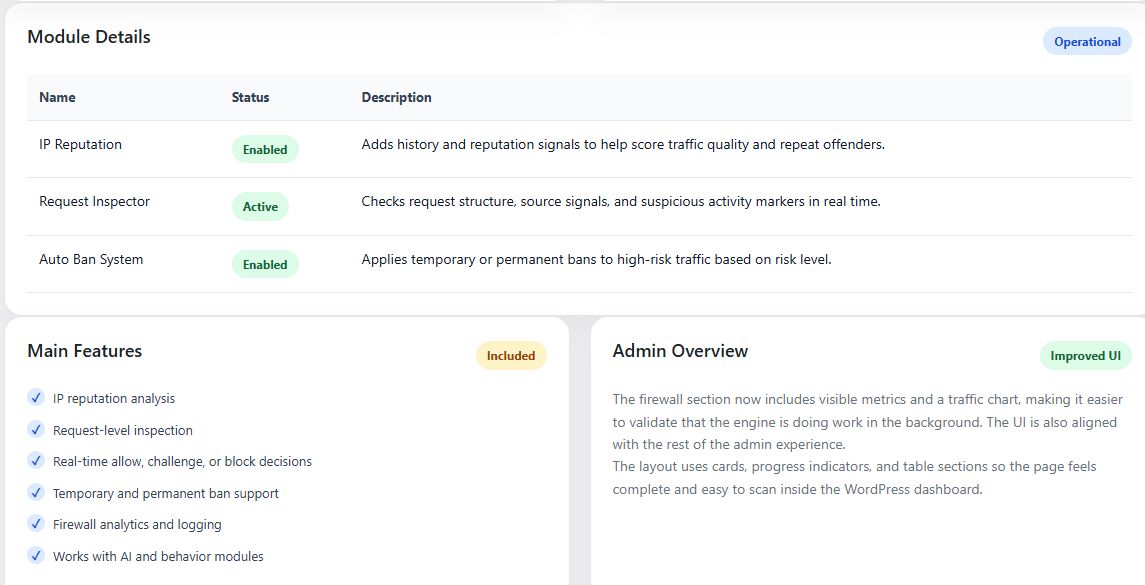


Overview
Kaddora AI Spam Firewall for WordPress
Kaddora AI Spam Firewall for WordPress is an advanced AI-powered security and anti-spam plugin designed to protect WordPress websites from spam attacks, malicious bots, brute force login attempts, fake registrations, suspicious traffic, malware threats, and automated abuse.
The plugin combines intelligent firewall technology, machine learning-based spam detection, login security tools, bot mitigation systems, IP reputation analysis, and real-time threat monitoring to provide comprehensive website protection. AI and machine-learning approaches are increasingly used in cybersecurity and spam detection because they can identify evolving attack patterns and automate threat prevention.
Whether you manage a blog, WooCommerce store, membership website, business portal, LMS platform, or agency website, Kaddora AI Spam Firewall helps secure your site while reducing spam and unauthorized access.
Benefits
- Prevent spam comments
- Block malicious bots
- Protect login pages
- Stop brute force attacks
- Reduce fake registrations
- Improve website security
- Monitor suspicious activity
- Protect WooCommerce stores
- Improve website reliability
Security Coverage
- Spam Protection
- Login Security
- Bot Detection
- Firewall Rules
- Malware Monitoring
- User Activity Tracking
- Registration Protection
- WooCommerce Security
- API Protection
- Real-Time Threat Detection
The plugin provides a complete security layer for modern WordPress websites.
Features
AI Spam Detection
Automatically detect and block spam activity using intelligent filtering systems.
Detects
- Spam Comments
- Contact Form Spam
- Fake Registrations
- Automated Spam Bots
- Suspicious Requests
Machine-learning systems are widely used in modern spam detection because they can adapt to new spam patterns and improve detection accuracy over time.
Advanced Firewall Protection
Protect WordPress from malicious traffic.
Features
- Request Filtering
- IP Blocking
- Country Blocking ###li/li###
- Suspicious Activity Monitoring
Login Security Protection
Secure WordPress login pages.
Features
- Brute Force Protection
- Login Attempt Limits
- Login Lockouts
- Login Monitoring
- Suspicious Login Detection
Bot Protection System
Detect and block malicious bots automatically.
Blocks
- Spam Bots
- Crawling Abuse
- Fake Traffic
- Automated Attacks
- Registration Bots
Real-Time Threat Monitoring
Monitor security events in real time.
Track
- Login Attempts
- Spam Activity
- Firewall Events
- Security Alerts
- Blocked Requests
Malware Threat Monitoring
Identify suspicious website activity.
Features
- ###li/li###
- Security Monitoring
- Suspicious File Alerts
- Activity Tracking
- Security Reports
Comment Spam Protection
Automatically filter WordPress comment spam.
Features
- AI Spam Analysis
- Spam Scoring
- Auto Blocking
- Manual Review System
Registration Security
Protect user registration systems.
Features
- Fake User Detection
- Registration Filtering
- Spam Prevention
- Account Verification
WooCommerce Security
Special WooCommerce protection tools.
Features
- Customer Account Protection
- Checkout Security
- Fraud Prevention
- Login Monitoring
Contact Form Protection
Works with popular form plugins.
Compatible With
- Contact Form 7
- WPForms
- Fluent Forms
- Gravity Forms
- Ninja Forms
IP Reputation System
Analyze visitor trust levels.
Features
- Blacklist Support
- Reputation Scoring ###li/li###
- Risk Detection
Security Analytics Dashboard
Monitor website protection.
Reports Include
- Blocked Threats
- Spam Attempts
- Login Activity
- Firewall Events
- Security Trends
API Protection
Secure REST API requests.
Features
- Request Validation
- Abuse Detection
- API Monitoring
- Endpoint Protection
Activity Logs
Track important website actions.
Log Types
- Login Logs
- Security Events
- Spam Attempts
- Firewall Actions
Email Security Alerts
Receive notifications for:
- Security Threats
- Login Attacks
- Firewall Events
- Spam Surges
Security Rules Engine
Create custom security rules.
Control
- IP Rules
- Country Rules
- User Rules
- Request Rules
AI Threat Intelligence
Intelligent analysis for evolving attack patterns.
Machine-learning cybersecurity systems are increasingly used to identify malicious activity, anomaly behavior, intrusion attempts, and advanced threats more effectively than static security systems.
Security Features
- Nonce Verification
- Capability Checks
- Sanitized Inputs
- Escaped Outputs
- Secure Database Queries
- Protected Admin Actions
Future Roadmap
Planned upgrades:
- AI Malware Scanner
- AI Threat Prediction
- Cloud Firewall
- Advanced Device Fingerprinting
- Zero-Day Threat Monitoring
- Security Risk Scoring
- AI Security Assistant
Requirements
Requirements
Minimum Requirements
- WordPress 6.0+
- PHP 7.4+
- MySQL 5.7+
- HTTPS Enabled
- REST API Enabled
Recommended Requirements
- WordPress Latest Version
- PHP 8.1+
- 256 MB Memory Limit
- WP Cron Enabled
- SSL Certificate Enabled
Optional AI Features
May require:
- OpenAI API
- Google Gemini API
Instructions
Installation
- Upload the plugin ZIP file.
- Activate the plugin.
- Navigate to:
WordPress Admin → Kaddora AI Spam Firewall
- Complete setup wizard.
- Configure protection settings.
- Save configuration.
Enable Spam Protection
- Open Spam Protection Settings.
- Enable AI Spam Detection.
- Configure filtering level.
- Save settings.
Configure Login Security
- Open Login Security.
- Set login attempt limits.
- Configure lockout duration.
- Enable login monitoring.
Enable Firewall Protection
- Open Firewall Settings.
- Enable firewall.
- Configure security rules.
- Save settings.
Configure Bot Protection
- Open Bot Protection.
- Enable bot filtering.
- Select protection level.
- Save configuration.
View Security Reports
Open Security Dashboard to monitor:
- ###li/li###
- Spam Attempts
- Login Activity
- Firewall Logs
- Security Events
Enable Email Alerts
- Open Notifications.
- Configure admin email.
- Enable security alerts.
- Save settings.
Troubleshooting
Firewall Not Blocking Threats
- Verify firewall enabled.
- Review security rules.
- Clear cache.
Login Lockouts Not Working
- Verify login protection enabled.
- Check security settings.
- Review plugin conflicts.
Spam Still Appearing
- Increase security level.
- Enable AI detection.
- Review spam logs.
Reports Not Updating
- Verify WP Cron.
- Refresh dashboard.
- Check logging settings.
Support
Visit the Kaddora support portal for documentation, updates, tutorials, and technical support.
Instructions
Installation
Method 1: Install via WordPress Dashboard
- Download the plugin ZIP file.
- Login to your WordPress Admin Panel.
- Navigate to:
Plugins → Add New → Upload Plugin
- Click Choose File.
- Select the plugin ZIP file.
- Click Install Now.
- Activate the plugin.
Method 2: Manual Installation
- Extract the plugin ZIP package.
- Upload the plugin folder to:
/wp-content/plugins/
- Login to WordPress Admin.
- Navigate to:
Plugins → Installed Plugins
- Activate Kaddora AI Spam Firewall for WordPress.
Initial Setup
After activation:
- Navigate to:
WordPress Admin → Kaddora AI Spam Firewall
- Run the setup wizard.
- Select protection level.
- Configure security options.
- Save settings.
Configure AI Protection
The plugin supports AI-powered threat detection.
Setup AI Engine
- Open:
Settings → AI Security
- Select AI Provider.
- Enter API Key.
- Save settings.
- Run connection test.
Supported Providers:
- OpenAI
- Google Gemini
Enable Spam Protection
Protect Comments
- Open:
Spam Protection
- Enable:
- Comment Spam Protection
- AI Spam Detection
- Auto Spam Blocking
- Save settings.
The plugin will automatically analyze and block suspicious comments.
Enable Login Security
Brute Force Protection
- Open:
Login Security
- Enable:
- Login Attempt Limits
- Login Lockouts
- Suspicious Login Detection
- Configure:
Maximum Login Attempts: 5
Lockout Duration: 30 Minutes
- Save settings.
Enable Bot Protection
Protect Website From Automated Bots
- Open:
Bot Protection
- Enable:
- Bad Bot Detection
- Automated Request Blocking
- Spam Bot Filtering
- Save configuration.
The plugin will automatically identify and block malicious bots.
Enable Firewall Protection
Activate Website Firewall
- Open:
Firewall Settings
- Enable Firewall.
- Configure:
- IP Filtering
- Request Filtering ###li/li###
- Security Rules
- Save settings.
Registration Protection
Prevent Fake User Registrations
- Open:
Registration Security
- Enable:
- Registration Monitoring
- Spam User Detection
- Account Verification
- Save settings.
The plugin will automatically analyze registration activity.
WooCommerce Security
Protect Customer Accounts
- Open:
WooCommerce Security
- Enable:
- Customer Login Protection
- Checkout Security
- Fraud Monitoring
- Save settings.
Contact Form Protection
Supported Forms:
- Contact Form 7
- WPForms
- Fluent Forms
- Gravity Forms
- Ninja Forms
Setup
- Open:
Form Protection
- Select installed forms.
- Enable protection.
- Save settings.
The plugin will automatically filter spam submissions.
Security Monitoring
View Security Dashboard
Navigate to:
Kaddora AI Spam Firewall → Dashboard
Monitor:
- Blocked Threats
- Spam Attempts
- Login Attacks
- Bot Activity
- Firewall Events
Security Reports
Generate Reports
- Open:
Security Reports
- Select date range.
- Click Generate Report.
Reports include:
- Spam Statistics ###li/li###
- Firewall Activity
- Login Security Events
- User Security Logs
IP Blocking
Block Suspicious IP Addresses
- Open:
IP Manager
- Add IP address.
- Select:
- Temporary Block
- Permanent Block
- Save settings.
Country Blocking
Restrict Access By Country
- Open:
Geo Protection
- Select countries to block.
- Save settings.
Email Security Alerts
Receive Threat Notifications
- Open:
Notifications
- Enter admin email.
- Enable alerts.
Receive notifications for:
- Brute Force Attacks
- Spam Surges
- Firewall Events
- Security Risks
Activity Logs
Review Security Logs
Navigate to:
Security Logs
View:
- Login Attempts
- Spam Events
- Firewall Actions
- Bot Detection Events
- User Activity
Malware Monitoring
Monitor Suspicious Activity
- Open:
Malware Monitoring
- Enable monitoring.
- Configure alert settings.
- Save configuration.
Recommended Security Configuration
Small Websites
- Medium Protection Level
- Login Security Enabled
- Spam Protection Enabled
Business Websites
- High Protection Level
- Firewall Enabled
- Security Alerts Enabled
WooCommerce Stores
- Maximum Protection Level
- Fraud Monitoring Enabled
- Checkout Security Enabled
Troubleshooting
Spam Comments Still Appearing
- Increase spam detection level.
- Enable AI analysis.
- Verify protection settings.
Login Lockouts Not Working
- Check login protection settings.
- Verify plugin permissions.
- Clear cache.
Firewall Not Blocking Requests
- Confirm firewall is enabled.
- Review security rules.
- Check server configuration.
Bot Traffic Still Detected
- Increase bot protection level.
- Enable advanced filtering.
- Review blocked IP list.
Reports Not Updating
- Verify WP-Cron is active.
- Clear website cache.
- Refresh reports.
Best Practices
For maximum protection:
- Enable all security modules.
- Review logs regularly.
- Keep WordPress updated.
- Use strong passwords.
- Enable login protection.
- Monitor security reports weekly.
- Configure email alerts.
Support
For documentation, updates, tutorials, feature requests, and technical assistance, visit the official Kaddora support portal.
Other items by this author


| Category | Plugins / WordPress / Security |
| First release | 29 May 2026 |
| Last update | 1 June 2026 |
| Tags | anti spam, website security, firewall, wordpress security, login security, bot protection, brute force protection, malware protection, login protection, security plugin, wordpress firewall, spam protection, ai security, spam firewall, threat detection. |