SEO Sitemap Robots StudioSEO Sitemap Robots Studio
Generate robots.txt, sitemap.xml and sitemap.html with a no-database PHP tool, URL scanner and ZIP export. Recently Updated
SEO Sitemap Robots Studio
Generate robots.txt, sitemap.xml and sitemap.html with a no-database PHP tool, URL scanner and ZI...
Screenshots


Overview
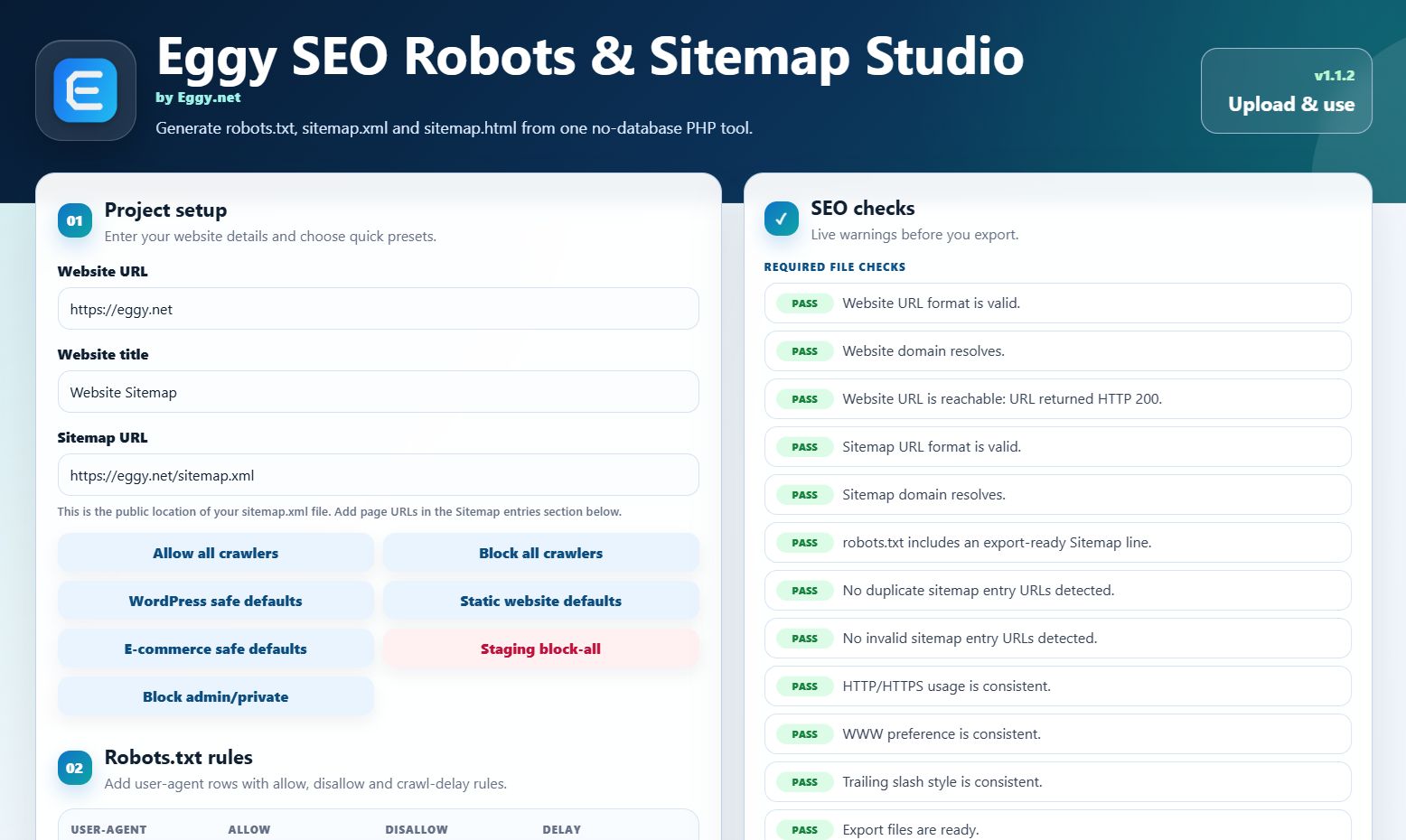
Eggy SEO Robots & Sitemap Studio is a no-database PHP, JavaScript, HTML and CSS tool for creating robots.txt, sitemap.xml and sitemap.html output from a browser-based interface.
The product is designed for normal PHP hosting. It does not require MySQL, MariaDB, SQLite, PDO, an installer, an admin login, Composer, npm or external APIs.
This is a manual SEO file generator with an optional same-domain URL scanner. It is not an unlimited website crawler, SEO ranking tool, keyword research tool, backlink checker or search engine submission service.
What the Script Creates
If a bug is found, please report it through the marketplace support/message system with the steps to reproduce it. Verified issues will be reviewed and addressed with an update or hotfix where appropriate.
- robots.txt output
- sitemap.xml output
- sitemap.html output
- Export ZIP containing generated files
Main Features
- No database required
- No installer required
- Built with PHP, JavaScript, HTML and CSS
- Upload-and-use index.php interface
- robots.txt generator
- sitemap.xml generator
- sitemap.html generator
- Same-domain internal URL scanner
- Compact sitemap entries list
- Live preview panels
- Basic SEO file checks
- Copy-to-clipboard buttons
- Individual download buttons
- Export ZIP download
- Responsive desktop and mobile layout
- Editable config/config.php settings file
- Documentation included
Robots.txt Generator
The robots.txt section allows users to create robots.txt output using form fields and preset buttons.
Included robots.txt options:
- Website URL input
- Sitemap URL input
- User-agent rule input
- Allow rule input
- Disallow rule input
- Crawl-delay input
- Add/remove robots.txt rule rows
Included robots.txt preset buttons:
- Allow all crawlers
- Block all crawlers
- WordPress-style robots.txt preset
- Static website robots.txt preset
- E-commerce-style robots.txt preset
- Staging site block-all preset
- Admin/private folders preset
AI and Crawler Rule Options
The script includes optional robots.txt rule options for selected AI and crawler user-agents.
Included bot rule options:
- GPTBot
- ChatGPT-User
- ClaudeBot
- PerplexityBot
- Google-Extended
- CCBot
- Bytespider
These options generate robots.txt rules only. The script does not connect to AI services and does not use an AI API.
XML Sitemap Generator
The sitemap.xml section lets users create XML sitemap output from entered URLs.
Included sitemap options:
- Manual sitemap URL entry
- Bulk sitemap URL textarea
- Optional page title field
- Priority field
- Change frequency field
- Last modified date field
The sitemap.xml output is generated from URLs entered manually, pasted in bulk or added through the optional same-domain scanner.
HTML Sitemap Generator
The script can also generate a basic human-readable sitemap.html page from the sitemap entries.
The HTML sitemap uses the entered URLs and optional page titles to create a simple link list.
Same-Domain URL Scanner
The included scanner can fetch a starting URL, detect internal links from that page and add discovered same-domain URLs to the sitemap entries list.
Scanner options include:
- Starting URL
- Maximum pages to scan
- Maximum crawl depth
Scanner behaviour:
- Scans same-domain URLs only
- Skips external domains
- Skips duplicate URLs
- Skips mailto, tel, javascript and anchor-only links
- Normalizes supported internal links
- Adds selected scanned URLs into the existing sitemap entries list
Important scanner notes:
- ###li/li###
- It does not guarantee that every website URL will be found.
- It does not crawl password-protected areas.
- It does not use external APIs.
- It does not run as a background crawler.
- Manual URL entry and bulk URL entry are still available.
Compact Sitemap Entries
Sitemap entries are shown in a compact list so larger URL sets remain easier to manage.
The compact entry list includes:
- URL
- Title
- Priority
- Frequency
- Last modified date
- Edit option
- Delete option
- Bulk entry controls
Individual entries can still be edited when needed.
Basic SEO File Checks
The checks panel helps identify common input issues before exporting files.
Included checks may include:
- Website URL format
- Sitemap URL format
- Sitemap entry URLs
- Export readiness
- Domain/DNS or reachability warnings where supported by the server
These are basic file and URL checks. The script does not perform a full SEO audit.
Export Options
The full customer version allows users to copy or download:
- robots.txt
- sitemap.xml
- sitemap.html ###/ulul###
- robots.txt
- sitemap.xml
- sitemap.html
- README_export.txt
The export readme explains the generated files.
Included Files
- index.php
- config/config.php
- includes/
- assets/css/style.css
- assets/js/app.js
- assets/img/
- documentation/index.html
- README.txt
- license/license.txt
Requirements
- PHP hosting
- PHP 8.1 or newer recommended
- Standard PHP sessions enabled
- JavaScript-enabled modern browser
- No database required
Not Included
- No MySQL, MariaDB, SQLite or PDO requirement
- No installer
- No admin dashboard
- No user accounts
- No Composer setup
- No npm setup
- No external API connection
- No automatic search engine submission
- No Google Search Console integration
- No keyword research tool
- No backlink checker
- No ranking checker
- No unlimited crawler
This product is intended for users who want a no-database PHP tool for generating robots.txt, sitemap.xml and sitemap.html files, with optional same-domain URL scanning to help add internal page URLs.
Features
- No database required
- No installer required
- Built with PHP, JavaScript, HTML and CSS
- Upload-and-use index.php interface
- Editable config/config.php settings file
- robots.txt generator
- sitemap.xml generator
- sitemap.html generator
- Same-domain internal URL scanner
- Compact sitemap entries list
- Live robots.txt preview
- Live sitemap.xml preview
- Live sitemap.html preview
- Website URL input
- Website title input
- Sitemap URL input
- User-agent rule input
- Allow rule input
- Disallow rule input
- Crawl-delay input
- Add/remove robots.txt rule rows
- robots.txt preset buttons
- Allow all crawlers preset
- Block all crawlers preset
- WordPress-style robots.txt preset
- Static website robots.txt preset
- E-commerce-style robots.txt preset
- Staging site block-all preset
- Admin/private folders preset
- Optional AI/crawler robots.txt rule section
- GPTBot rule option
- ChatGPT-User rule option
- ClaudeBot rule option
- PerplexityBot rule option
- Google-Extended rule option
- CCBot rule option
- Bytespider rule option
- Manual sitemap URL entry
- Bulk sitemap URL textarea
- Optional sitemap page title field
- Sitemap priority field
- Sitemap change frequency field
- Sitemap last modified date field
- Edit sitemap entry option
- Delete sitemap entry option
- Bulk sitemap entry controls
- Scanner starting URL input
- Scanner maximum pages input
- Scanner maximum crawl depth input
- Scanner same-domain link detection
- Scanner duplicate URL skipping
- Scanner external domain skipping
- Scanner results panel
- Add selected scanned URLs to sitemap entries
- Basic SEO file checks panel
- Website URL format check
- Sitemap URL format check
- Sitemap entry URL checks
- Export readiness check
- Domain/DNS or reachability warnings where supported by the server
- Copy-to-clipboard buttons included
- Download robots.txt button
- Download sitemap.xml button
- Download sitemap.html button
- Export ZIP download
- Export ZIP contains robots.txt, sitemap.xml, sitemap.html and README_export.txt
- Responsive desktop and mobile layout
- Documentation included
- No MySQL required
- No MariaDB required
- No SQLite required
- No PDO required
- No Composer required
- No npm required
- No external API required
Requirements
Note: The scanner and live reachability checks depend on the hosting server allowing outbound requests. If outbound requests are blocked by the host, manual URL entry and bulk URL entry can still be used.
Requirements
- PHP hosting
- PHP 8.1 or newer recommended
- Standard PHP sessions enabled
- JavaScript-enabled modern web browser
- Ability to upload files to your hosting account
- Outbound server requests allowed if using the optional same-domain URL scanner
- DNS/socket functions may be needed for domain/reachability checks where supported by the server
- No database required
- No MySQL required
- No MariaDB required
- No SQLite required
- No PDO required
- No Composer required
- No npm required
- No external API required
Instructions
Installation Instructions
- Download and extract the product ZIP file.
- Upload the extracted product files to your PHP hosting account.
- Upload the files to the folder where you want the tool to run.
If you upload the files directly into your website root, open:
yourdomain.com/index.php
If you upload the files into a folder, open:
yourdomain.com/folder-name/index.php
- No database setup is required.
- No installer needs to be run.
- No admin account needs to be created.
- No Composer commands are required.
- No npm commands are required.
- If needed, edit the basic product settings inside:
config/config.php
Using the Tool
- Open index.php in your browser.
- Enter the website URL.
Example:
https://example.com
- Enter or confirm the sitemap URL.
Example:
https://example.com/sitemap.xml
- Use the robots.txt section to create robots.txt rules.
You can add:
- User-agent rules
- Allow rules
- Disallow rules
- Crawl-delay values
- Use the included robots.txt preset buttons if required.
Included preset options:
- Allow all crawlers
- Block all crawlers
- WordPress-style preset
- Static website preset
- E-commerce-style preset
- Staging site block-all preset
- Admin/private folders preset
- Use the optional AI/crawler rule section if you want to generate robots.txt rules for the listed crawler user-agents.
Included bot rule options:
- GPTBot
- ChatGPT-User
- ClaudeBot
- PerplexityBot
- Google-Extended
- CCBot
- Bytespider
These options generate robots.txt rules only. The script does not connect to AI services or use an AI API.
Creating Sitemap Entries Manually
- Go to the Sitemap entries section.
- Add a page URL manually.
- Optional fields can be filled in if needed:
- Page title
- Priority
- Change frequency
- Last modified date
- Click the add button to add the URL to the sitemap entries list.
- Existing entries appear in the compact sitemap entries list.
- Use the edit option to edit an individual sitemap entry.
- Use the delete option to remove an individual sitemap entry.
- Use the bulk URL textarea if you want to paste multiple URLs at once.
Using the Same-Domain URL Scanner
- Go to the Scan internal URLs section.
- Enter a starting URL.
Example:
https://example.com
- Set the maximum number of pages to scan.
- Set the maximum crawl depth.
- Start the scan.
- Review the scanner results.
- Select the URLs you want to add.
- Click the add selected scanned URLs button to add them to the sitemap entries list.
Scanner Notes
The scanner is optional.
The scanner detects same-domain internal links from fetched HTML pages.
The scanner does not guarantee that every website URL will be found.
The scanner does not scan password-protected areas.
The scanner does not use external APIs.
The scanner depends on the hosting server allowing outbound requests.
If outbound requests are blocked by the hosting server, the scanner may not be able to fetch pages. Manual URL entry and bulk URL entry can still be used.
Reviewing Previews
The tool includes live preview panels for:
- robots.txt
- sitemap.xml
- sitemap.html
Review the previews before downloading or exporting files.
SEO Checks
The checks panel helps identify common file and URL issues before export.
The checks may include:
- Website URL format
- Sitemap URL format
- Sitemap entry URLs
- Export readiness
- Domain/DNS or reachability warnings where supported by the server
These are basic file and URL checks. The script does not perform a full SEO audit.
Downloading Generated Files
The full customer version allows users to download:
- robots.txt
- sitemap.xml
- sitemap.html ###/ulul###
- robots.txt
- sitemap.xml
- sitemap.html
- README_export.txt
Where to Upload Generated Files
After generating the files, upload them to the public location of the website they are for.
Typical root-domain locations:
robots.txt:
yourdomain.com/robots.txt
sitemap.xml:
yourdomain.com/sitemap.xml
sitemap.html:
yourdomain.com/sitemap.html
If the website uses a subfolder or custom hosting setup, upload the generated files to the correct public location for that website.
Requirements
- PHP hosting
- PHP 8.1 or newer recommended
- Standard PHP sessions enabled
- JavaScript-enabled modern web browser
- Ability to upload files to your hosting account
- Outbound server requests allowed if using the optional same-domain URL scanner
- DNS/socket functions may be needed for domain/reachability checks where supported by the server
- No database required
- No MySQL required
- No MariaDB required
- No SQLite required
- No PDO required
- No Composer required
- No npm required
- No external API required
Important Notes
This script is a manual SEO file generator with an optional same-domain internal URL scanner.
It does not automatically guarantee discovery of every URL on a website.
It does not submit sitemaps to search engines.
It does not connect to Google Search Console.
It does not include keyword research.
It does not include backlink checking.
It does not include ranking checks.
It does not include user accounts.
It does not include an admin dashboard.
It does not require a database.
Other items by this author


|
PHP Script Installation Service
Don't worry about the installation of your script! Have your PHP Script installed for you.
|
$39 | Buy now |
| Category | Scripts & Code / PHP Scripts / Search |
| First release | 2 June 2026 |
| Last update | 4 June 2026 |
| Files included | .php, .css, .html, Javascript .js |
| Tags | html, php, css, Javascript, php script, Sitemap, robots.txt, no database, xml sitemap, seo tool, website tool, zip export, no mysql, robots generator, sitemap.xml, sitemap.html, sitemap generator, seo files, url scanner, internal url scanner, crawler rules, ai crawler rules, no installer, web utility |