Kaddora Performance Suite Pro Plugin Kaddora Performance Suite Pro Plugin
Boost WordPress speed with caching, image optimization, database cleanup, lazy loading, CDN support, and AI-powered performance . Recently Updated
Kaddora Performance Suite Pro Plugin
Boost WordPress speed with caching, image optimization, database cleanup, lazy loading, CDN suppo...
Screenshots


Overview
Kaddora Performance Suite Pro for WordPress
Kaddora Performance Suite Pro is an all-in-one WordPress performance optimization plugin designed to dramatically improve website speed, Core Web Vitals, SEO rankings, and user experience through intelligent automation and advanced optimization technologies.
Built for bloggers, businesses, WooCommerce stores, agencies, developers, and enterprise websites, the plugin combines AI-powered optimization with modern performance techniques including page caching, browser caching, object caching, image optimization, lazy loading, CSS & JavaScript optimization, CDN integration, database cleanup, and real-time performance monitoring.
Kaddora Performance Suite Pro automatically analyzes your website and provides smart recommendations to eliminate bottlenecks, reduce loading times, and maximize overall website performance without requiring advanced technical knowledge.
Whether you're running a personal blog or a high-traffic eCommerce platform, Kaddora Performance Suite Pro helps deliver faster loading pages, improved SEO performance, lower bounce rates, and a better visitor experience.
Features
🚀 AI-Powered Performance Optimization
- AI-powered performance analysis
- Smart optimization recommendations
- Automatic speed improvements
- AI bottleneck detection
- Performance scoring
- Resource optimization insights
- Website health monitoring
- Smart diagnostics
- AI-powered recommendations
- Automated optimization reports
⚡ Advanced Page Caching
- Full page caching
- Dynamic page caching
- Smart cache invalidation
- Browser caching
- Mobile cache support
- Logged-in user cache
- Automatic cache management
- Scheduled cache clearing
- Cache preloading
- Intelligent cache regeneration
🖼 Image Optimization
- Automatic image compression
- Lossless optimization
- Smart image resizing
- WebP conversion
- AVIF support
- Lazy loading
- Responsive image optimization
- Bulk image optimization
- Image quality control
- Background optimization
📦 CSS & JavaScript Optimization
- CSS minification
- JavaScript minification
- HTML minification
- CSS compression
- JS compression
- CSS combination
- JavaScript combination
- Deferred JavaScript loading
- Async JavaScript loading
- Critical CSS generation
🌐 CDN Integration
- Cloud CDN compatibility
- Global content delivery
- Static asset optimization
- CDN URL rewriting
- Asset distribution
- Edge optimization
- Faster global delivery
- CDN cache management
- Multi-CDN compatibility
- Automatic CDN integration
🗄 Database Optimization
- Database cleanup
- Revision cleanup
- Spam comment cleanup
- Auto draft removal
- Trash cleanup
- Expired transient removal
- Table optimization
- Database repair
- Scheduled optimization
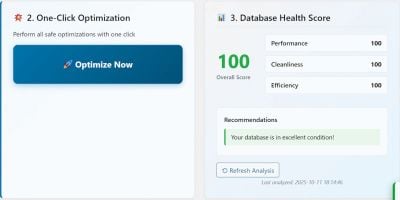
- One-click cleanup
💾 Object & Browser Caching
- Object caching
- Redis compatibility
- Memcached compatibility
- Browser cache headers
- Cache expiration management
- Resource caching
- Session optimization
- Smart cache rules
- Automatic optimization
- Performance tuning
📈 Core Web Vitals Optimization
- Largest Contentful Paint (LCP) optimization
- First Input Delay (FID) optimization
- Interaction to Next Paint (INP) optimization
- Cumulative Layout Shift (CLS) optimization
- Speed Index improvements
- Time to First Byte optimization
- Render optimization
- Font loading optimization
- Script loading optimization
- User experience improvements
📊 Performance Monitoring
- Live performance dashboard
- Speed reports
- Resource usage reports
- Cache analytics
- Optimization reports
- Performance history
- Website health score
- AI recommendations
- Exportable reports
- Real-time monitoring
🛒 WooCommerce Optimization
- Product page optimization
- Checkout speed optimization
- Cart optimization
- AJAX optimization
- Store caching
- Customer session optimization
- Product image optimization
- WooCommerce database cleanup
- Faster checkout performance
- Better shopping experience
🔒 Security & Stability
- Safe optimization engine
- Rollback support
- Backup-friendly architecture
- Resource protection
- Secure optimization process
- Stable caching system
- Error logging
- Compatibility monitoring
- Safe update mechanism
- Enterprise-grade reliability
🔌 Developer Features
- Hook & filter support
- REST API ready
- CLI compatibility
- Developer-friendly APIs
- Modular architecture
- Easy customization
- Plugin compatibility
- Debug mode
- Advanced configuration
📱 Mobile Performance
- Mobile optimization
- Responsive asset loading
- Mobile cache management
- Mobile image optimization
- Mobile-specific performance rules
- Faster smartphone loading
- Tablet optimization
- Adaptive delivery
- Mobile Core Web Vitals
- Better mobile UX
📧 Automation & Smart Scheduling
- Scheduled optimization
- Automatic database cleanup
- Automatic image optimization
- Scheduled cache clearing
- Smart monitoring
- Email performance reports
- Automated recommendations
- AI notifications
- Maintenance scheduling
- Background optimization
Requirements
Minimum Requirements
- WordPress 6.0 or higher
- PHP 7.4 or higher
- MySQL 5.7+ or MariaDB equivalent
Recommended Requirements
- PHP 8.1 or higher
- WordPress Latest Version
- HTTPS-enabled website
- 256 MB PHP Memory Limit or higher
- SSD/NVMe hosting
- Redis or Memcached (optional)
- CDN (optional)
Browser Compatibility
- Google Chrome
- Mozilla Firefox
- Microsoft Edge
- Safari
- Opera
Instructions
Installation
- Download the Kaddora Performance Suite Pro ZIP package.
- Log in to your WordPress Admin Dashboard.
- Go to Plugins → Add New → Upload Plugin.
- Upload the ZIP file.
- Click Install Now.
- Activate the plugin.
- Open Kaddora Performance Suite Pro settings.
- Configure optimization options.
- Save your settings.
- Run the first performance optimization.
Initial Configuration
- Enable page caching
- Configure browser caching
- Enable image optimization
- Activate lazy loading
- Configure CSS & JS optimization
- Enable database cleanup
- Configure CDN integration
- Enable AI optimization
- Configure monitoring
- Save all settings
Daily Usage
- Monitor website performance
- Review AI recommendations
- Clear cache when needed
- Optimize newly uploaded images
- Run scheduled database cleanup
- Review Core Web Vitals
- Monitor WooCommerce performance
- Export reports
- Check optimization logs
- Review website health score
Best Practices
- Keep WordPress updated
- Keep themes and plugins updated
- Enable HTTPS
- Use high-quality hosting
- Enable CDN for global delivery
- Regularly optimize images
- Schedule database cleanup
- Review AI recommendations
- Monitor Core Web Vitals
- Backup your website before major changes
Benefits
- Faster page loading
- Improved Core Web Vitals
- Better Google rankings
- Increased SEO performance
- Reduced bounce rates
- Better user experience
- Faster WooCommerce stores
- Lower server resource usage
- Improved conversion rates
- AI-powered optimization automation
Other items by this author


| Category | Plugins / WordPress / Performance |
| First release | 16 June 2026 |
| Last update | 16 June 2026 |
| Tags | javascript optimization, wordpress speed optimization, wordpress performance plugin, cache plugin, performance suite, ai performance optimizer, image optimization plugin, database cleaner, lazy load plugin, core web vitals optimizer, css minify, cdn integration, woocommerce speed optimization, website performance booster, kaddora performance suite pro |