


Kaddora GST Invoice Billing Plugin for WordPressKaddora GST Invoice Billing Plugin for WordPress
Kaddora Invoice & GST Billing Plugin for WordPress helps in invoices, calculate taxes, track payments, and manage expenses eas
Kaddora GST Invoice Billing Plugin for WordPress
Kaddora Invoice & GST Billing Plugin for WordPress helps in invoices, calculate taxes, track ...
Screenshots


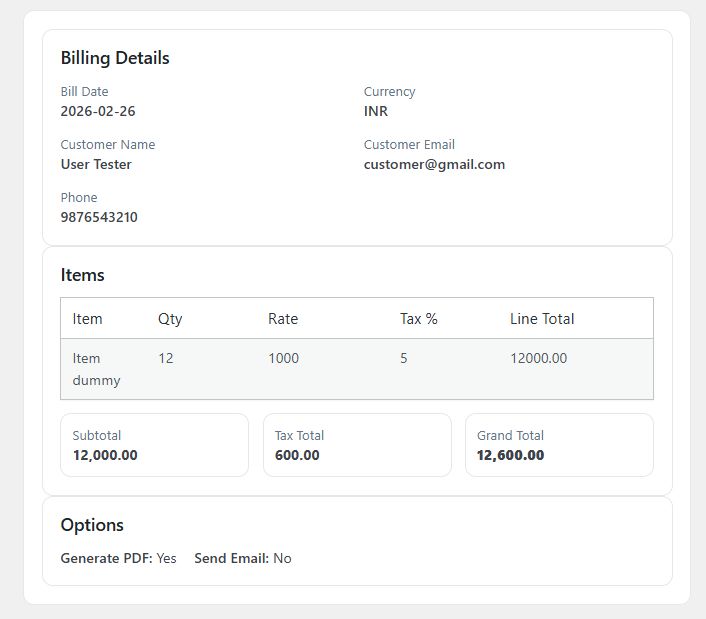
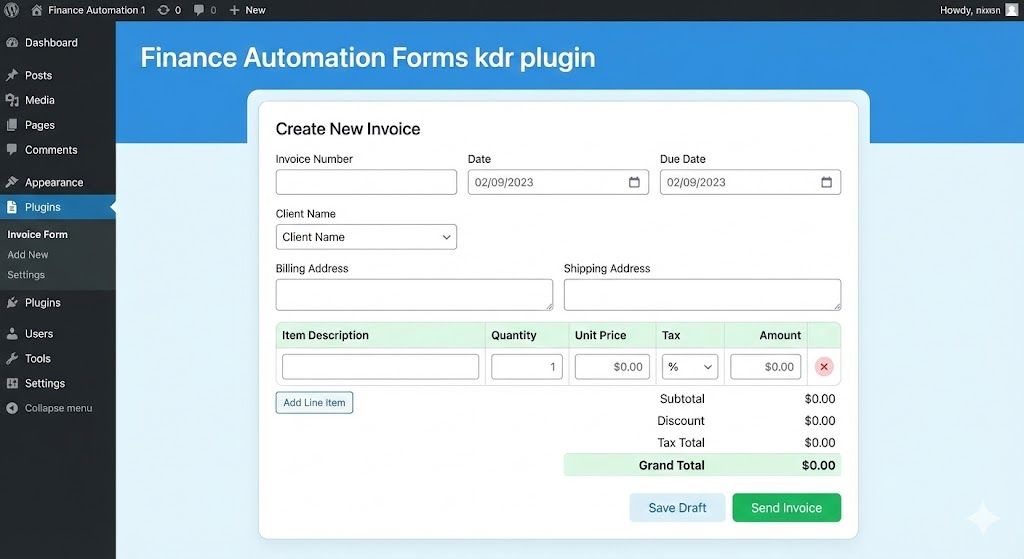

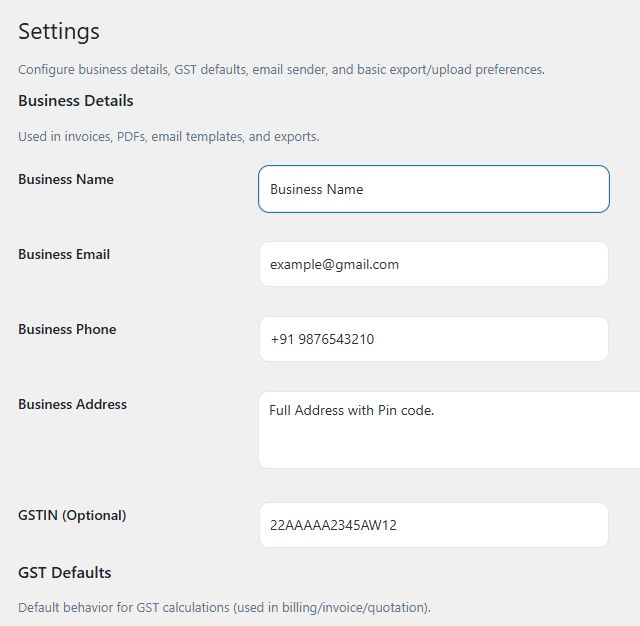

Overview
Kaddora Invoice & GST Billing Plugin for WordPress
Kaddora Invoice & GST Billing Plugin for WordPress is a powerful all-in-one billing solution designed to help businesses, freelancers, and agencies manage invoices, calculate GST taxes, track payments, and monitor expenses directly from their WordPress dashboard.
This plugin simplifies financial management by providing an easy-to-use interface where users can generate professional invoices, automatically calculate GST taxes, record payments, and manage business expenses without using complex accounting software.
Whether you run a small business, an online store, or a service agency, Kaddora helps streamline your billing workflow and keeps your financial records organized.
Key Features
1.Professional Invoice Creation
Create clean and professional invoices directly from your WordPress dashboard. Add client details, invoice numbers, product or service descriptions, tax amounts, and payment information in just a few clicks.
Invoices can be easily managed, edited, and tracked from one central dashboard.
2.GST Tax Calculator
The plugin includes a built-in GST tax calculator that automatically calculates taxes based on your invoice amount. This helps ensure accurate tax calculations and reduces manual errors when creating invoices.
You can apply GST to products or services and view tax totals instantly.
3.Payment Tracking
Track payments for each invoice and maintain a clear overview of your financial transactions. Mark invoices as paid, pending, or overdue to monitor your business cash flow effectively.
This feature helps businesses stay organized and maintain accurate billing records.
4.Expense Management
Record and manage your business expenses within the plugin. Track operational costs, categorize expenses, and maintain financial transparency.
By monitoring both income and expenses in one place, you can better understand your business performance.
5.Easy WordPress Dashboard Integration
Kaddora integrates seamlessly into the WordPress admin dashboard. Users can manage invoices, payments, and expenses without leaving their website backend.
The interface is designed to be simple, intuitive, and easy to use even for beginners.
6.Automated Billing Workflow
Automate many parts of your billing process. The plugin reduces repetitive manual work by organizing invoices, tracking payment status, and calculating taxes automatically.
This helps save time and improves overall efficiency.
7.Clean & Professional Interface
The plugin includes a modern and organized interface that makes billing management simple. Clear menus, structured layouts, and user-friendly navigation allow users to handle financial tasks quickly.
8.Lightweight and Optimized
Kaddora is built with performance in mind. The plugin is lightweight, optimized for speed, and follows WordPress development standards to ensure compatibility with most themes and plugins.
Use Cases
Kaddora Invoice & GST Billing Plugin is perfect for:
- Freelancers
- Small businesses
- Agencies
- Consultants
- Service providers
- WordPress website owners
Anyone who needs a simple billing system inside WordPress can benefit from this plugin.
Installation Guide
- Download the plugin ZIP file.
- Go to your WordPress Dashboard.
- Navigate to Plugins → Add New.
- Click Upload Plugin.
- Upload the ZIP file and install it.
- Activate the plugin.
- Access the billing system from the WordPress admin menu.
Requirements
- WordPress 5.5 or higher
- PHP 7.2 or higher
- Compatible with most modern WordPress themes
Why Choose Kaddora Invoice & GST Billing Plugin
- All-in-one billing management
- Automated GST tax calculation
- Easy invoice generation
- Payment tracking system
- Expense management tools
- Lightweight and fast performance
- Simple dashboard interface
Support and Updates
The plugin will receive regular updates to ensure compatibility with the latest WordPress versions and improvements in performance and features.
Support is available to help users install, configure, and use the plugin effectively.
Features
Key Features
1. Professional Invoice Generation
Kaddora allows you to create professional and well-structured invoices directly from your WordPress dashboard. You can easily add client details, invoice numbers, service descriptions, tax information, and payment details. The plugin helps businesses generate invoices quickly while maintaining a clean and organized billing system.
2. Automatic GST Tax Calculation
The plugin includes a built-in GST tax calculator that automatically calculates tax amounts based on your invoice totals. This reduces manual calculations and ensures accurate tax records. It is especially useful for businesses that need to manage GST billing for products or services.
3. Payment Tracking System
Track the status of each invoice with the integrated payment management system. Mark invoices as paid, pending, or overdue and keep a clear overview of your financial transactions. This feature helps businesses monitor cash flow and maintain organized payment records.
4. Expense Management
Kaddora allows users to record and manage business expenses within the same dashboard. Track operational costs, categorize expenses, and maintain detailed records to better understand your business finances.
5. Centralized Billing Dashboard
All invoices, payments, and expenses are managed from a centralized dashboard inside WordPress. This makes it easy to view financial summaries, track transactions, and manage billing activities without using external accounting software.
6. Client Information Management
Store and manage client information including contact details and billing records. This helps businesses maintain organized customer data and generate invoices quickly for repeat clients.
7. Lightweight and High Performance
Kaddora is designed with performance in mind. The plugin uses optimized code to ensure fast loading speeds and minimal impact on your website performance. It works smoothly with most WordPress themes and plugins.
8. Simple and User-Friendly Interface
The plugin interface is clean and intuitive, making it easy for beginners and professionals to manage billing tasks. No technical knowledge is required to create invoices, calculate taxes, or track payments.
9. WordPress Dashboard Integration
Kaddora integrates seamlessly with the WordPress admin panel. Users can manage all billing activities directly from their website backend without switching to external platforms.
10. Secure and Reliable
The plugin follows WordPress development standards to ensure secure data handling and reliable performance. All billing information is stored safely within your WordPress environment.
11. Flexible Business Usage
Kaddora can be used by various types of businesses including freelancers, agencies, consultants, and service providers. It provides a simple billing solution that works for many different business models.
12. Regular Updates and Improvements
The plugin is designed for continuous improvement. Future updates may include new features, performance improvements, and compatibility updates with the latest WordPress versions.
Requirements
Technical Requirements
Before installing Kaddora Invoice & GST Billing Plugin for WordPress, please make sure your server and website meet the following requirements.
WordPress Version
The plugin requires WordPress 5.5 or higher to function properly. It is compatible with the latest versions of WordPress and follows WordPress development standards.
PHP Version
Your server should be running PHP 7.2 or higher. For better performance and security, PHP 7.4 or above is recommended.
MySQL / Database
The plugin works with standard WordPress database systems including:
- MySQL 5.6 or higher
- MariaDB 10.1 or higher
It uses the existing WordPress database structure and may create additional tables for invoices, payments, and expenses.
Web Server
The plugin works with common hosting environments such as:
- Apache
- Nginx
- LiteSpeed
Most modern WordPress hosting providers support these configurations.
WordPress Themes Compatibility
Kaddora Invoice & GST Billing Plugin is designed to work with most modern WordPress themes, including:
- Business themes
- Blog themes
- eCommerce themes
- Custom themes
No special theme configuration is required.
Browser Compatibility
The plugin dashboard works on all major modern browsers, including:
- Google Chrome
- Mozilla Firefox
- Microsoft Edge
- Safari
User Permissions
To manage invoices and billing features, the user must have administrator or manager-level permissions within the WordPress dashboard.
Hosting Requirements
For the best performance, the plugin should be installed on a reliable WordPress hosting environment that supports:
- Secure HTTPS connection
- Standard WordPress file permissions
- Sufficient memory allocation (recommended 128MB or higher)
Recommended Configuration
For optimal performance:
- PHP memory limit: 128MB or higher
- HTTPS enabled
- Updated WordPress installation
- Regular website backups
Instructions
How to Use Kaddora Invoice & GST Billing Plugin
Follow the steps below to start creating invoices, calculating GST, and managing payments using Kaddora Invoice & GST Billing Plugin for WordPress.
1. Install the Plugin
- Download the plugin ZIP file after purchase.
- Log in to your WordPress Dashboard.
- Go to Plugins → Add New.
- Click Upload Plugin.
- Select the plugin ZIP file.
- Click Install Now.
- After installation, click Activate.
Once activated, the Kaddora Invoice & Billing menu will appear in your WordPress admin panel.
2. Access the Billing Dashboard
After activating the plugin:
- Go to WordPress Dashboard.
- Click the Kaddora Invoice & Billing menu.
- Open the Billing Dashboard.
From here you can manage:
- Invoices
- Clients
- Payments
- Expenses
- Tax settings
3. Create a New Invoice
To generate a new invoice:
- Go to Invoices → Add New Invoice.
- Enter the client information.
- Add products or services.
- Enter quantity and price.
- Apply GST tax if required.
- Review the invoice details.
- Click Save or Generate Invoice.
The invoice will be stored in your invoice list for future tracking.
4. Calculate GST Automatically
When creating an invoice:
- Enter the product or service amount.
- Select the GST tax rate.
- The plugin will automatically calculate the tax amount and total price.
This helps ensure accurate tax calculations for every invoice.
5. Track Invoice Payments
To manage payments:
- Go to Invoices.
- Select an invoice.
- Update the payment status.
Available statuses include:
- Paid
- Pending
- Overdue
This helps you keep track of your business cash flow.
6. Record Business Expenses
To track expenses:
- Go to Expenses.
- Click Add Expense.
- Enter expense details such as category, amount, and date.
- Save the record.
This feature allows you to monitor business spending easily.
7. Manage Clients
You can maintain client records for easier invoice creation.
Steps:
- Go to Clients.
- Add client name, email, and contact details.
- Save the client information.
These details can be reused when generating invoices.
8. Monitor Your Financial Records
From the Kaddora Dashboard, you can quickly view:
- Total invoices
- Paid invoices
- Pending payments
- Total expenses
This overview helps you understand your financial activity.
9. Update Plugin Settings
You can customize billing settings by going to:
Kaddora Settings
Here you can configure:
- Tax settings
- Currency
- Invoice format
- Billing preferences
10. Keep the Plugin Updated
Regularly update the plugin to ensure:
- Compatibility with the latest WordPress versions
- Security improvements
- Performance updates
Updates can be installed directly from the WordPress dashboard.
Other items by this author





| Category | Plugins / WordPress / Miscellaneous |
| First release | 9 March 2026 |
| Last update | 9 March 2026 |
| Tags | invoice, invoice generator, expense manager, billing system, tax calculator, GST billing system, invoice manager, business invoice, payment tracking, gst invoice, billing plugin, wordpress invoice plugin, accounting plugin, finance automation, invoice management. |








