Home / Scripts & Code / VB.NET

Restaurant Management System - VB.NET Restaurant Management System - VB.NET
A complete POS and inventory solution for restaurants. Manage orders, billing, and a modern VB.NET interface. Recently UpdatedHome / Scripts & Code / VB.NET
Restaurant Management System - VB.NET
A complete POS and inventory solution for restaurants. Manage orders, billing, and a modern VB.NE...
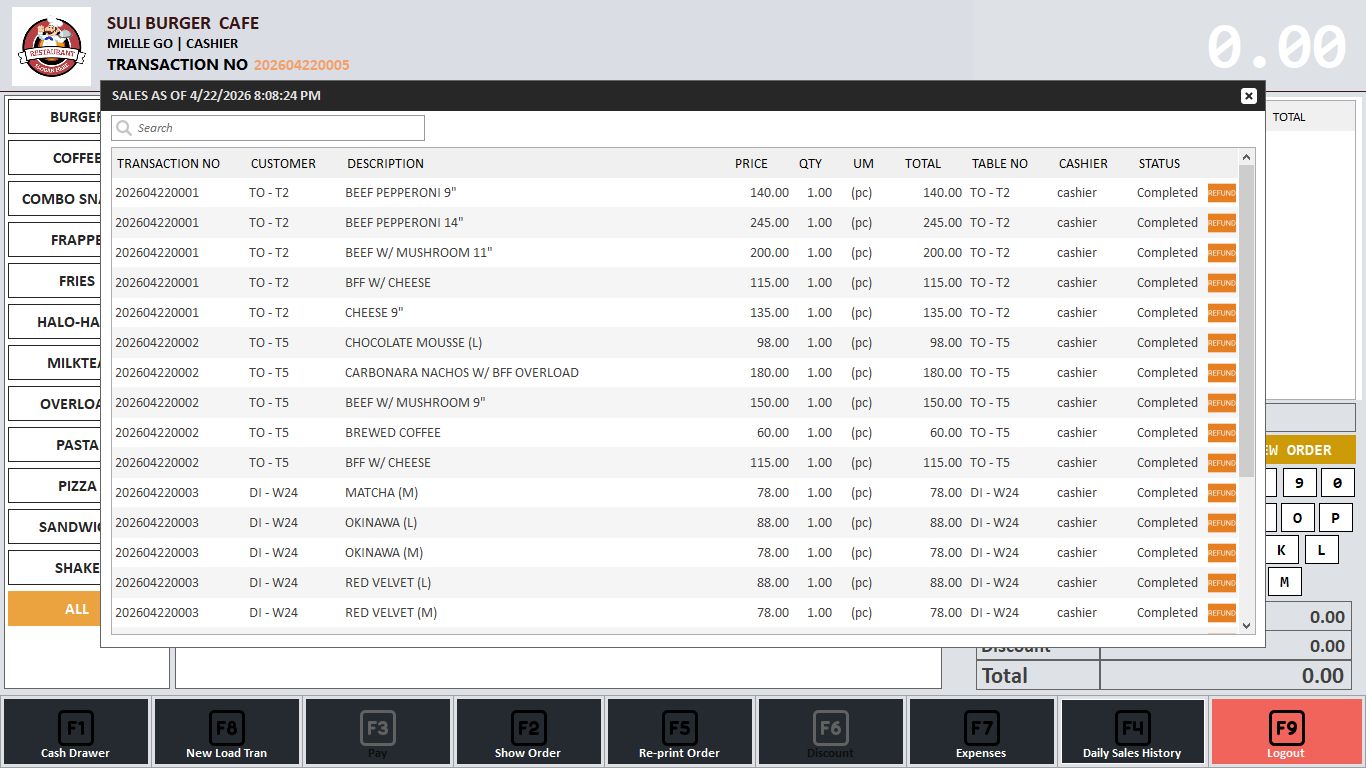
Screenshots




Overview
About the Project
This is a high-quality Restaurant Management System (POS) developed in VB.NET with a MySQL database. It features a modern, touch-friendly UI designed for efficiency in fast-paced restaurant environments.
Features
Key Features of Restaurant POS System
- Touch-Friendly Menu: Visual category and product selection with high-quality images, perfect for touch screens.
- Order Management: Supports Dine-In, Delivery, and Takeaway order types.
- Integrated Virtual Keyboard: Built-in numeric and QWERTY keyboard for fast operation without physical hardware.
- Real-time Billing: Fast invoice generation with automated tax, discount, and sub-total calculations.
- Inventory & Stock Control: Track your items and stock levels in real-time to prevent shortages.
- Daily Sales History: Detailed logs of all transactions with the ability to review previous sales.
- Expense Management: Track restaurant daily expenses directly from the POS terminal.
- Function Key Shortcuts: Fast access to key features using function keys (F1-F9) for professional cashiers.
- Database Integration: Powered by MySQL for high performance and data security.
- Receipt Printing: Compatible with thermal printers for professional receipt generation.
Requirements
list the software the buyer must have installed on their computer to run your code. For your specific project, you should list:
- Visual Studio (2019 or newer recommended).
- .NET Framework (specify the version you used, e.g., 4.7.2).
- XAMPP or WAMP Server (to run MySQL/phpMyAdmin).
- MySQL Connector/NET (so VB.NET can talk to the database).
Instructions
Give a simple step-by-step guide so the buyer doesn't get errors.
- Step 1: Open XAMPP and start Apache and MySQL.
- Step 2: Go to
localhost/phpmyadminand create a new database. - Step 3: Import the
.sqlfile included in the project folder. - Step 4: Open the solution file (
.sln) in Visual Studio. - Step 5: Update the connection string in the code (if the database password is different).
- Step 6: Press "Start" to run the application.
Other items by this author


Information
| Category | Scripts & Code / VB.NET |
| First release | 24 April 2026 |
| Last update | 24 April 2026 |
| Tags | restaurant, MySQL, management system, VB.NET, pharmacy, inventory, POS, Point Of Sale, billing system, desktop application, pharmacy pos, windows form, sales report, restaurant management system free source code |