Kaddora AI Appointment Scheduler WordPress PluginKaddora AI Appointment Scheduler WordPress Plugin
AI-powered booking and appointment scheduling plugin for WordPress with calendar management, reminders, and automation. Recently Updated
Screenshots




Overview
Kaddora AI Booking & Appointment Scheduler Plugin is an advanced WordPress solution designed to simplify appointment management, online bookings, calendar scheduling, and customer reservations. Powered by intelligent automation, the plugin helps businesses streamline scheduling processes while improving customer experience.
Whether you run a salon, clinic, consultancy, coaching service, fitness center, education platform, agency, or any appointment-based business, Kaddora AI Booking & Appointment Scheduler Plugin enables customers to book appointments online 24/7.
The plugin automates booking confirmations, appointment reminders, calendar synchronization, staff scheduling, and customer notifications, reducing manual work and missed appointments.
With an intuitive booking interface, flexible scheduling options, and AI-powered automation tools, businesses can efficiently manage appointments while increasing customer satisfaction and operational productivity.
Kaddora AI Booking & Appointment Scheduler Plugin is built for speed, reliability, scalability, and ease of use, making it the ideal scheduling solution for modern businesses.
Features
FEATURES
✓ Online Appointment Booking
Allow customers to schedule appointments directly from your website.
✓ AI Scheduling Assistant
Automatically optimize available time slots and booking schedules.
✓ Smart Calendar Management
Manage appointments through an interactive calendar dashboard.
✓ Automated Appointment Reminders
Send reminders via email and notifications to reduce no-shows.
✓ Staff & Team Scheduling
Assign appointments to specific staff members and manage availability.
✓ Multiple Service Management
Create unlimited services with customizable durations and pricing.
✓ Real-Time Availability
Display available appointment slots instantly.
✓ Booking Confirmation Automation
Automatically confirm customer bookings.
✓ Customer Management System
Track customer booking history and appointment records.
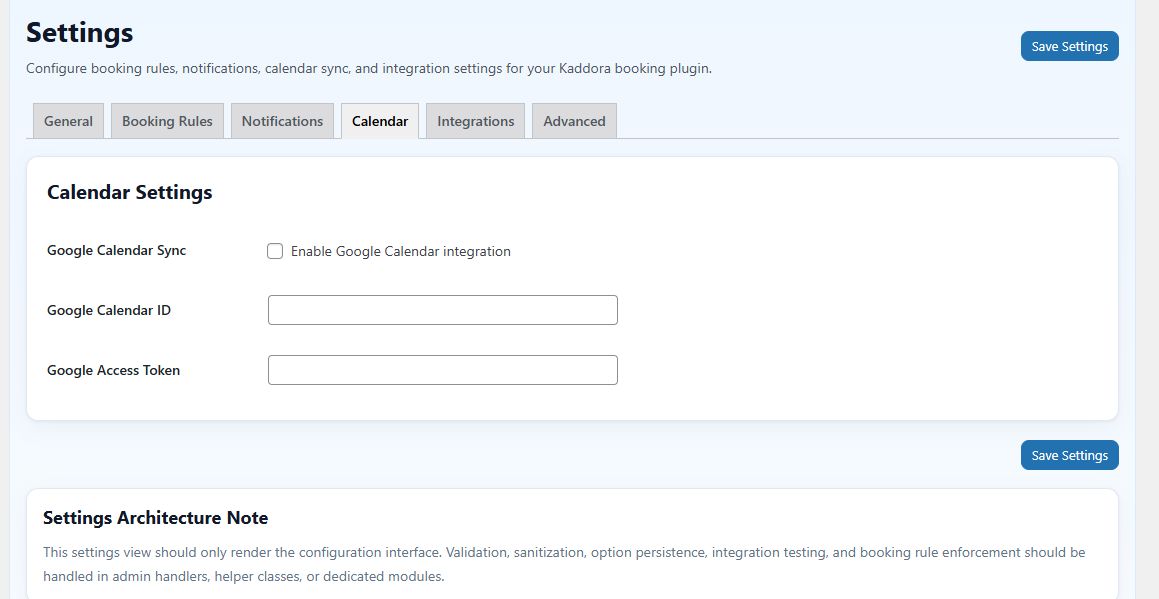
✓ Google Calendar Integration
Synchronize appointments with Google Calendar.
✓ Zoom & Google Meet Integration
Automatically generate meeting links for virtual appointments.
✓ Recurring Appointments
Support recurring and repeat bookings.
✓ Time Zone Support
Automatically detect customer time zones.
✓ Custom Booking Forms
Create personalized booking forms with custom fields.
✓ Payment Integration Ready
Accept online payments for appointments and reservations.
✓ Mobile Responsive Design
Fully optimized for desktop, tablet, and mobile devices.
✓ AI Analytics & Insights
Monitor booking trends and business performance.
✓ WooCommerce Compatibility
Sell appointments and services through WooCommerce.
✓ Secure Customer Data
Built with WordPress security standards.
✓ Easy Setup & Management
User-friendly interface with no coding required.
Requirements
Requirements
- WordPress 6.0 or higher
- PHP 7.4 or higher
- MySQL 5.7 or higher
- SSL Certificate (Recommended)
- Administrator Access
- Modern Web Browser
- Internet Connection
Recommended
- PHP 8.0+
- WordPress Latest Version
- WooCommerce (Optional)
- Google Calendar Account (Optional)
- Zoom Account (Optional)
- Google Meet Account (Optional)
Instructions
Installation & Setup Instructions
Step 1: Install Plugin
- Login to WordPress Admin Dashboard.
- Navigate to Plugins → Add New.
- Upload the plugin ZIP file.
- Click Install Now.
- Activate the plugin.
Step 2: Configure General Settings
- Open Kaddora AI Booking settings.
- Configure business information.
- Set working hours.
- Configure booking preferences.
Step 3: Create Services
- Add appointment services.
- Define duration and pricing.
- Set service availability.
Step 4: Configure Staff
- Add team members.
- Assign services.
- Define working schedules.
Step 5: Setup Booking Calendar
- Configure appointment calendar.
- Set available booking slots.
- Enable customer booking options.
Step 6: Enable Notifications
- Configure email notifications.
- Enable booking confirmations.
- Enable reminder notifications.
Step 7: Optional Integrations
- Connect Google Calendar.
- Connect Zoom.
- Connect Google Meet.
- Configure payment gateways.
Step 8: Publish Booking Form
- Insert booking shortcode on any page.
- Publish booking page.
- Start accepting appointments online.
Step 9: Monitor Appointments
- Manage bookings from dashboard.
- View appointment history.
- Track customer activity.
- Generate booking reports.
Other items by this author





| Category | Plugins / WordPress / Booking |
| First release | 1 June 2026 |
| Last update | 1 June 2026 |
| Tags | booking system, online booking, booking plugin, service booking, wordpress booking, calendar booking, appointment booking, woocommerce booking, google calendar, appointment management, scheduling software, appointment scheduler, ai scheduling, reservation plugin, appointment reminders |