Watermark Studio – React Image Watermark ToolWatermark Studio – React Image Watermark Tool
Modern React app to add text or image watermarks to images quickly using Vite, TypeScript, and Tailwind CSS
Watermark Studio – React Image Watermark Tool
Modern React app to add text or image watermarks to images quickly using Vite, TypeScript, and Ta...
Screenshots
Overview
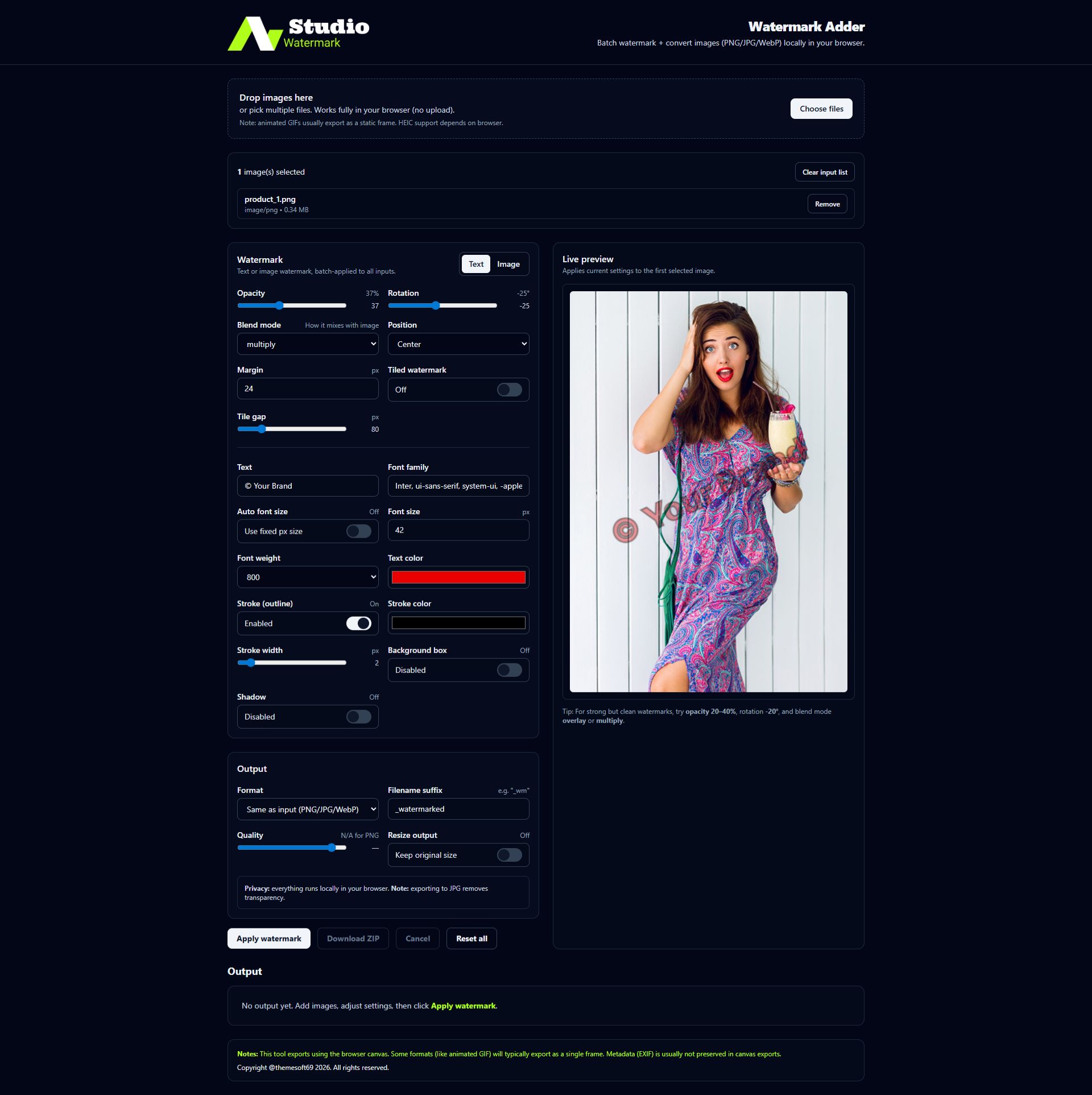
Watermark Studio is a modern and lightweight React application designed to add text or image watermarks to images with ease. Built using React, Vite, TypeScript, and Tailwind CSS, it delivers fast performance, a clean user interface, and an efficient workflow.
This tool is ideal for content creators, photographers, developers, and businesses who want to protect their images or add branding in a simple, professional way. The application is fully responsive, easy to customize, and well-structured for further development.
Watermark Studio focuses on speed, simplicity, and flexibility, making it suitable for both personal projects and commercial web applications.
Features
- Add text or image watermarks to images
- Built with React + Vite for fast performance
- TypeScript for better code quality and safety
- Modern UI designed with Tailwind CSS
- Lightweight and easy-to-use interface
- Fully responsive design (desktop & mobile friendly)
- Fast image processing directly in the browser
- Easy to customize and extend
- Clean and well-structured source code
- No backend required
- SEO-friendly project structure
- Production-ready build setup
- Cross-browser compatible
- Suitable for personal and commercial projects
Requirements
- Node.js v16 or higher
- npm, yarn, or pnpm package manager
- Basic knowledge of React and TypeScript
- Modern web browser (Chrome, Firefox, Edge, Safari)
- Code editor (VS Code recommended)
- Local development environment
Instructions
- Download the project and extract the files.
- Open the project folder in your code editor.
-
Install the required dependencies using one of the following commands:
-
npm install -
yarn install
-
-
Start the development server:
-
npm run dev
-
- Open your browser and visit the local URL shown in the terminal.
-
To create a production build, run:
-
npm run build
-
- The optimized production files will be generated in the dist folder.
- Upload the contents of the dist folder to your hosting server if needed.
- Customize the source code and styles as required.
Other items by this author








Information
| Category | Scripts & Code / ReactJS |
| First release | 28 January 2026 |
| Last update | 28 January 2026 |
| Software framework | React |
| Files included | .html, Javascript .js |
| JavaScript Framework | Node.js |
| Tags | image editor, web application, typescript, watermark, react, tailwind css, vite, image tool, image watermark, watermark tool, react app, frontend app |